
How Do I Trade Futures with Leverage on Altrady?
Trading Futures with Altrady
Altrady supports USDⓈ-M perpetual futures (and USDC perpetuals on some exchanges; not coin-margined). Each futures exchange needs its own Trading account in Altrady, with an API key that has Futures trading enabled, and once a position’s entries are filled its leverage can’t be changed.
Setup is specific to each exchange — click your exchange below for its Connect guide and the essential futures-setup steps.
| Exchange | Contracts | Hedge / One-Way | Notes |
|---|---|---|---|
| Binance | USDⓈ-M (USDT) | Both | No cross-collateral, except BNFCR (multi-asset mode, cross only) |
| Bybit | USDT / USDC perps | Both (switch only when flat) | Unified Trading Account supported |
| BingX | USDT perps | Both (Hedge from v4.5) | — |
| Hyperliquid | USDC perps | One-Way only | Unified Account by default; TradFi pairs via the XYZ sub-DEX (own wallet) |
| Toobit | USD perps | Hedge only | — |
| KuCoin | USD perps | One-Way only | Max 10× by API; set margin mode to Isolated on the exchange first |
| OKX | USDT, plus X-Perps & TradFi (USDC) | Both | EEA: assessment + no Fast Connect; enable Futures in account mode; leverage/margin stored per position |
| Kraken | USD perps | One-Way only | Unified Wallet as margin; Cross margin shows effective leverage (small positions read below 1×) |
Finding a futures market
Open the Markets widget and choose Futures to list only futures markets (or pick any market marked F). Altrady sometimes uses short exchange codes for futures: BIFU (Binance), BYBIF (Bybit), KUCNF (KuCoin), BNGXF (BingX), HYPERLIQUIDF (Hyperliquid), TBITF (Toobit), OKXF (OKX), KRKNF (Kraken).
Some exchanges also offer specialised perpetual types, each with its own filter in the Markets widget: X-Perps — longer-duration standard perpetuals (OKX offers these, approved for EEA residents) — and TradFi — derivatives based on traditional assets such as stocks and indices, rather than cryptocurrencies.
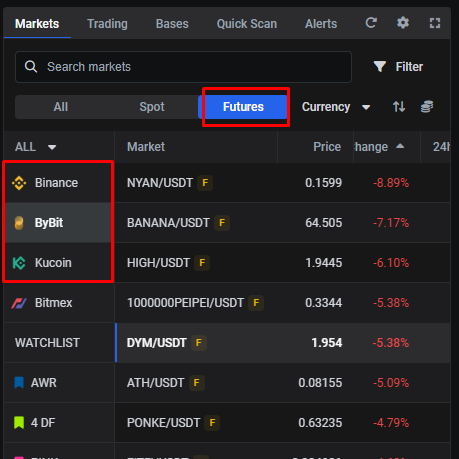 🔍 Click the image to see a larger version
## The Trading widget on futures
🔍 Click the image to see a larger version
## The Trading widget on futures
On a futures market the Trading widget adds three fields that behave as they do on your exchange:
- Leverage amount and Leverage type (margin mode) — for how these work, see margin mode, leverage, and liquidation price explained.
- Reduce Only (one-way mode) — use it to close or reduce a position without opening one on the opposite side. If every balance reads zero, Reduce Only has been left on; turn it off to trade normally.
- In Hedge mode the widget shows Long/Short with Open/Close instead of Buy/Sell + Reduce Only — see hedge mode vs one-way mode.
All order types work on futures, for both long and short positions, as regular or smart orders.
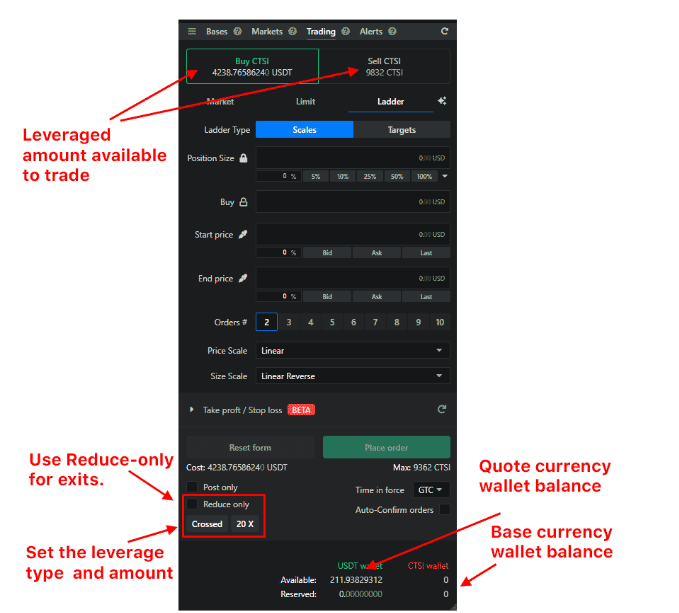 🔍 Click the image to see a larger version
## Regular orders
🔍 Click the image to see a larger version
## Regular orders
A regular order is a plain entry (Buy or Sell) that you exit later with your own take-profit and stop-loss orders.
- Entry: set your leverage type and amount, leave Reduce Only off, and enter a long or short as usual. A percentage entry is based on the leveraged amount shown at the top of the widget.
- Exit: either tick Reduce Only in the Trading widget (so the amount shown is what’s open to close) and place your exit; or, from My Positions, use the 3-dot menu → Exit position (Limit/Market), which builds a 100% reduce-only exit for you. If an Exit-position order looks wrong, the position may be missing trades — see the positions links below.
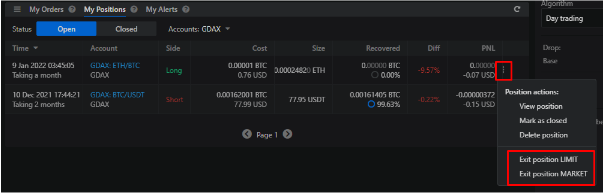 🔍 Click the image to see a larger version
## Smart orders
🔍 Click the image to see a larger version
## Smart orders
Smart orders (including all-in-one orders) are managed by Altrady and add what exchanges don’t: an entry combined with take-profits and/or a stop loss, trailing stop loss and trailing take profit, and time- or price-triggered entries and exits. A smart order creates a smart position, with all its trades grouped for analytics. See set up a smart position with take profit and stop loss. Always edit smart orders in Altrady, not on the exchange — an edit made on the exchange breaks Altrady’s management of the position.
Futures positions in Altrady
Altrady builds its own analytical positions from your trades, and can hold more than one position per side on a contract (the exchange nets them into one, with a single liquidation price, margin mode, leverage, and margin). So a position’s size, PnL, or leverage can legitimately differ from the exchange. When the numbers don’t match, or a position looks wrong, these cover it:
- Why your position’s size, PnL, or leverage doesn’t match the exchange
- Why does my position look wrong?
- Creating a position from existing orders
- Import your trade history — exchanges send only limited history when you first connect (often about a day), so import it for accurate positions and analytics.