
My position's size, PnL, or leverage doesn't match the exchange
If a position’s size, PnL, or leverage in Altrady doesn’t match what the exchange shows, it’s usually one of two things: a difference that’s there by design in how Altrady tracks positions, or a sync delay where a recent change hasn’t reached Altrady yet. Most of the time nothing is wrong. Start with a resync, then use the sections below to understand the differences that are expected.
Resync first
The exchange doesn’t tell Altrady the instant something changes, so a recent order, fill, fee, or setting change can take a moment to arrive. A resync forces Altrady to re-pull your orders, trades, and balances and recalculate the position.
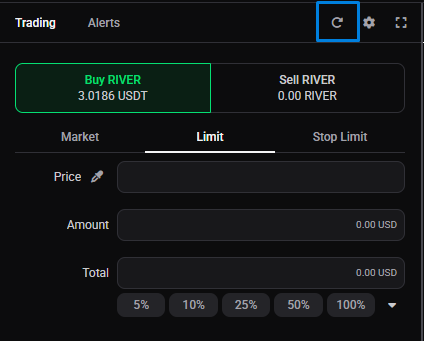
- Open the Trading widget for the exchange account in question.
- Click the Resync icon (the circular arrow) at the top of the widget.
- Give it a few seconds to finish.
 🔍 Click the image to see a larger version
You can also click the resync arrow on the position or the chart. If the numbers still don’t match after a resync, the sections below explain why, starting with the differences that are completely normal.
🔍 Click the image to see a larger version
You can also click the resync arrow on the position or the chart. If the numbers still don’t match after a resync, the sections below explain why, starting with the differences that are completely normal.
Several Altrady positions on one contract
On futures, the most common reason a single position doesn’t match is that Altrady can hold more than one position in the same direction on the same contract. This is deliberate: it lets you run more than one strategy on the same market at once. Each smart position you open is tracked separately, so Altrady keeps its own orders, trades, average entry price, break-even price, and PnL for each one. The exchange doesn’t do this: it combines them into a single position with one size and one set of figures.
Some values can only ever have one value per contract, so Altrady shares them across all your positions on that contract, taking them from the exchange’s single figure:
- one liquidation price,
- one margin mode and leverage multiplier,
- one margin amount.
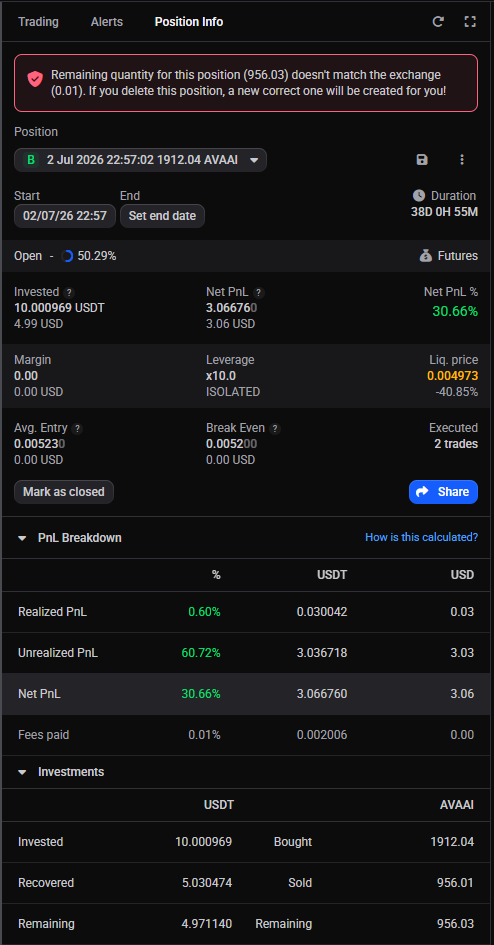
So if the open size of the position you’re viewing is smaller than the exchange shows, and you hold more than one Altrady position on that contract, that’s expected: the exchange’s size is the total of them all. Add up the open size of each Altrady position on the contract to confirm they total the exchange’s figure.
The Position Info widget only flags this with a warning when the total of your open positions on the contract doesn’t match the exchange’s open amount — that is, when something is genuinely off (missing trades, for example), not simply because you hold more than one position. If you see that warning, resync and check every position’s trades are accounted for.
 🔍 Click the image to see a larger version
If you deleted a single position but the exchange still shows it open, Altrady rebuilds a manual position to match the open amount. If the rebuild doesn’t match exactly, check its start date and set it early enough to include all the relevant trades. For a smart position whose numbers won’t reconcile even after a resync, converting it to manual and back to a smart position rebuilds them from its orders and trades and clears some errors a resync can’t. If it still won’t reconcile, delete it and create a new manual position from existing orders with the start date on its first trade, so every fill is included.
Check which account you’re viewing
If you run more than one account on the same exchange (a second API key, or separate spot and futures accounts), Altrady shows the position for whichever account is selected, so it’s easy to compare the exchange against the wrong one. Confirm the selected account is the one the position actually lives on before reading anything into a mismatch. See run multiple accounts on the same exchange.
“Invested” and “Cost” are not the open amount
Don’t read Altrady’s Invested (in the Position Info widget) or Cost (in My Positions) as the amount currently open on the exchange. The exchange shows only what’s open right now, while Altrady tracks the total you’ve opened and the amount you’ve closed separately, so Invested and Cost can include size you’ve already closed. The amount actually open is the Remaining figure in the Position Info widget.
A quick way to read the open amount on futures: turn on Reduce Only (one-way mode) or select the Close side (hedge mode), and the Available Balance shows the amount available to close, which is exactly what’s open. For more on these fields, see Available Balance vs your Assets and why Available Balance can read zero.
Comparing PnL on futures
The exchange’s PnL should come out very close to the sum of the PnL of all your Altrady positions on that contract. If it doesn’t line up:
- Check the open sizes match first. If they don’t, it’s the multiple-position or sync situation above.
- If any of the positions are manual, check their start dates so each one includes the right trades.
- Make sure no order or trade has been pulled into more than one position: overlapping positions double-count and throw the totals off.
The cleanest way to avoid overlap is to use either smart positions or manual positions on a given market, rather than mixing the two. For what each figure means, see understanding your position numbers.
What Altrady reads from the exchange, and what it calculates
For futures, Altrady reads these values directly from the exchange and refreshes them on each sync:
- total open size and cost,
- margin size,
- margin mode and leverage multiplier,
- liquidation price and percentage (the exchange doesn’t provide this for cross margin).
Everything else, average entry, break-even, and PnL, Altrady calculates from your trades and the fees the exchange charged, with one deliberate exception: funding fees are not included. If your exchange folds funding payments into its own PnL, that difference alone can leave a small gap between the two, and it grows the longer the position stays open. That’s expected, not an error. Because leverage, margin mode, and the liquidation price are read during a sync, a change you make on the exchange appears in Altrady after the next resync. See margin mode, leverage, and liquidation explained.
Trades placed on the exchange
On spot, a mismatch is almost always because an order was placed on the exchange itself rather than through Altrady, so those trades aren’t part of your Altrady smart position. The exchange doesn’t notify Altrady the instant something changes, so there’s a delay before it appears. A Resync (above) pulls in the latest orders and trades and updates your balances. If those exchange trades should be part of the position, import your trade history from the exchange so they’re included. See also trades made outside Altrady.
The same happens right after you connect an exchange or add a new API key: the exchange only provides a limited amount of trade and order history. Positions created from partial data won’t match the exchange.
Missing or unmatched positions
Positions, bots, and history are tied to the trading account they were created under. If that account is deleted or deactivated, its positions are deleted also, leaving orders and trades to be resynced on the new account. So when you need to change an API key, IP whitelist, or other connection details, edit the existing trading account rather than adding a new one: a new account starts empty and won’t carry the old positions. See replace an API key on an existing account.
Still stuck?
If the numbers still don’t add up after a resync, and you’ve ruled out multiple positions on the contract, funding fees, and trades placed on the exchange, reach out through support chat. Include the exchange, the market, and a screenshot of Altrady’s numbers next to the exchange’s, so the team can see exactly where the two diverge.