
Margin mode, leverage, and liquidation price explained
Margin mode decides whether your positions share risk or stay separate, leverage decides how much buying power your margin creates, and your liquidation price shows right on the Position Info widget for every open futures position. Here’s how the three fit together and where to check each one.
Cross vs Isolated margin mode
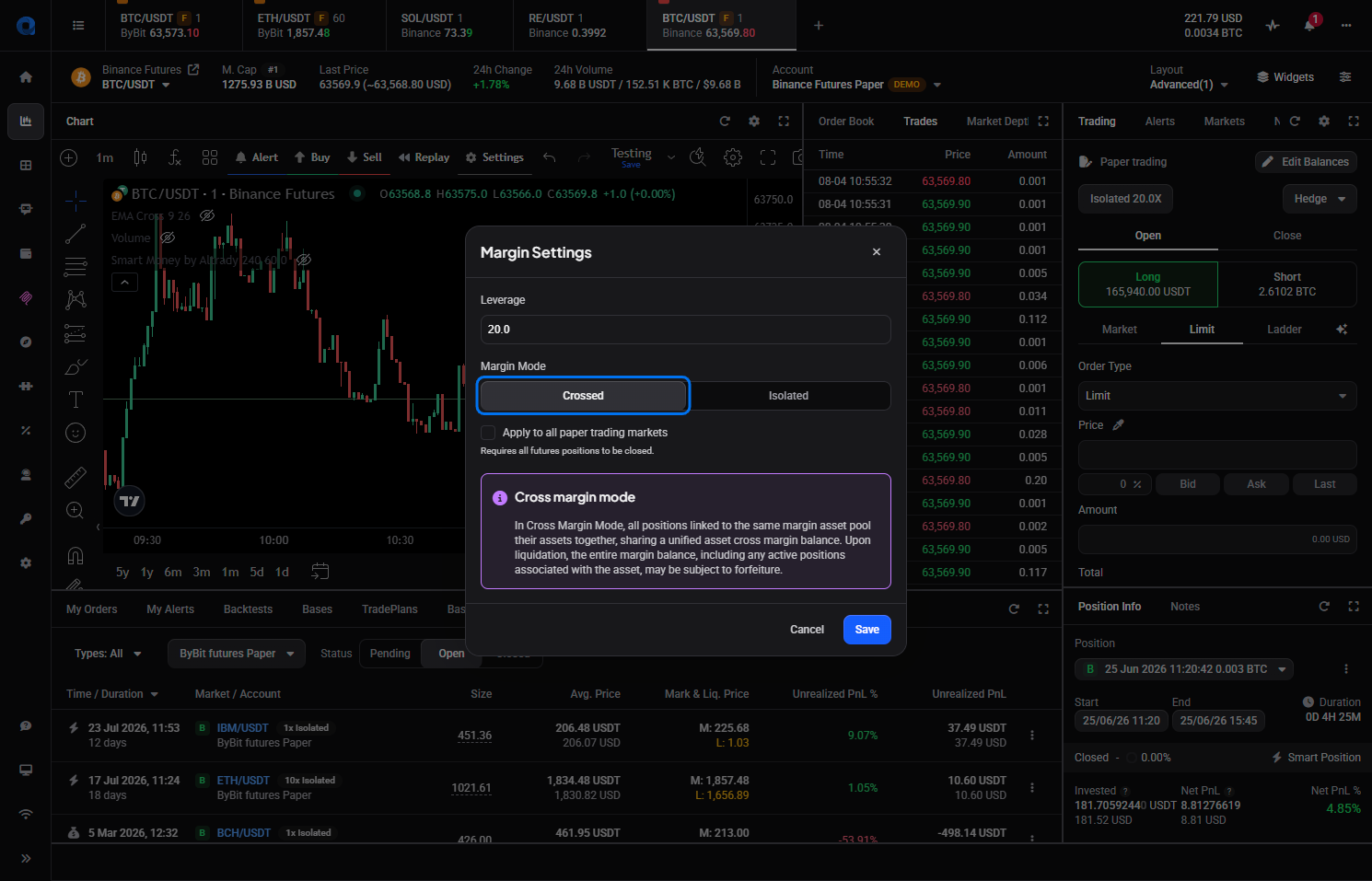 🔍 Click the image to see a larger version
When you place a futures order, the order form has a Margin Settings section with a Margin Mode field set to Crossed or Isolated.
🔍 Click the image to see a larger version
When you place a futures order, the order form has a Margin Settings section with a Margin Mode field set to Crossed or Isolated.
In Crossed mode, every position on the same margin asset shares one balance. If a position moves against you, the loss draws from that shared balance, and if liquidation happens, the whole pooled balance, including your other positions on that asset, can be affected.
In Isolated mode, each position only risks the margin you put into it. Once a position’s margin ratio reaches 100%, that position alone gets liquidated. The rest of your account balance stays untouched.
Some exchanges use a fixed leverage in cross margin that can’t be changed from the order form. If you see that message, switch to Isolated margin to set a custom leverage instead.
What leverage multiplies
Leverage multiplies your position size relative to the margin you put in, not your whole account balance. Set 5x leverage on $100 of margin and you open a position worth $500 in buying power.
The trade-off runs both ways: gains and losses are amplified by the same multiple. A price move that’s a small dent at 1x becomes a much bigger swing, and a faster path to liquidation, at higher leverage. Altrady shows you the buying power your leverage creates before you confirm the order, so there are no surprises after the fact.
For a full walkthrough of placing a leveraged futures order, see How do I trade futures with leverage on Altrady?.
Where to see your liquidation price
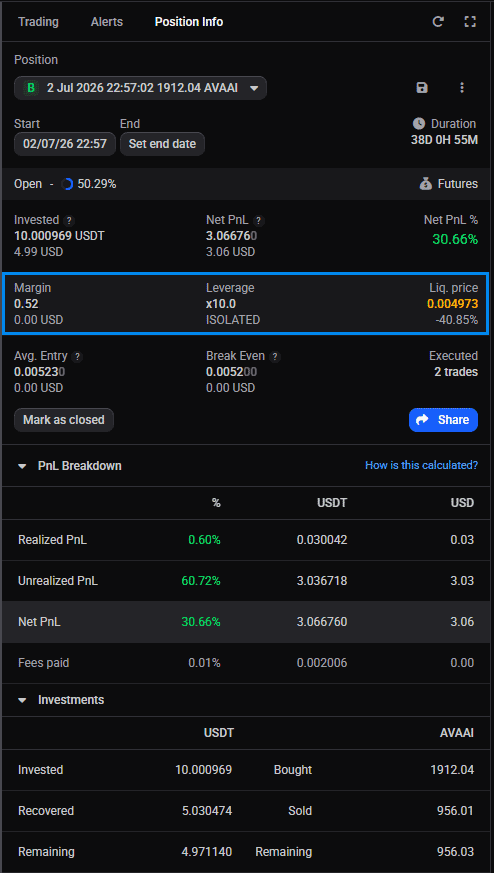 🔍 Click the image to see a larger version
Once a futures position is open, the Position Info widget shows three figures side by side for that position:
🔍 Click the image to see a larger version
Once a futures position is open, the Position Info widget shows three figures side by side for that position:
- Margin: the position’s cost divided by its leverage. This is what’s actually at risk in Isolated mode.
- Leverage: shown as a multiplier such as x3.0, next to your margin type (Isolated or Crossed).
- Liq. price: the price that triggers liquidation, with its percentage distance from the current market price.
Your liquidation price is also visible in the My Positions widget, so you can keep an eye on it without opening the Position Info widget for each position individually.
Keep an eye on that percentage distance. It’s the quickest way to judge how much room a position has left, especially in a volatile market.
Can I add margin to an open position?
Margin mode can’t be changed once a position is open. Leverage, though, can be changed on an open position on some exchanges; others don’t support it and lock the leverage for the lifetime of the position.
At this time, the only way to increase the margin on an open position is to reduce its leverage. Since margin is the position’s cost divided by its leverage, lowering the leverage raises the margin backing the position, which also moves the liquidation price further from the current market price. There’s no separate control to top up or withdraw margin directly.
If your exchange doesn’t allow leverage changes on an open position, the only way to change your exposure is to close the position and open a new one with the settings you want.
More than one position on the same market
All positions on the same market share the same margin mode and leverage — these settings belong to the market, not to an individual order. So a second order placed on a market where you already have a position takes that market’s current margin mode and leverage; you can’t run two different leverage or margin settings on the same market at once.
If you’re trading both a long and a short on the same market, Hedge mode vs One-Way mode for futures positions covers how Altrady keeps them separate.
Is there a maximum leverage?
On live exchange accounts, the maximum leverage depends on the exchange and market, not on Altrady. On paper trading accounts, leverage is capped at 100x.
Still stuck?
If your liquidation price looks off, or you’re not sure which margin mode a position is using, reach out through support chat inside Altrady. The team can pull up your position with you and check the numbers together.