
Available Balance vs your Assets: what you can trade with
The Trading widget shows two balance figures that often don’t match, and that trips people up. Available Balance at the top is what you can buy or sell right now on the selected pair and account. Assets at the bottom is what you actually hold on that account. Here’s what each one means and why they differ.
Available Balance (top of the widget)
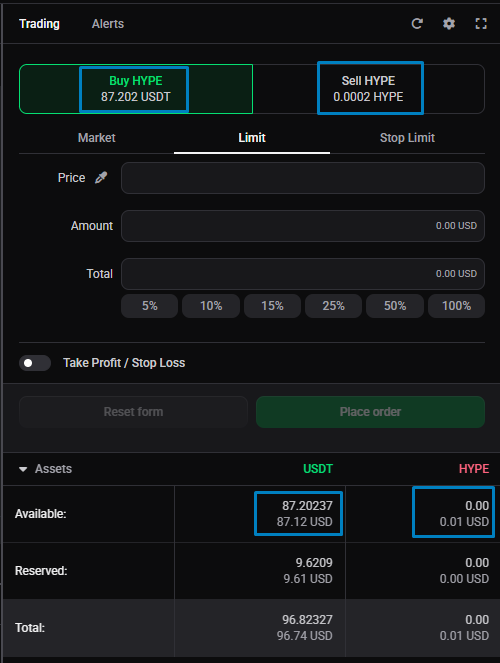
Available Balance is the amount available for trading on the currently selected market and account, shown per side:
- On the Buy side, it’s the quote currency you can spend to buy the coin.
- On the Sell side, it’s the amount of the coin you can sell on that market.
 🔍 Click the image to see a larger version
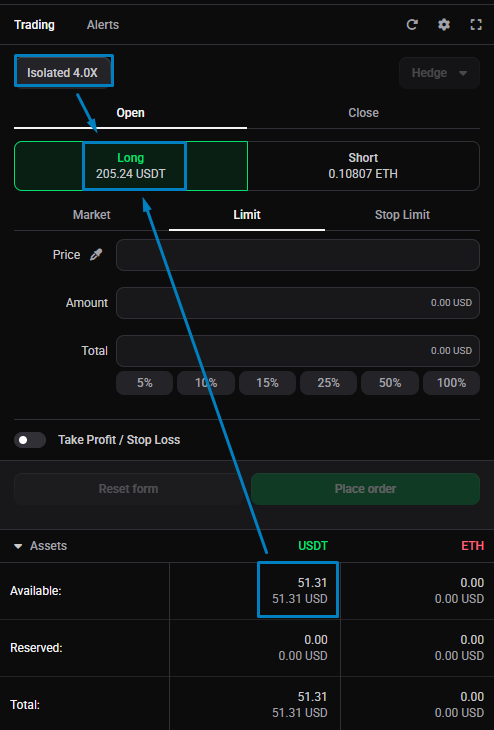
Because it’s tied to the selected pair, it changes as you switch markets. On a futures market, Available Balance is the leveraged amount, your margin multiplied by your leverage, which is why it can be much larger than the cash in your account. For how leverage and margin fit together, see margin mode, leverage, and liquidation price explained. It may also include the value of other assets you hold as collateral, where the exchange allows that: many exchanges now offer a unified or portfolio-margin account, and they each handle this differently. If you size an order by percentage on futures, that percentage is taken from this leveraged amount.
🔍 Click the image to see a larger version
Because it’s tied to the selected pair, it changes as you switch markets. On a futures market, Available Balance is the leveraged amount, your margin multiplied by your leverage, which is why it can be much larger than the cash in your account. For how leverage and margin fit together, see margin mode, leverage, and liquidation price explained. It may also include the value of other assets you hold as collateral, where the exchange allows that: many exchanges now offer a unified or portfolio-margin account, and they each handle this differently. If you size an order by percentage on futures, that percentage is taken from this leveraged amount.
 🔍 Click the image to see a larger version
One nuance: with Reduce Only turned on, the Buy and Sell figures at the top switch to showing your current open position amount on the exchange, since a reduce-only order can only close what you already hold. See hedge mode vs one-way mode for how Reduce Only and the Close side work.
🔍 Click the image to see a larger version
One nuance: with Reduce Only turned on, the Buy and Sell figures at the top switch to showing your current open position amount on the exchange, since a reduce-only order can only close what you already hold. See hedge mode vs one-way mode for how Reduce Only and the Close side work.
Assets (bottom of the widget)
Assets shows the wallet balances for the base and quote currency of the current pair. On a spot market both are shown, split into Available and Reserved:
- Available is free to use.
- Reserved is already committed to open orders. Check the My Orders widget to see where it’s tied up.
On a futures account, Assets shows only the quote currency, since you don’t actually hold the base coin: a futures position is a contract, not a purchase of the token.
Why the two differ
- Leverage. On futures, the top Available Balance is your buying power (margin times leverage), so it’s larger than the wallet figure in Assets.
- Collateral assets. Available Balance can include the value of other assets you hold as collateral, where the exchange allows it, so the amount you can trade with may be more than the base and quote balances for the current pair alone. Many exchanges now offer a version of a unified or portfolio-margin account, and they each handle this differently.
- Reserved funds. Money committed to open orders counts as Reserved in Assets and isn’t available to trade, so Available Balance falls as you place orders.
Still stuck?
If Available Balance looks wrong for a market, check the selected account, your leverage, and whether funds are reserved by open orders. If it reads zero or lower than you expect, Why is my Available Balance zero or lower? has a full checklist. If it still doesn’t add up, reach out through support chat with the market and account and we’ll check the figures with you.