
Why is my Available Balance zero or lower than expected?
If the Available Balance at the top of the Trading widget shows zero, or less than you expect, you usually can’t place the order. Here are the common reasons and how to check each. For what Available Balance means in the first place, see Available Balance vs your Assets.
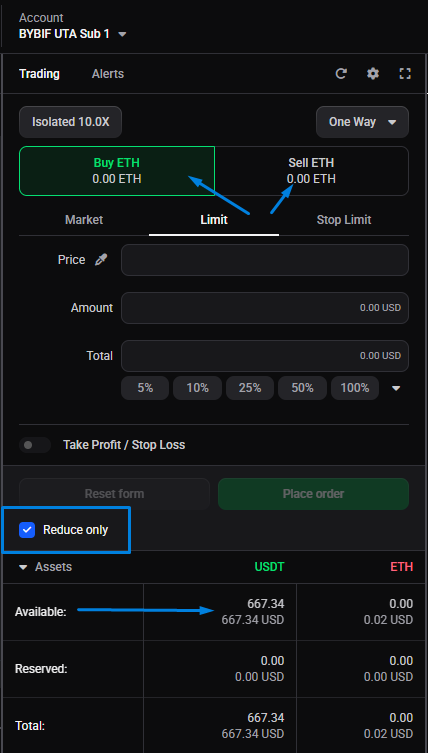
It’s a futures pair with Reduce Only on
On a futures market, if Available Balance is zero, check whether Reduce Only is enabled. A reduce-only order can only close a position, so the widget shows the amount you have open and available to close, not new buying power. If nothing is open, that reads zero.
- In one-way mode, turn Reduce Only off to open or add to a position.
- In hedge mode, the same happens when the Close side is selected: only the open amount is available to close. Switch to the side you actually want to trade.
 🔍 Click the image to see a larger version
The market uses a separate balance
Some markets are funded from their own balance rather than your main futures balance. On Hyperliquid, the builder-deployed perps (HIP-3) and TradFi pairs, such as XYZ100, use a separate balance and aren’t funded by the main futures balance, so Available Balance can read zero even when your futures account has funds. You need to fund that balance separately. See the Hyperliquid connection guide for how its balances are split.
The selected pair’s quote currency has no balance
Available Balance is specific to the selected pair. If the quote currency of that pair has no balance in the account, it shows zero even when you hold plenty of other coins. Check that you’ve selected the pair you meant to trade. Check the Assets section at the bottom of the trading widget to see the wallet balances for the quote and base currencies.
It’s a Unified Trading Account (UTA)
Some exchanges offer a Unified Trading Account — Bybit’s UTA, or a unified / portfolio-margin account on OKX — where several currencies sit in one account and can back your trades together. It’s easy to assume that means any coin you hold counts fully toward the Available Balance for any pair. That isn’t always the case:
- The exchange only counts eligible collateral, usually with a haircut, so a coin may back a trade at less than its full value, or not at all if it isn’t an accepted collateral currency.
- Available Balance is still worked out for the pair you’re trading, so a currency the exchange isn’t counting toward that market won’t show here, even though it’s sitting in the unified account.
To trade the full amount you expect, check which currencies your exchange counts as collateral for that market, or convert into the pair’s quote currency.
You’re on the wrong account
If you have more than one account on the same exchange (a second API key, or a spot and a futures account), the widget trades whichever one is selected. Available Balance can be zero simply because the funded account isn’t the one selected. Switch accounts and check again; see run multiple accounts on the same exchange.
The balance is tied up in open orders
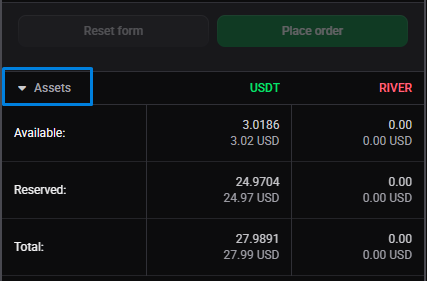
Funds committed to open orders aren’t available to trade. Check the Assets at the bottom of the widget to see the total and how much is Reserved. To see every open order on the account, open the My Orders widget, set it to Open and all markets, and cancel anything you don’t need to free up the balance.
 🔍 Click the image to see a larger version
The balance hasn’t synced yet
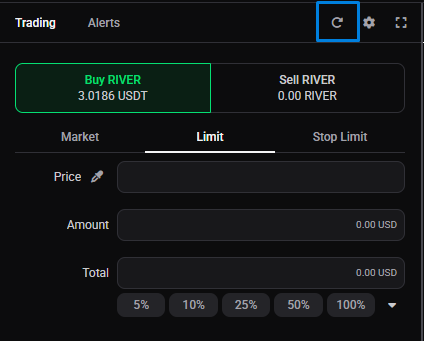
If you’ve just deposited, transferred between wallets, or closed a position, Altrady may not have picked up the new balance yet. Do a Resync to force an update.
 🔍 Click the image to see a larger version
It’s a paper account
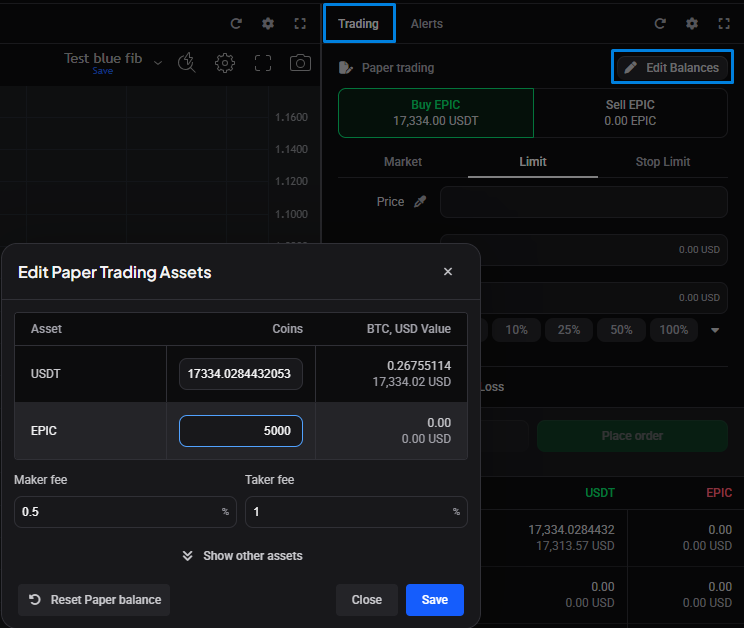
On a paper (demo) account, balances are editable: set them yourself from the Edit Balances screen if you need more to practise with.
 🔍 Click the image to see a larger version
Still stuck?
If Available Balance still shows zero on a market you expect to trade, let us know the exchange, account, and pair and we’ll check what Altrady is seeing. You can reach our support team anytime through the chat bubble in the bottom-right corner of our Help Center at help.altrady.com.