
Replace an API key on an existing account
Use this article if:
- You have reset your vault (5-word password), or
- Your API key has expired, been deleted, or needs to be replaced for any other reason
What happens to your trading account after a vault reset?
Resetting your vault wipes all saved API keys from Altrady. Your trading account stays intact: your trade history, open orders, and bot configurations are all preserved, but the live account will stop working until you save a new API key to it.
You do not need to create a new trading account in Altrady. You only need to generate a new API key on your exchange and save it to your existing account using Edit. This keeps your trade history intact, unlike deleting and re-adding the account.
Overview
For each trading account that needs updating:
- Generate a new API key on your exchange
- Paste it into the existing trading account in Altrady using Edit
If you have both a Spot and a Futures account on the same exchange, treat them as separate accounts. Each needs its own new API key, and each must be edited separately in Altrady.
Step 1: Edit the trading account in Altrady
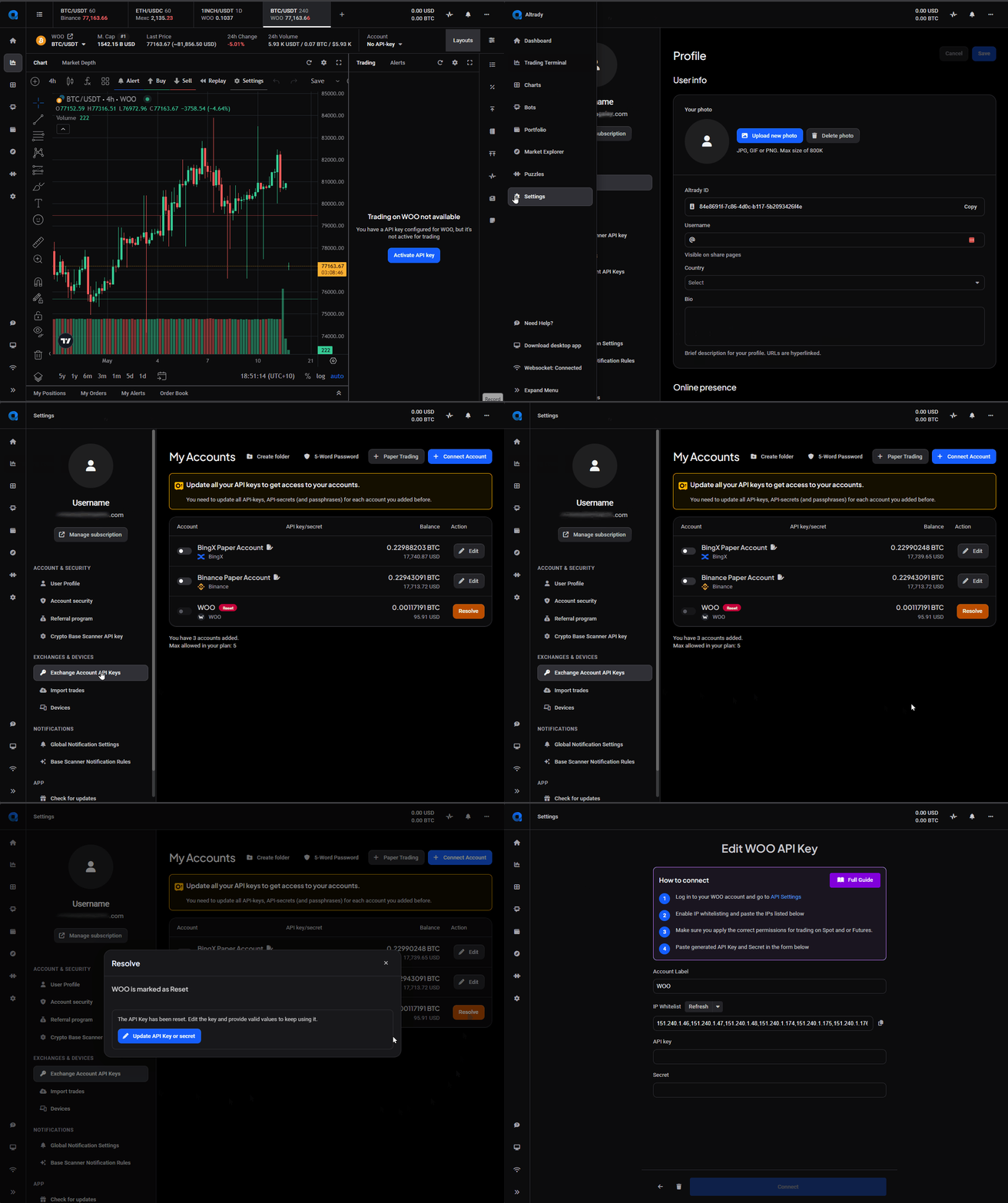
- In Altrady, go to Settings > Exchange Account API Keys
- Find the trading account you need to update
- Click Edit or Resolve
- The IP whitelist becomes visible once the account is in Edit mode
 🔍 Click the image to see a larger version
Step 2: Generate a new API key on your exchange
Log into your exchange and create a new API key. See Connecting your exchange for step-by-step instructions on creating an API key for each exchange.
Follow only the steps for creating the API key on the exchange itself; you don’t need to follow the steps for adding a new account in Altrady. Use the IP whitelist shown on your existing Trading Account in Altrady, and keep your new API key and secret ready before moving on.
Remember: Altrady only ever needs read and trade permissions on your API key. It can never withdraw funds, so do not enable withdrawal permissions when creating the key.
When creating a new API key, do not use Fast Connect (where offered). Fast Connect creates a brand-new trading account; it cannot be used to update an existing one.
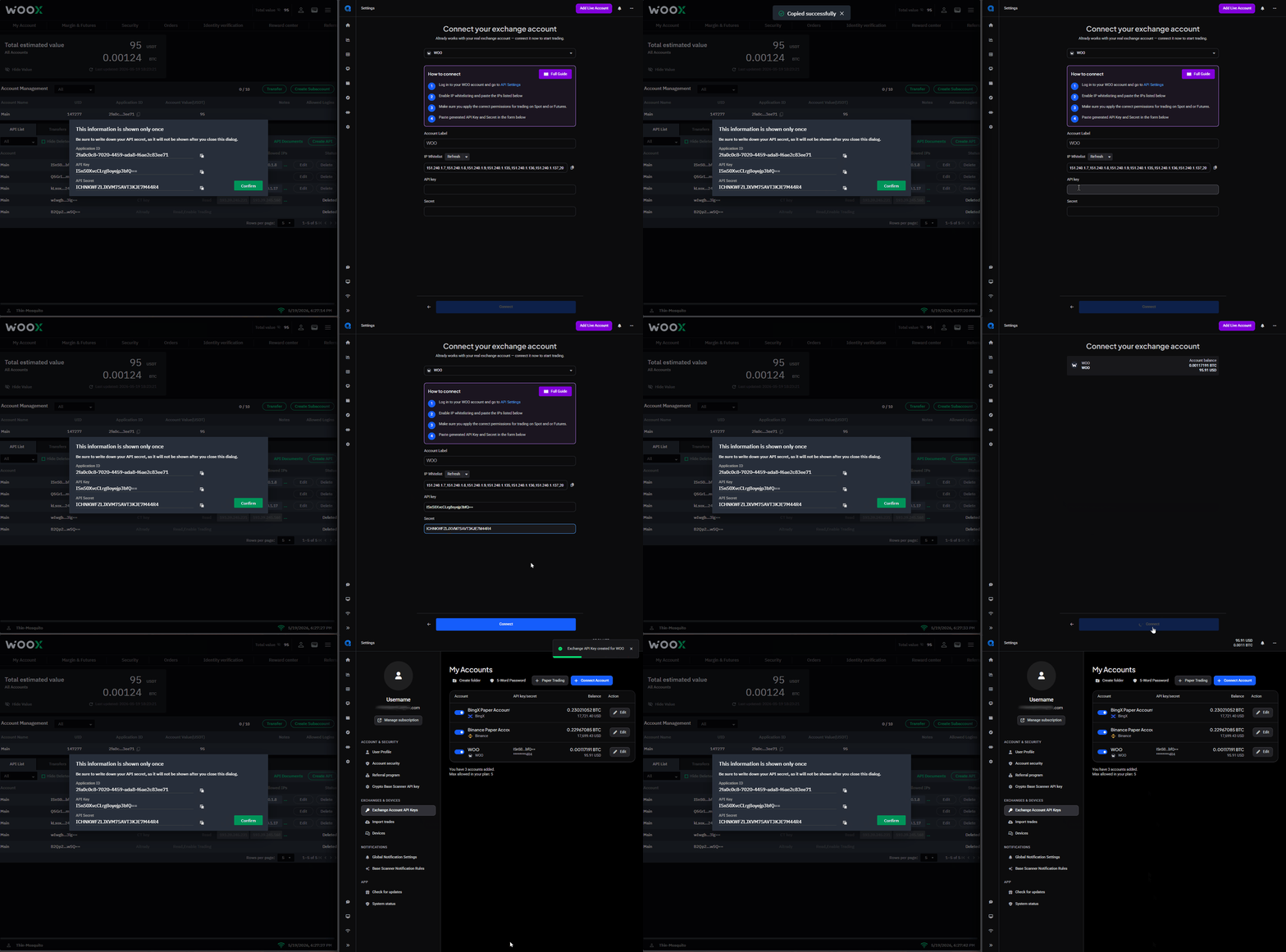
Step 3: Paste the new key and secret
- Replace the existing API key and secret with the new values
- If your exchange requires a passphrase (e.g. KuCoin), replace that too
- Confirm the new details on the exchange
- Click Connect in Altrady
Your bots, positions, and open orders are not affected by changing the API key, unless there was a period when the original key was inactive.
 🔍 Click the image to see a larger version
Repeat for each account
Repeat Steps 1 and 2 for every trading account that needs a new key, including both Spot and Futures accounts if you have them.
If you’re doing a vault reset and your Trading Account has “Extra Keys” attached, those must also be replaced.
Related articles
See Connecting your exchange for exchange-specific guides on creating an API key.
Having trouble?
Please contact our support team via chat or email at the bottom of this page.