
Why don't I see all my coins or assets in Altrady?
Most “missing” coins aren’t gone. This article is about your wallet balances, the coins you actually hold, and why one might not show up where you expect. If instead you’re asking why you can’t place an order for the full amount you hold, that’s your tradeable Available Balance, a different figure: see Available Balance vs your Assets.
Where Altrady shows your wallet balances
Two places show what you hold:
- The Trading widget, under Assets (at the bottom). This shows the balances for the quote and base currency of the market and account you have selected. On a futures market the base currency is never bought (you trade contracts, not the coin), so unless you already hold that asset in a wallet, its Assets figure reads zero.
- Portfolio, which lists every coin, with a summary on the Dashboard and your total in the top bar next to the notification icons. If that total shows asterisks instead of a number, it’s just hidden: click it to switch the display back on. For how to read the values here, see understanding your Portfolio overview.
Check which account you’ve selected
The Portfolio asset list shows the coins for the account or accounts you have selected. If you select more than one account, their balances are combined into one list; to see a single account’s exact holdings, select just that account, and note that selecting a sub-account can drop the main account’s coins out of the list.
The Selected Total and the 1d, 30d, and 1y change figures at the top of the page follow the date range you pick, but the itemised coin list below always shows your current holdings, so the date range won’t add or remove coins from it. For more, see understanding your Portfolio overview.
A coin shows zero or lower than you expect
- Some of it is in open orders. Funds committed to open orders aren’t free, so a holding can look smaller than you expect. Open My Orders>Open>All markets in the trading terminal and check for orders using that coin, remembering that a coin like BTC can be the quote or the base currency of a pair. See viewing your open positions and orders.
- It’s below the display filter. To keep the list readable, Portfolio hides coins worth less than a threshold you set, the Hide assets with value lower than field above the assets table. Lower it, or disable the setting, to see more tokens. This is a display setting only: the coin is still on the exchange and still counted in your totals. Genuinely tiny “dust” balances that the exchange itself won’t let you trade will sit below this filter.
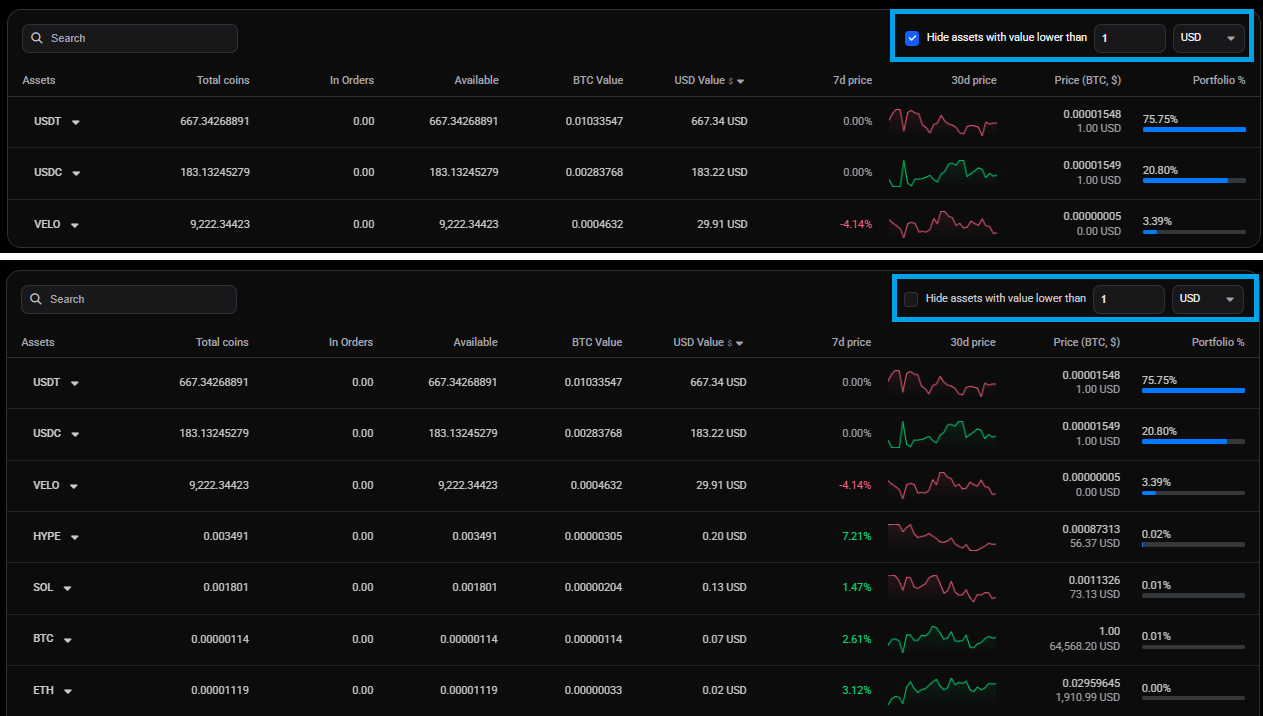 🔍 Click the image to see a larger version
## The coin is on the exchange but still not in Altrady
🔍 Click the image to see a larger version
## The coin is on the exchange but still not in Altrady
If a coin has a real balance on the exchange yet never appears in Altrady:
- Check which exchange account holds it. Altrady reads your Spot, Futures, and unified (UTA) accounts. It does not read the Funding wallet, which is where deposits often land by default. If the coins are there, transfer them into the account you trade from and they’ll show on the next sync.
- Check whether the coin is in a subaccount
- Check whether the coins are staked, in an Earn program, or lent out. These usually can’t be traded and often carry no tradeable value, and exchanges handle them differently. Some hide them entirely, so they never reach Altrady. Others rename them, sending Altrady a different symbol that has no value: KuCoin sends staked GALA as GALAX, Kraken sends staked DOT as DOT.S, and Binance flexible Earn shows as an LD coin (for example LDUSDC), while locked Earn positions may not appear at all. Because these carry no value, the display filter above also hides them. To trade the coins, unstake or redeem them on the exchange first.
Linked external wallets
If the balance is in an external, private wallet you’ve connected to Altrady (rather than an exchange account), check that it’s a coin Altrady can track for that wallet. See add and track an external wallet and why is my external wallet balance missing or outdated?.
Just connected, or a stale balance
A freshly connected account needs to finish its first sync before every asset appears; futures accounts can take up to 60 seconds. If a balance still looks out of date, resync: see how do I manually refresh or resync my balances?. On mobile, Portfolio has a per-account resync (open the account’s three-dot menu and choose Refresh balances) but no global one, so refresh the specific account, or resync from the Trading widget.
What this article doesn’t cover
If a coin shows up but the amount looks wrong (too high, too low, or split oddly across accounts), see why is my Altrady balance different from what’s on the exchange?. If Altrady can’t reach your exchange at all (errors, an expired key, or an account stuck on “Sync failed”), that’s a connection problem: see balances or positions aren’t syncing.
Still stuck?
If you’ve checked the selected account, cleared the display filter, confirmed the coins aren’t staked or sitting in a Funding wallet, and given a new connection time to sync, reach out through support chat with the exchange and coin name so we can take a look with you.