
How do I manually refresh or resync my balances?
If your balance on the Portfolio screen looks stale but nothing shows a connection error, you don’t need to wait it out: you can force an update in two places, the account itself or in the trading widget on the Trading Terminal.
Refresh a single account’s balance
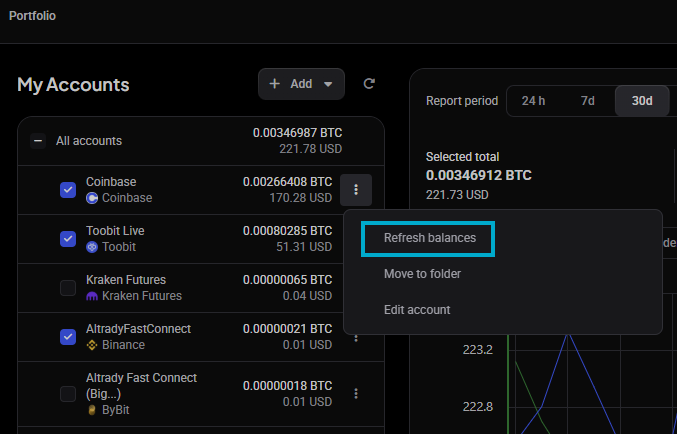
Balances update live over a websocket connection while Altrady is open, so most of the time you’ll see numbers move on their own. When one account still looks behind, refresh it directly:
- Open the Portfolio screen.
- In the accounts sidebar, find the account or wallet you want to update.
- Click Refresh balances.
 🔍 Click the image to see a larger version
This pulls the latest balance for that account only, so it’s quick even if you’re watching several exchanges at once.
🔍 Click the image to see a larger version
This pulls the latest balance for that account only, so it’s quick even if you’re watching several exchanges at once.
Resync open orders in the Trading widget
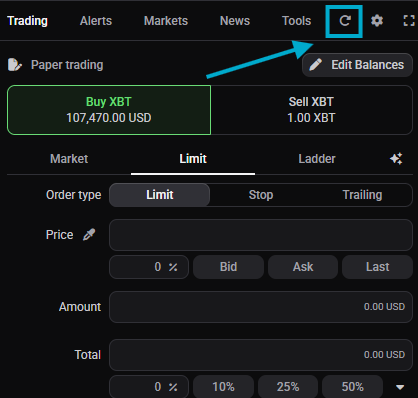
The Trading widget shows the Assets for the pair you’re trading. If the Assets don’t look right:
- Open the Trading widget for that market.
- Click the Resync icon (the circular arrow) in the top right.
- Give it a few seconds. It’s normal for the balance to take a moment to appear after you click.
 🔍 Click the image to see a larger version
## Resync icons across the Trading Terminal
🔍 Click the image to see a larger version
## Resync icons across the Trading Terminal
Refresh balances and Resync aren’t limited to Portfolio and the Trading widget: most widgets on the Trading Terminal have their own resync arrow icon in the top right corner, and clicking it forces an update of that widget’s orders, trades, positions, and balances for the selected account. The My Positions widget is a common example: it already refreshes automatically every 30 seconds, but if you need a number sooner, its resync icon pulls the latest data immediately.
Why balances update on their own
A manual refresh is a fallback, not how Altrady keeps your balances current day to day. For accounts connected with a live API key, Altrady requests updates from the exchange and the exchange also pushes changes back, so orders, trades, and balance changes normally arrive quickly and automatically, especially when the change originated in Altrady. Delays can still happen, though: some exchanges are simply slower to push updates, or the change (a deposit, or an order placed directly on the exchange) happened outside Altrady in the first place. The Refresh balances button and the Resync icon exist for those moments you want the latest numbers right now, not because the live feed stopped working.
Don’t resync too often
Avoid clicking a resync or refresh icon repeatedly in a short span, no more than about every 20 seconds for the same account. Each click sends a fresh request to the exchange, and hitting that too frequently can trigger the exchange’s own rate limits, which may temporarily suspend your API key rather than speed anything up.
What the sync status means when you first connect
When you connect an exch
 🔍 Click the image to see a larger version
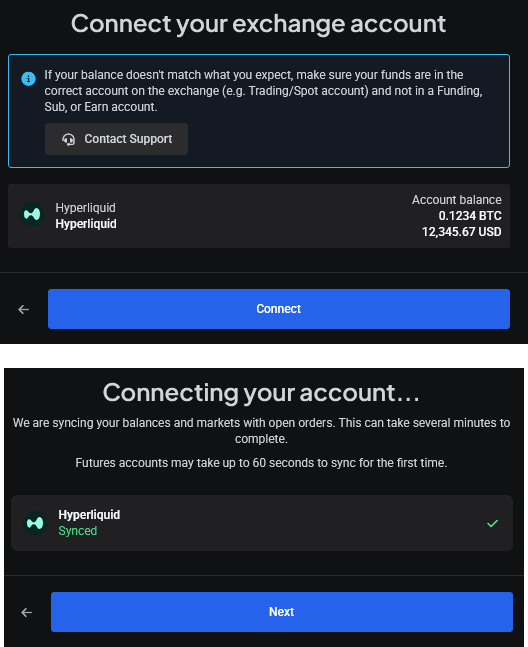
ange account, Altrady shows one of three states while it works through the initial sync:
🔍 Click the image to see a larger version
ange account, Altrady shows one of three states while it works through the initial sync:
- Syncing account…: Altrady is pulling in your balances and history for the first time.
- Synced: everything came through and your account is ready to use.
- Sync failed: something went wrong during the initial sync.
The first sync after adding an API key can take a few minutes. Futures accounts may take up to 60 seconds to sync for the first time.
If numbers still look off after refreshing
A manual refresh only re-pulls what’s already there. If your balance doesn’t match what you’d expect even after refreshing, check that your funds are in the correct account on the exchange (for example, Trading or Spot) and not sitting in a Funding, Sub, or Earn account: Altrady only reads the account type it’s connected to. For the full breakdown of balance mismatches, see why is my Altrady balance different from what’s on the exchange?.
It’s also worth checking whether small balances are simply hidden from view rather than missing: Portfolio has a Hide assets with value lower than setting, and the dashboard will show a note like “Coins below a set value are hidden. You can change this in Portfolio.” if that’s the case. See why don’t I see all my coins or assets in Altrady? for details.
When refresh doesn’t help
If Refresh balances or Resync doesn’t change anything, or the account is stuck showing Sync failed, that’s a connection problem rather than something a manual refresh can fix. Head to balances or positions aren’t syncing for troubleshooting steps.
Still stuck?
If your balances still look wrong after refreshing and checking the account type on the exchange, reach out through support chat in the app. Include which account and which exchange, and whether you saw Sync failed at any point, so the team can look into it quickly.