
Why was my order rejected?
An order can fail to go through for one of two reasons: Altrady’s own checks caught something before the order was sent, or the exchange itself refused it after Altrady sent it. Which one you’re dealing with tells you where to look, and this article covers both.
Before it’s sent: Altrady’s checks
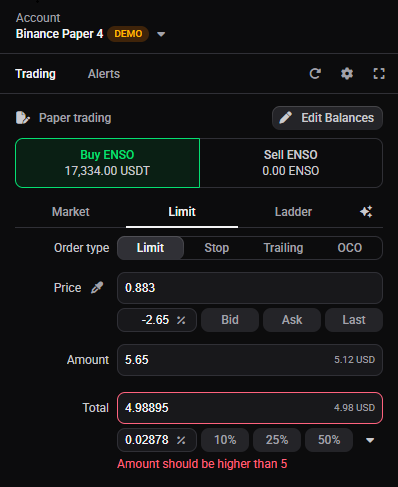
Before Altrady sends an order, it runs a few quick checks. If one fails, the order isn’t sent, so there are no fees and nothing to undo, and Place Order stays disabled until you fix it.
 🔍 Click the image to see a larger version
There are two ways to find what’s wrong:
🔍 Click the image to see a larger version
There are two ways to find what’s wrong:
- Read the message in the order form: it names the field to fix.
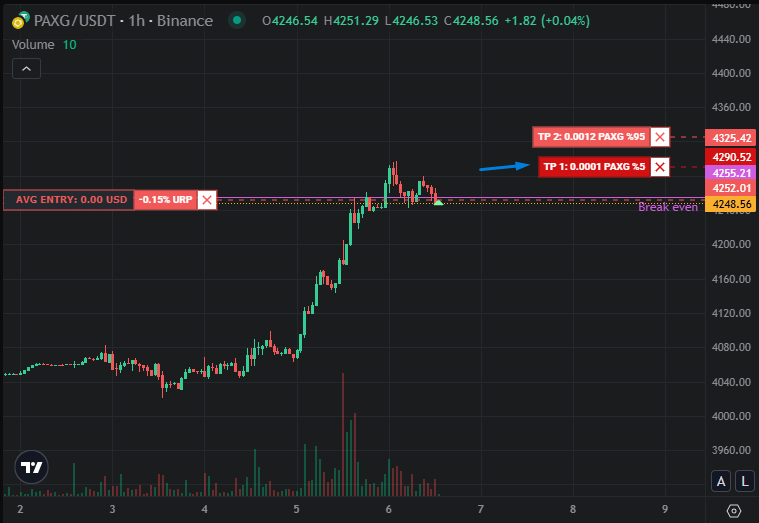
- Look at the order handles on the chart. A dark-coloured handle means that order is invalid; valid orders show in their normal, lighter colour. That tells you at a glance which order in the set is the problem, which helps when you have several entries or take-profits. See image below.
 🔍 Click the image to see a larger version
The usual causes, and where each is covered in full:
🔍 Click the image to see a larger version
The usual causes, and where each is covered in full:
- Not enough free balance. See what does “Insufficient balance” mean?. If the Available Balance at the top of the widget reads zero, that has its own causes: see why is my Available Balance zero or lower than expected?.
- An order below the exchange’s minimum size. See what does “Order size is too small” mean?. One case catches people out: your entry can be large enough while a take-profit order is too small, because the position is split across all your take-profits and each slice still has to clear the minimum. Reduce the number of take-profit (or entry) orders, or increase the position size. For a scaled ladder, adjust the scaling: on exchanges whose minimum is a quote-currency value, the orders at lower prices need to be larger than those at higher prices so each one clears the floor.
- A price or stop on the wrong side. A buy limit above the market, or a stop-loss on the wrong side of your entry, gets caught here. See price and stop-loss order errors.
- A market order that’s too large. Exchanges cap single market orders to limit slippage. Reduce the size, or use a limit order, which doesn’t carry the same cap.
After it’s sent: the exchange rejects it
Sometimes Altrady’s checks pass and the exchange still refuses the order. These come back from the exchange, so the exact wording varies, but they fall into a few groups:
- Order size too small. Often phrased as “minimum notional.” If it appears the instant you place the order, it’s usually the entry order that’s under the floor.
- Order size too large. Some markets cap the size of a single order.
- Order too far from the current price. Some exchanges reject a limit order that would rest too far from the current price, measured as a percentage (on Binance this is a PERCENT_PRICE filter). The allowed range is often wide, but some exchanges are stricter. A trailing take profit sidesteps this, since Altrady manages the trail and places the final order at the current price.
- Post Only couldn’t be honoured. If you used Post Only and the order would have filled immediately as a taker, the exchange cancels it rather than let it take liquidity. Move the price so it rests in the book, or turn Post Only off. See what do Post Only and Time in Force do?.
- Can’t trade from your location. Enforced by the exchange based on your country, and sometimes your state or region. It can also mean your identity check (KYC) isn’t complete. This is set on the exchange, not in Altrady.
- No permission to trade this market. Some exchanges require you to switch on a market type yourself before you can trade it, such as futures, or leveraged tokens on a spot exchange. This can only be done on the exchange, and may involve completing a short quiz. Open the same pair on the exchange and finish the process there, then try again in Altrady.
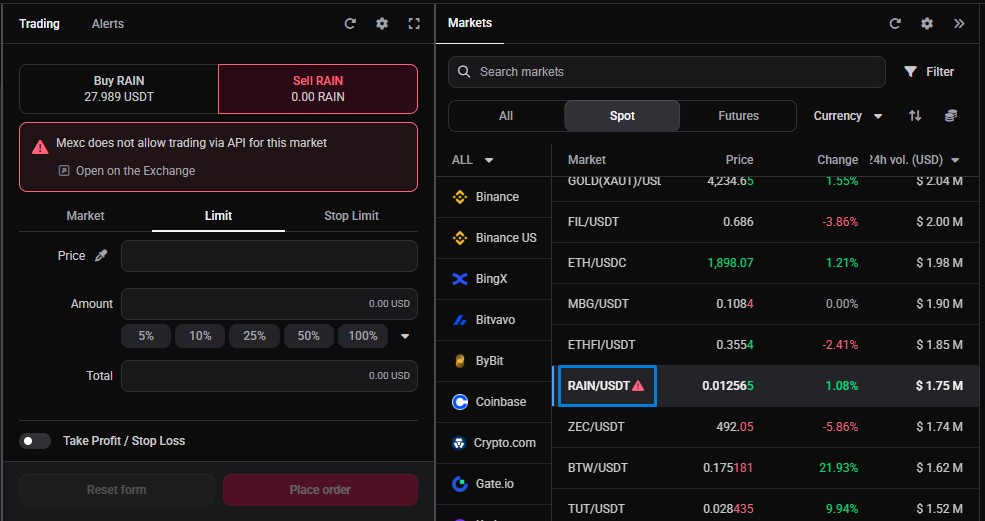
- The market isn’t tradeable through the API. Some pairs are listed for information only and can’t be traded by a connected app (for example MEXC pairs, or BingX “Innovation Zone” coins). Altrady marks these with a red triangle next to the market, so if a pair carries that marker it’s view-only (see image below).
- Market orders aren’t allowed on this pair. Some exchanges don’t allow market orders on certain markets (common on MEXC); when that’s the case, the Market option isn’t shown for that pair. These rules change, so a smart order with a stop-market exit can occasionally become disallowed by the time it triggers.
- The market is in limit-only mode. Some exchanges restrict a market to limit orders until they judge liquidity high enough (Coinbase does this on newly listed or thin markets). Use a limit order until it reopens fully.
- Leverage or margin errors. On futures, the exchange can refuse an order over leverage limits or for insufficient available margin. These are usually specific to your account and market, so check your leverage setting and the available margin for that pair.
 🔍 Click the image to see a larger version
Exchanges word these differently and some are cryptic. For the exact messages and codes exchanges return, see common exchange error messages.
🔍 Click the image to see a larger version
Exchanges word these differently and some are cryptic. For the exact messages and codes exchanges return, see common exchange error messages.
When it looks like a connection problem, not an order problem
If the rejection comes with an authentication-style message, or your balance hasn’t updated in a while, the order itself might not be the issue. Check balances or positions aren’t syncing and fix an invalid or expired exchange account first; a stale connection can make a fine order look like it failed.
Still stuck?
If you’ve checked the message against this list and the order still won’t go through, send us the exact error text and the pair you were trading.
Need more help? You can reach our support team anytime through the chat bubble in the bottom-right corner of our Help Center at help.altrady.com.