
What do Altrady's price and stop-loss error messages mean when placing an order?
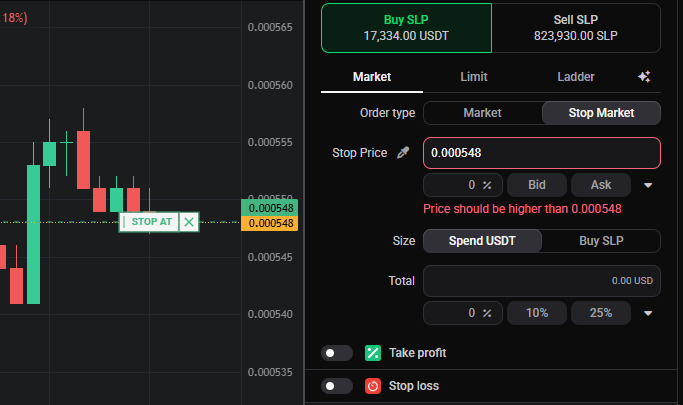
Altrady checks your order’s prices before it reaches the exchange. If you see a message like “Price should be higher than …” or “Stop price is above entry order(s)”, the order was never sent: Altrady is flagging one field to adjust. None of these mean the exchange rejected your trade, and the fix is always the same shape: find the price field the message names and move it.
 🔍 Click the image to see a larger version
## Why Altrady checks prices first
🔍 Click the image to see a larger version
## Why Altrady checks prices first
Exchanges reject orders with conflicting prices, a buy limit too far above the current market, or a stop-loss on the wrong side of your entry, and once that rejection comes back it’s hard to unpick. Altrady catches the same conflicts locally, so the message points straight at the field to fix. Until you do, Place Order stays disabled.
A price on the wrong side of the market
A message like “Price should be higher than …” (or “lower than …”) means a limit or stop price is on the wrong side of a reference price, for example a buy limit set above the current market when it should sit below. The number in the message is the boundary your price has to cross: move that field past it and the message clears.
A stop-loss on the wrong side of your entry
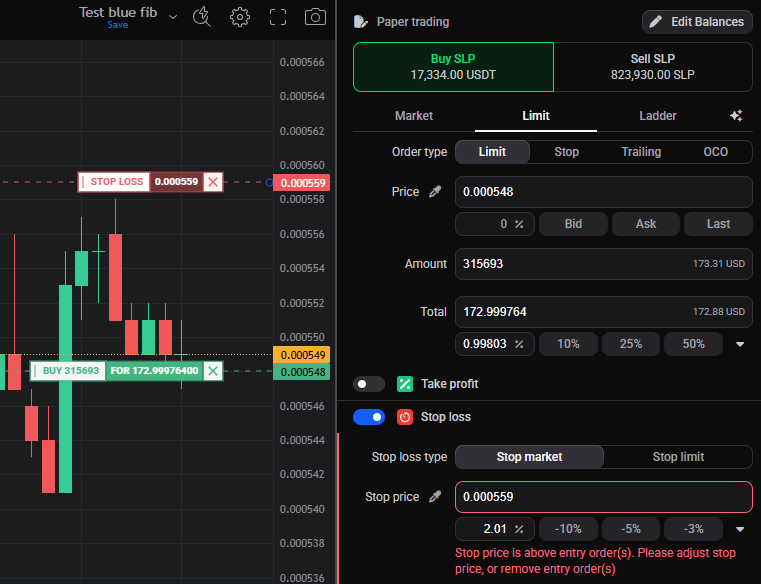
Your entry and stop-loss have to stay on the correct sides of each other: for a long, the entry sits above the stop-loss; for a short, below it. Messages like “Price should be higher/lower than Stop Loss (…)” or “Stop price is above/below entry order(s)” mean that relationship is broken. Adjust the entry, adjust the stop, or remove the conflicting entry order, any of those clears it. For how these protections work, see stop loss and protection modes on a smart order.
 🔍 Click the image to see a larger version
## A market order that’s too large
🔍 Click the image to see a larger version
## A market order that’s too large
Market orders fill immediately at the best available price, so Altrady caps how large a single market order can be. A message like “Total position size should be lower than … for market orders” means you’re over that cap: reduce the size, or switch that entry or exit to a limit order, which doesn’t carry the cap. See market order price protection.
A start or expiry time that has already passed
If you scheduled an entry with a Start position at time, or gave an order an expiry, and that time has already passed (or is set to now), Altrady flags it rather than placing an order that would immediately trigger or expire. Move the start or expiry time forward. See smart order timing: Start position at, expiry, and auto-close.
Emergency SL on the wrong side of the stop
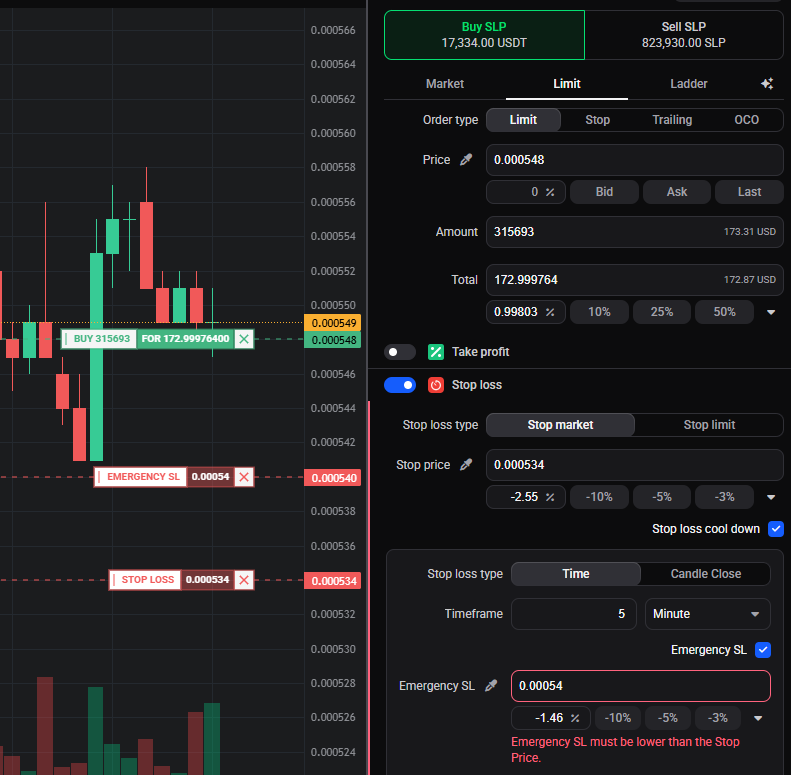
Emergency SL is a fallback exit Altrady can arm behind your regular stop. It has to sit on the correct side of the Stop Price, so a message like “Emergency SL must be higher/lower than the Stop Price” means it has crossed over. Move the Emergency SL field back to the right side. See stop loss cool-down and Emergency SL on a smart order.
 🔍 Click the image to see a larger version
## “Hedge mode not supported”
🔍 Click the image to see a larger version
## “Hedge mode not supported”
This one isn’t a price problem. “Hedge mode not supported. Smart orders cannot be placed in both directions” means your exchange account is in one-way mode, which can’t hold a long and a short on the same market at once. See hedge mode vs one-way mode to switch modes.
Related errors
If the prices are fine but the order still won’t place, check whether the balance is short or an order is below the minimum size.
Still stuck?
If you’ve adjusted the field the message names and it still won’t clear, send us the exact error text with the order form open so the team can see the same numbers you do. You can reach our support team anytime through the chat bubble in the bottom-right corner of our Help Center at help.altrady.com.