
Smart order timing: Start position at, expiry, and auto-close
The Expirations / Auto close section groups three timing controls for a smart order: when the position may start, when a pending entry should expire, and when an open position should auto-close. You can use any of them on their own or together.
Start position at
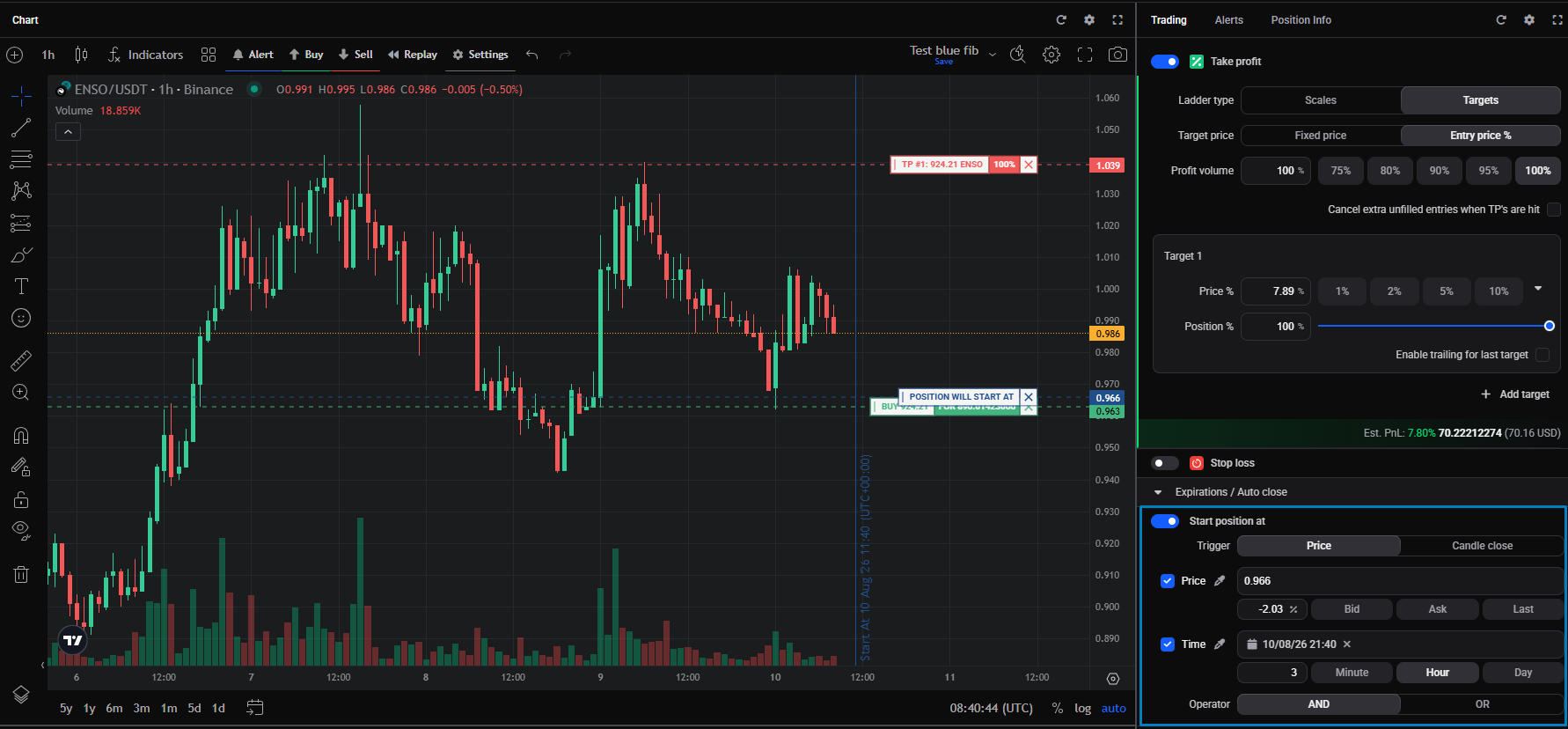
Start position at delays the position until a price and/or time is reached, so the entry order isn’t placed until your condition is met. Until then the order is a hidden order: it isn’t sent to the exchange, so it reserves no funds and doesn’t show in the order book, and it stays Pending in Altrady. Because nothing is reserved, several starts can share the same funds, and the trigger can sit above or below the current price.
-
Trigger: Price or Candle close. With Price, the start condition is checked against the live price. With Candle close, Altrady waits for a candle, on a timeframe you choose, to close beyond your level before starting, so a wick that only touches the level and pulls back doesn’t trigger it. Candle close only affects the price check: if you’ve also set a Time condition it still uses the exact time, whether the two are combined with AND or OR.
-
Price: set the start price directly, by dragging the Position will start at handle on the chart, with the eyedropper, or as a percentage offset from the current price (with a Bid, Ask, or Last reference).
-
Time: a date and time from the calendar, or a duration in Minute, Hour, or Day.
-
Operator: when you set both a price and a time, choose AND (start only once both are met) or OR (start as soon as either is met).
 🔍 Click the image to see a larger version
Expire position at
If your entry order hasn’t filled yet, Expire position at cancels it automatically, so you don’t get filled long after the setup still made sense.
Expiration works on Limit, Stop, Trailing, and Ladder entries, on longs and shorts. It doesn’t apply to a Market entry, which fills at once. Once an entry fills, or partly fills, expiration no longer applies and the position runs. On a ladder, all the related entry orders expire together.
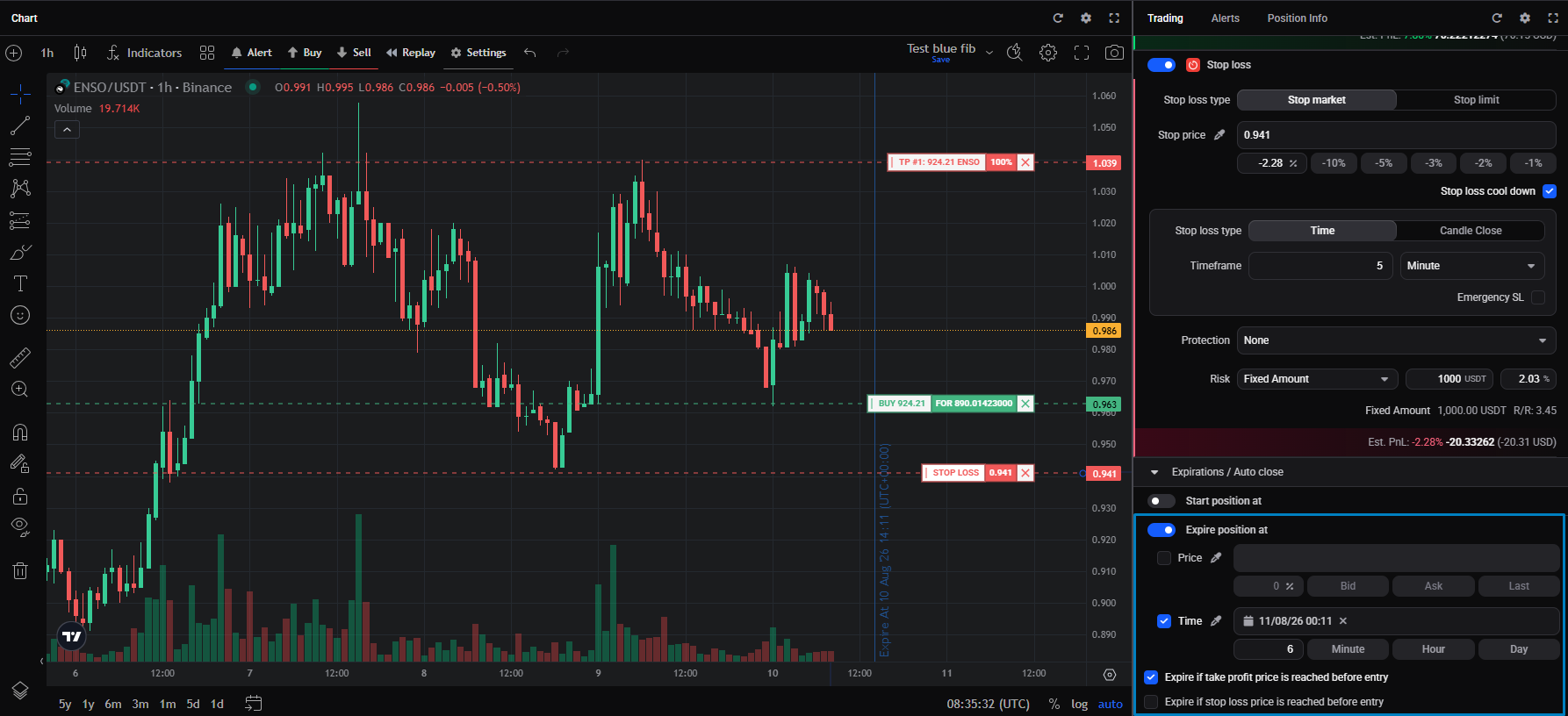
Turn on Expire position at and set any of these. Whichever is met first cancels the pending entry and removes the position from My Positions:
- Price: cancel when a price is reached. Set it with the quick buttons, by dragging the blue cancellation handle on the chart, with the eyedropper, or as a percentage offset from the current price. The cancellation price shows as a blue line on the chart.
- Time: cancel at a set date and time (the calendar), or after a duration, a number of Minutes (1 to 60), Hours (1 to 24), or Days (1 to 30). A blue vertical line marks the expiry time on the chart.
- Expire if take profit price is reached before entry: cancel if price reaches your take profit before the entry fills by setting the price option one step beyond the Take Profit price.
The price and time conditions can run together; the first one met wins.
 🔍 Click the image to see a larger version
## Time-Based auto close
🔍 Click the image to see a larger version
## Time-Based auto close
Time-Based auto close closes an open position after a set time, for a trade that’s taking too long to reach either its take profit or stop loss. It only starts counting once an entry has filled.
- Close In: a number of Minute, Hour, or Day.
- At that time the position is closed at market regardless of profit or loss: a long is sold, a short is bought back.
- It works alongside your stop loss and take profits. Whichever comes first wins, so if the auto-close time arrives before a take profit or stop loss, the position closes then.
- Each additional DCA entry fill restarts the timer, so a position that keeps adding entries keeps pushing its auto-close time back.
A note on time zones
The start, expiry, and auto-close times use exact timestamps regardless of your chart’s timeframe. The chart shows times in UTC, while the Trading widget uses your computer’s time zone, so the same moment can read differently in the two places.
Still stuck?
If a position started, expired, or auto-closed when you didn’t expect it to, or didn’t when it should have, reach out through support chat with the market and the position.