
Webhook Signal Reference: Open, Increase, Reduce, Close, and Reverse
New to webhooks? Start with How webhook signals work.
Webhook signals are JSON payloads sent to a webhook-type signal bot. They can be sent from a TradingView alert or from an Altrady alert, and each one carries an action that tells Altrady what to do with a position. (To start or stop the bot itself, see Webhook signals: start or stop a signal bot.)
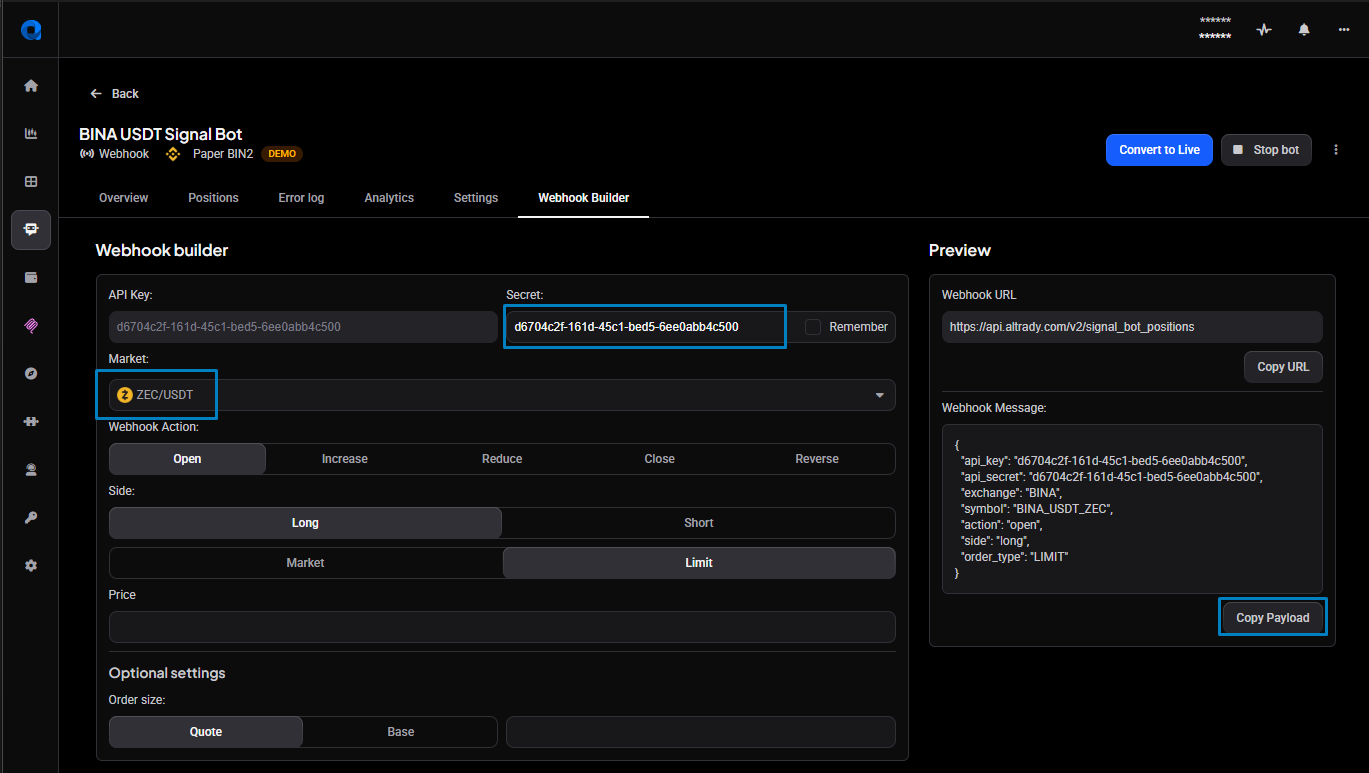
To generate the JSON for a basic signal, use the Webhook Builder tab in the signal bot, next to the Settings tab. For setting up the alert-to-Altrady connection itself, see How to connect TradingView alerts to Altrady with webhooks.
Build a signal with the Webhook Builder
The quickest way to create a signal is the Webhook Builder tab in your signal bot, next to Settings. Pick the market and the Webhook Action (Open, Increase, Reduce, Close, or Reverse), choose the Side and the order type, and set any optional values — the Preview panel builds the JSON for you and shows the Webhook URL to send it to (https://api.altrady.com/v2/signal_bot_positions). Use Copy URL and Copy Payload to grab both.
 🔍 Click the image to see a larger version
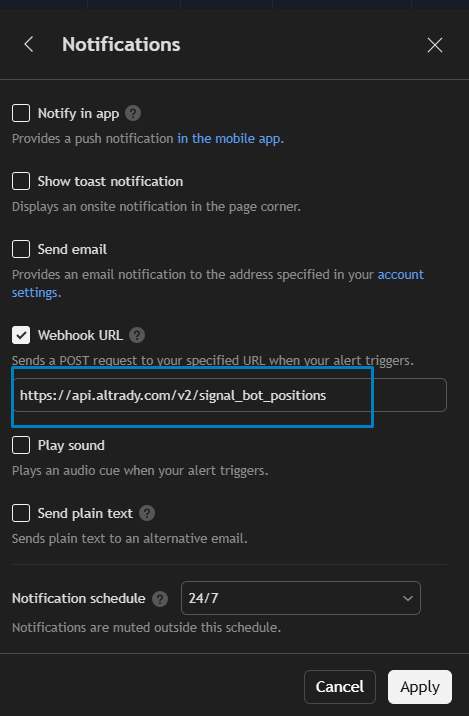
To send the signal from TradingView, open the alert’s Notifications tab, enable Webhook URL, and paste the bot’s Webhook URL into the field:
 🔍 Click the image to see a larger version
For the full walkthrough of creating the TradingView alert, see How to connect TradingView alerts to Altrady with webhooks.
The rest of this article is the full field reference — for building or adjusting a signal by hand, or for understanding what the Builder produced.
Actions at a glance
Position actions:
- open — opens a new position (long or short).
- increase — increases the size of an existing position.
- reduce — decreases the size of an existing position.
- close — closes a specified position, or all positions for the specified market and side.
- reverse (futures only) — closes the current position and opens a new one in the opposite direction.
Bot actions: a webhook signal can also start or stop the bot itself (start_bot, stop_bot, start_and_open, stop_and_close) — see Webhook signals: start or stop a signal bot.
Settings every signal needs
Each webhook signal must include:
-
api_keyandapi_secret— these must match the Altrady API key and secret in the bot settings. -
action— the action to perform. If omitted, it defaults toopen. - the market, specified in one of two ways (never both):
-
exchangeplussymbol, wheresymboluses theEXCHANGE_QUOTE_BASEformat — for exampleBINA_USDT_BTCis BTC quoted in USDT on Binance (BINA). For the pair BTC/USDT, BTC is the base currency and USDT is the quote currency. See valid exchange and symbol values for the full list of exchange codes. -
tv_exchangeplustv_ticker, using the TradingView variables{{exchange}}and{{ticker}}, which TradingView fills in when the alert fires. This is useful when one strategy sends signals for more than one pair.
-
{
  "api_key": "YOUR_ALTRADY_API_KEY",
  "api_secret": "YOUR_ALTRADY_API_SECRET",
  "action": "open",
  "exchange": "BYBI",
  "symbol": "BYBI_USDT_SOL"
}
To pass the market dynamically with TradingView variables instead of a fixed exchange and symbol, use:
  "tv_exchange": "{{exchange}}",
  "tv_ticker": "{{ticker}}",
A minimal signal using only the settings required for all signal types looks like this:
{
 "api_key": "YOUR_ALTRADY_API_KEY",
 "api_secret": "YOUR_ALTRADY_API_SECRET",
 "action": "close",
 "exchange": "BYBI",
 "symbol": "BYBI_USDT_SOL"
}
A note on side
side is long or short:
- Use long for a position that opens with a Buy entry and closes with Sell exit(s).
- Use short for a position that opens with a Sell entry and closes with Buy exit(s). Short positions can be opened on futures exchanges using the quote currency, and on spot exchanges if the base-currency coins are already owned and available to sell.
Where side is required or optional depends on the action:
- On open and reverse,
sideis required. On a reverse it sets the side of the new position that will be opened. - On increase, reduce and close,
sideis optional and defaults tolong. Here it refers to the side of the existing position being acted on. - One signal acts on either long or short positions, not both.
Open a position
An open signal opens a new position. For it to be received and executed: the API key and secret must match the bot settings, the signal must be valid JSON, and it must meet all filter criteria in the signal bot settings.
Minimum required settings for an open signal
{
  "api_key": "YOUR_ALTRADY_API_KEY",
  "api_secret": "YOUR_ALTRADY_API_SECRET",
  "exchange": "BYBI",
  "symbol": "BYBI_USDT_SOL",
  "action": "open",
  "side": "long"
}
Apart from the settings required for all signal types, the only additional required setting for an open signal is side.
Example of an open signal including all required and optional settings
{
  "action": "open",
  "api_key": "YOUR_ALTRADY_API_KEY",
  "api_secret": "YOUR_ALTRADY_API_SECRET",
  "exchange": "BYBI",
  "symbol": "BYBI_USDT_SOL",
  "side": "long",
  "test": true,
  "quote_amount": 100,
  "order_type": "limit",
  "signal_price": 22.5,
  "signal_id": "unique_signal_id_123",
  "leverage": 5,
  "adjust_fee": true,
  "keep_entries_open": true,
  "dca_orders": [
    {
      "price_percentage": 5,
      "quantity_percentage": 100
    },
    {
      "price_percentage": 10,
      "quantity_percentage": 200
    }
  ],
  "take_profit": [
    {
      "price_percentage": 3,
      "position_percentage": 30
    },
    {
      "price_percentage": 5,
      "position_percentage": 40
    },
    {
      "price_percentage": 15,
      "position_percentage": 30,
      "trailing_distance": 1.5
    }
  ],
  "stop_loss": {
    "order_type": "STOP_LOSS_LIMIT",
    "stop_percentage": 7,
    "limit_percentage": 5,
    "cool_down_amount": 10,
    "cool_down_time_frame": "minute",
    "cool_down_type": "TIME",
    "cool_down_cancel_price": 20.5,
    "protection_type": "PRICE",
    "trailing_percentage": 5,
    "trailing_distance": 1
  },
  "entry_expiration": {
    "time": 60,
    "price": 25
  },
  "entry_condition": {
    "time": 5,
    "price": 22,
    "operator": "OR"
  }
}
Optional settings for the open (and reverse) signal
The reverse signal accepts exactly the same optional settings as the open signal. The tables below group them by concern.
Order parameters
| Setting | Values | Notes |
|---|---|---|
| test |
true or false
|
If true, creates pending orders instead of live orders. Note: "test": true will ONLY work with an open signal. For other signal types it will be ignored and a live order will be sent. |
| action | open |
Defaults to open. |
| order_type |
market or limit
|
Defaults to limit if omitted. |
| signal_price | numeric value | The TradingView variable "{{close}}" can be used to substitute the close price from the candle. If signal_price is omitted, Altrady substitutes the current price. |
| quote_amount OR base_amount | numeric value, optional. If used, overrides the bot settings for the entry size. | A fixed amount in quote or base currency, not a percentage of the account. If both are included, an error occurs. For BTC/USDT, BTC is the base currency and USDT is the quote currency. |
| signal_id | If included, must be a unique character string for each signal. | Generally only used with Pine Script. Include it in the open signal if it will be needed to target the position later. Use a varying value that keeps it unique, such as the TV variable {{time}}. If signal_id is omitted, Altrady generates one. |
| leverage | numeric value | Futures only. If included, overwrites the leverage in the signal bot settings. |
| margin_type |
ISOLATED or CROSSED
|
Futures only. Sets the position’s margin mode. |
| adjust_fee |
true or false
|
Defaults to true. Reduces the order size to allow for exchange fees. Recommended when the entry or position size uses 100% of the available balance, which can otherwise fail with an insufficient-balance error after the exchange deducts fees. false maximises the initial order size, as fees are not removed at this point, so use it if you want to use an initial order size that is close to the minimum allowed. |
| keep_entries_open |
true or false
|
If false, all DCA orders are cancelled when the first TP is filled or part-filled. If true, the DCA orders stay open until the position is closed. Defaults to true. |
Market orders and the size currency. When order_type is market, whether the exchange accepts quote_amount, base_amount, or either depends on the exchange; using one it doesn’t allow returns a “Market order doesn’t support quote currency” (or ”…base currency”) error. It’s the same per-exchange behaviour you see in the Trading widget — see Placing a market order for how to check which a given exchange allows.
DCA orders
The dca_orders block can be repeated up to 9 times, for a total of 10 entry orders. To use the DCA values from the signal, select the “DCA from Signal” option in the signal bot settings.
| Setting | Values | Notes |
|---|---|---|
| price_percentage | numeric value. Specify price_percentage or price. |
The percentage below the average entry price at which the order is placed. |
| price | numeric value. Specify price_percentage or price. |
The fixed price at which the DCA entry order is placed. |
| quantity_percentage | numeric value | The percentage of the initial entry order for this DCA (e.g. 200 = 200%, or 2x the entry order size). |
Multiple DCA orders are added by repeating the block:
{
  "dca_orders": [
    {
      "price_percentage": 5,
      "quantity_percentage": 100
    },
    {
      "price_percentage": 10,
      "quantity_percentage": 200
    },
    {
      "price_percentage": 20,
      "quantity_percentage": 400
    }
  ]
}
Take profit
The take_profit block can be repeated up to 10 times. To use the TP values from the signal, the “Take Profit from Signal” option must be selected in the signal bot settings.
| Setting | Values | Notes |
|---|---|---|
| price_percentage | numeric value. Specify price_percentage or price. |
The percentage above/below (long/short) the average entry price at which the TP order is placed. Either price or price_percentage must be used for all TP orders in a signal; they cannot be combined in one signal. |
| price | numeric value. Specify price_percentage or price. |
The actual price at which the order is placed. This does not change even when the average entry price changes. |
| position_percentage | numeric value | The percentage of the position size for this order. |
| trailing_distance | numeric value | If included, the last TP order becomes a Trailing Take Profit. This value sets the distance behind the TP price for the stop price to trail. When triggered, a market order closes the position. TTP is only available on the last TP. |
Multiple take profits are added by repeating the block. TP position_percentage values should add up to 100; if the sum is less than 100%, the remaining amount is included in the last TP.
{
  "take_profit": [
    {
      "price_percentage": 2,
      "position_percentage": 50
    },
    {
      "price_percentage": 4,
      "position_percentage": 30
    },
    {
      "price_percentage": 6,
      "position_percentage": 20
    }
  ]
}
To make the last TP a Trailing Take Profit, add trailing_distance to it:
{
  "take_profit": [
    {
      "price_percentage": 2,
      "position_percentage": 60
    },
    {
      "price_percentage": 5,
      "position_percentage": 40,
      "trailing_distance": 1.5
    }
  ]
}
Stop loss
Include the stop_loss block to set a stop loss in the signal. To use the SL values from the signal, select the “SL from Signal” option in the signal bot settings. For a full explanation of the stop-loss and protection options, see Stop loss and protection modes.
| Setting | Values | Notes |
|---|---|---|
| order_type |
STOP_LOSS_MARKET or STOP_LOSS_LIMIT
|
Optional. Defaults to STOP_LOSS_MARKET if not specified. |
| stop_percentage OR stop_price | Required if a stop-loss block is included. | Stop %: the percentage below the signal price at which the SL is placed. Once placed, the stop price is fixed and does not vary with the average entry price. OR Stop Price: specify a price. |
| limit_percentage OR limit_price | Required if order_type is STOP_LOSS_LIMIT. Ignored if order_type is STOP_LOSS_MARKET. |
Limit %: the percentage below the signal price at which the stop loss’s limit order is placed. Once placed, the limit price is fixed. OR Limit Price: specify a price. Must be used together with stop_percentage or stop_price when order_type is STOP_LOSS_LIMIT. |
Stop-loss cooldown
Optional, within the stop_loss block.
| Setting | Values | Notes |
|---|---|---|
| cool_down_type |
TIME or CANDLE_CLOSE
|
Determines which other cooldown settings must be included. |
| TIME | Specify a cool_down_time_frame (day, hour, minute) and a cool_down_amount. |
e.g. "cool_down_type": "TIME", "cool_down_time_frame": "minute", "cool_down_amount": 5. |
| CANDLE_CLOSE | Specify cool_down_candle_resolution in minutes: 1, 2, 3, 5, 10, 15, 30, 60, 120, 240, 360, 720, 1440. Maximum is 1440 (1 day). |
e.g. "cool_down_candle_resolution": "30". |
| Emergency Stop Loss | Optional with cooldown. Specify either a price or a percentage from the entry price. Like the initial SL, the ESL is fixed once placed. |
"cool_down_cancel_price": 101.123 OR "cool_down_cancel_percentage": 25. |
Stop-loss protection
Optional, within the stop_loss block.
| Setting | Values | Notes |
|---|---|---|
| protection_type |
PRICE, BREAK_EVEN, FOLLOW_TAKE_PROFIT
|
The type of trailing stop loss used to protect the position. PRICE follows the price. |
| trailing_price | Numeric. The price at which trailing starts. | Used with PRICE only. Specify either trailing_price or trailing_percentage. |
| trailing_percentage | Numeric. The percentage from the entry price at which trailing starts. | Used with PRICE only. Specify either trailing_price or trailing_percentage. |
| trailing_distance | Numeric. The percentage behind trailing_price or trailing_percentage that the stop price follows. |
Required with PRICE. |
Stop-loss examples:
Simple stop loss — SL 7.5% from entry, with no cooldown:
{
  "stop_loss": {
    "stop_percentage": 7.5
  }
}
Stop loss (20% from entry) with a 4-hour candle-close cooldown and Emergency Stop Loss (35% from entry):
{
  "stop_loss": {
    "stop_percentage": 20,
    "cool_down_type": "CANDLE_CLOSE",
    "cool_down_candle_resolution": "240",
    "cool_down_cancel_percentage": 35
  }
}
Fixed-price SL at 2.79, with a 10-minute timer cooldown and Emergency Stop Loss (at 2.59 fixed price):
{
  "stop_loss": {
    "stop_price": 2.79,
    "cool_down_amount": 10,
    "cool_down_time_frame": "minute",
    "cool_down_type": "TIME",
    "cool_down_cancel_price": 2.59
  }
}
Fixed-price SL at 0.00000100, with a 1-hour timer cooldown and protection (TSL follows price): the trigger price is 3% above the entry price and the trailing stop is 1% below the trigger price for a long position. For a short position the trigger price would automatically be below the entry price, and the stop price above the trigger price.
{
  "stop_loss": {
    "stop_price": 0.000001,
    "cool_down_amount": 1,
    "cool_down_time_frame": "hour",
    "cool_down_type": "TIME",
    "protection_type": "PRICE",
    "trailing_percentage": 3,
    "trailing_distance": 1
  }
}
Entry timing
Include entry_condition to set a price and/or time condition before the initial orders are placed, and entry_expiration to cancel the unfilled position at a time or price.
| Setting | Values | Notes |
|---|---|---|
| entry_condition › time | Numeric. Minutes added to the current time before the position opens. | Until the position opens, no coins are reserved. |
| entry_condition › price | Numeric. The price at which the position should open. | |
| entry_condition › operator |
AND or OR
|
If both time and price are used in entry_condition, choose whether both conditions must be met (AND) or just one (OR). |
| entry_expiration › time | Numeric. Minutes added to the current time before the position expires. | If set, overrides the expiry-time setting in the signal bot settings. |
| entry_expiration › price | Numeric. The price at which the unfilled position should expire. | If both time and price are specified, the position is cancelled when either condition is met. |
DCAs, TPs and SL can be included in the entry signal (useful when they vary per signal or market), set in the signal bot settings (useful when they do not vary), or added manually to positions after they open. In the bot settings, choose Custom to use the value in the bot, or Signal to use the value from the signal.
Open (and reverse) signal structure
Open Signal
└── Base Parameters (required)
    ├── api_key: "YOUR_ALTRADY_API_KEY"
    ├── api_secret: "YOUR_ALTRADY_API_SECRET"
    ├── action: "open"
    ├── EITHER:
    │   ├── exchange: "EXCHANGE_CODE"
    │   └── symbol: "MARKET_CODE"
    └── OR:
        ├── tv_exchange: "{{exchange}}"
        └── tv_ticker: "{{ticker}}"
    └── side: "long" │ "short"
    │
    ├── Order Parameters (optional)
    │   ├── test: true │ false
    │   ├── order_type: "market" │ "limit"
    │   ├── signal_price: number │ "{{close}}"
    │   ├── signal_id: string
    │   ├── leverage: number (futures only)
    │   ├── margin_type: "ISOLATED" │ "CROSSED" (futures only)
    │   ├── adjust_fee: true │ false
    │   ├── keep_entries_open: true │ false
    │   └── ONE OF:
    │       ├── quote_amount: number
    │       └── base_amount: number
    │
    ├── Entry Condition (optional)
    │   ├── time: number (minutes)
    │   ├── price: number
    │   └── operator: "AND" │ "OR"
    │
    ├── Entry Expiration (optional)
    │   ├── time: number (minutes)
    │   └── price: number
    │
    ├── Take Profit Settings (optional array)
    │   └── [
    │       {
    │           ├── ONE OF:
    │           │   ├── price_percentage: number
    │           │   └── price: number
    │           ├── position_percentage: number
    │           └── trailing_distance: number (last TP only)
    │       },
    │       {...}  // Up to 10 TPs
    │   ]
    │
    ├── DCA Orders (optional array)
    │   └── [
    │       {
    │           ├── ONE OF:
    │           │   ├── price_percentage: number
    │           │   └── price: number
    │           └── quantity_percentage: number
    │       },
    │       {...}  // Up to 9 DCAs
    │   ]
    │
    └── Stop Loss Settings (optional)
        ├── IF order_type: "STOP_LOSS_MARKET" (ONE required)
        │   ├── stop_percentage: number
        │   └── stop_price: number
        ├── IF order_type: "STOP_LOSS_LIMIT" (TWO required)
        │   ├── stop_percentage: number
        │   └── limit_percentage: number
        |    |       OR
        |    ├── stop_price: number
        |    └── limit_price: number
        │
        ├── Cooldown Settings (optional)
        │   ├── cool_down_type: "TIME" │ "CANDLE_CLOSE"
        │   ├── IF "TIME":
        │   │   ├── cool_down_time_frame: "minute" │ "hour" │ "day"
        │   │   └── cool_down_amount: number
        │   ├── IF "CANDLE_CLOSE":
        │   │   └── cool_down_candle_resolution: "1" │ "5" │ "15" │ ... │ "1440"
        │   └── Emergency SL (optional, ONE only)
        │       ├── cool_down_cancel_price: number
        │       └── cool_down_cancel_percentage: number
        │
        └── Protection Settings (optional)
            ├── protection_type: "PRICE" │ "BREAK_EVEN" │ "FOLLOW_TAKE_PROFIT"
            ├── IF "PRICE":
            │   ├── ONE OF:
            │   │   ├── trailing_price: number
            │   │   └── trailing_percentage: number
            │   └── trailing_distance: number
            └── (other protection types have their own parameters)
Increase a position
The increase signal increases the size of one or more open positions for a single market and side, that were opened by the signal bot.
Minimum required settings for an increase signal
{
  "api_key": "YOUR_ALTRADY_API_KEY",
  "api_secret": "YOUR_ALTRADY_API_SECRET",
  "action": "increase",
  "side": "long",
  "exchange": "BINA",
  "symbol": "BINA_USDT_BTC",
  "increase_order": {
    "quantity_percentage": 100
  }
}
One increase_order block must be included, and only one. Inside it, use exactly one of quantity_percentage, quote_amount or base_amount (a numeric value) to specify the increase amount. If more than one is included, the signal is rejected.
-
quantity_percentageincreases the position size by a percentage of the initial entry order size. For example, 100 increases the position by the same amount as the initial entry order. -
quote_amountincreases the position size by the amount of quote currency specified (rounded down to the highest possible order size). -
base_amountincreases the position size by the amount of base currency specified (e.g.250for 250 ADA on BIFU_USDT_ADA).
Example increase signal including required and optional settings
This example uses the TradingView variable {{close}} to insert the price at candle close:
{
  "api_key": "YOUR_ALTRADY_API_KEY",
  "api_secret": "YOUR_ALTRADY_API_SECRET",
  "action": "increase",
  "side": "long",
  "exchange": "BINA",
  "symbol": "BINA_USDT_BTC",
  "increase_order": {
    "base_amount": 25.5,
    "order_type": "limit",
    "price": "{{close}}"
  }
}
Optional settings for the increase signal
-
order_typeis optional and can belimitormarket. If omitted, it defaults tolimit. For a limit increase order,pricecan be specified. - If
marketis used, the order is placed as a market order and anypricefield is ignored. -
pricecan be a numeric value or a TradingView variable such as{{close}}(TV only). -
order_typeandpricemust be inside theincrease_orderblock.
Increase signal structure
Increase Signal
└── Base Parameters (required)
    ├── api_key: "YOUR_ALTRADY_API_KEY"
    ├── api_secret: "YOUR_ALTRADY_API_SECRET"
    ├── action: "increase"
    ├── EITHER:
    │   ├── exchange: "EXCHANGE_CODE"
    │   └── symbol: "MARKET_CODE"
    └── OR:
        ├── tv_exchange: "{{exchange}}"
        └── tv_ticker: "{{ticker}}"
    ├── side: "long" | "short"
    └── increase_order: {
        ├── ONE OF: (required)
        │   ├── quantity_percentage: number
        │   ├── quote_amount: number
        │   └── base_amount: number
        ├── order_type: "limit" | "market" (optional, defaults to "limit")
        └── IF "limit": price: number (optional)
Reduce a position
The reduce signal reduces the size of one or more positions opened by the signal bot, for the specified market and side. It partially closes the matching positions by the amount specified in the signal.
Processing
Once the reduce signal is received, for each position that matches the signal symbol and side:
- all open take-profit orders are cancelled;
- a new order is created for the amount in the reduce block;
- each existing TP is reduced proportionally and placed again at its original price.
For example: existing TPs at [price (%)] 105 (20%), 115 (30%), 125 (50%). A reduce signal to close 10% of the position at market price is received. New TPs: 10% (market order), plus limit orders at 105 (18%), 115 (27%), 125 (45%).
Minimum required settings for a reduce signal
{
  "action": "reduce",
  "api_key": "YOUR_ALTRADY_API_KEY",
  "api_secret": "YOUR_ALTRADY_API_SECRET",
  "exchange": "BINA",
  "symbol": "BINA_USDT_SOL",
  "side": "long",
  "reduce_order": {
      "percentage": 25
  }
}
One reduce_order block must be included. Use exactly one of percentage, quote_amount or base_amount (a numeric value) to specify the reduce amount. If more than one is included, the signal is rejected. The open position = filled entries − filled exits.
-
percentagereduces the position size by a percentage of the current position size in base/contract currency. For example, if the size is 0.2 BTC and the reduce amount is 50%, 0.1 BTC is sold/bought (long/short). Set it to 100 to close the position, or use a close signal. -
quote_amountreduces the position size by the amount of quote currency specified (rounded down to the highest possible order size). -
base_amountreduces the position size by the amount of base (contract) currency specified (e.g.250for 250 ADA on BIFU_USDT_ADA).
Example of a reduce signal including all required and optional settings
This example creates a market TP order for 25.5 ADA:
{
  "api_key": "YOUR_ALTRADY_API_KEY",
  "api_secret": "YOUR_ALTRADY_API_SECRET",
  "action": "reduce",
  "side": "long",
  "exchange": "BINA",
  "symbol": "BINA_USDT_SOL",
  "reduce_order": {
    "base_amount": 25.5,
    "order_type": "market"
  }
}
Optional settings for the reduce signal
-
order_typeis optional and can belimitormarket, and must be inside thereduce_orderblock. If omitted, it defaults tolimit. For a limit reduce order,priceis optional. - If
marketis used, the order is placed as a market order. -
pricecan be a numeric value or a TradingView variable such as{{close}}(TV only).
Reduce signal structure
Reduce Signal
└── Base Parameters (required)
    ├── api_key: "YOUR_ALTRADY_API_KEY"
    ├── api_secret: "YOUR_ALTRADY_API_SECRET"
    ├── action: "reduce"
    ├── EITHER:
    │   ├── exchange: "EXCHANGE_CODE"
    │   └── symbol: "MARKET_CODE"
    └── OR:
        ├── tv_exchange: "{{exchange}}"
        └── tv_ticker: "{{ticker}}"
    ├── side: "long" | "short"
    └── reduce_order: {
        ├── ONE OF: (required)
        │   ├── percentage: number
        │   ├── quote_amount: number
        │   └── base_amount: number
        ├── order_type: "limit" | "market" (optional, defaults to "limit")
        └── IF "limit": price: number (optional)
Close a position
The close signal closes running position(s) for the specified market that were opened by the same signal bot.
- A close will close the position(s) regardless of whether any entry orders have been filled.
- When the close signal is received, all open orders (entries, exits, stop loss) are cancelled so the close order can close the position.
- The close signal should be sent at the price where the position is to be closed. With a limit order, the position will not close until the limit price is reached and the order is fully filled.
- Consecutive close signals cancel open limit orders created by previous close signals.
Required in the signal: the API key and secret must match the bot settings, "action": "close" is required, and the market must be specified with exchange and symbol (or tv_exchange and tv_ticker).
order_type is required for a close signal, as either market or limit:
-
"order_type": "limit"must be used withprice. It closes the position with a limit order at the specified price. -
"order_type": "market"must not be combined withprice. It closes the position using a pseudo-market order (a limit order 10% from the current price).
Minimum required settings for a close signal
This signal closes all open long positions for XBT/USD that were opened by the signal bot:
{
  "action": "close",
  "api_key": "YOUR_ALTRADY_API_KEY",
  "api_secret": "YOUR_ALTRADY_API_SECRET",
  "exchange": "KRKN",
  "symbol": "KRKN_USD_XBT",
  "side": "long",
  "order_type": "limit",
  "price": 30500
}
Example of a close signal including all required and optional settings
{
  "action": "close",
  "api_key": "YOUR_ALTRADY_API_KEY",
  "api_secret": "YOUR_ALTRADY_API_SECRET",
  "exchange": "KRKN",
  "symbol": "KRKN_USD_XBT",
  "side": "long",
  "signal_id": "original_signal_id_123",
  "order_type": "market"
}
Optional settings for the close signal
-
side — if omitted, defaults to
long. It refers to the side of the original position when it was opened. One signal closes either long or short positions, not both. -
signal_id — if used, this must be the
signal_idof the signal that opened the specific position. When it is omitted, all positions for the specified market and side that were opened by the signal bot are closed. Where more than one position may be open for the same symbol and side,signal_idtargets a specific position. Because it must match thesignal_idthat opened the position, this is not possible with standard TradingView indicators; it might be possible with Pine Script. If nosignal_idwas specified on the original signal, Altrady generated one, and TradingView will not have access to that Altrady-generated id. If your bot has “Max per market” = 1, only one position is ever open for a market at a time, so the close signal closes that single position andsignal_idis not needed.
Close signal structure
Close Signal
└── Base Parameters (required)
    ├── api_key: "YOUR_ALTRADY_API_KEY"
    ├── api_secret: "YOUR_ALTRADY_API_SECRET"
    ├── action: "close"
    ├── EITHER:
    │   ├── exchange: "EXCHANGE_CODE"
    │   └── symbol: "MARKET_CODE"
    └── OR:
        ├── tv_exchange: "{{exchange}}"
        └── tv_ticker: "{{ticker}}"
    ├── order_type: "market" | "limit" (required for close)
    │   └── IF "limit": price: number (required)
    ├── side: "long" | "short" (optional, defaults to "long")
    └── signal_ID: "ORIGINAL_SIGNAL_ID" (optional)
Reverse a position (futures only)
The reverse signal can only be used for futures markets.
Minimum settings for a reverse signal
This example closes any existing short positions and opens a new long position for BTC/USDT on Binance:
{
  "action": "reverse",
  "api_key": "YOUR_ALTRADY_API_KEY",
  "api_secret": "YOUR_ALTRADY_API_SECRET",
  "exchange": "BINA",
  "symbol": "BINA_USDT_BTC",
  "side": "long"
}
- Other than
"action": "reverse", all settings are identical to the required and optional settings for the open signal above. - The reverse signal is like two signals in one:
closeandopen. It closes the existing position(s) with a market order and opens a new position with the given parameters. The new position is not opened until the existing one is closed. Forside, valid options arelongorshort; this is the side of the new position. If omitted, it defaults tolong. - It retries up to 5 times with a 3-second delay before failing. This happens asynchronously, so the webhook returns immediately and returns 204 no content when the request is successfully received; otherwise it returns the same error messages as the open action.
- Reverse is recommended over sending independent close and open signals. With separate signals the timing of the close is unknown, and if the close has not completed on the exchange before the open arrives, the open is ignored (unless hedge mode is enabled and two positions per market are allowed). Only one signal can be sent per TV alert, so separate signals would need two alerts.
- If the position is already closed when the reverse is received, it just opens a new position with the given settings.
The reverse signal is not compatible with the Profit Volume setting in the signal bot (which keeps a percentage of the contracts or tokens after a position closes). Profit Volume should be set to its default value of 100% (1). In one-way mode, if some contracts are still held for the previous direction, the reverse signal cannot open the new reversed position.
Reverse signal structure
Reverse Signal (Futures Only)
└── Base Parameters (required)
    ├── api_key: "YOUR_ALTRADY_API_KEY"
    ├── api_secret: "YOUR_ALTRADY_API_SECRET"
    ├── action: "reverse"
    ├── EITHER:
    │   ├── exchange: "EXCHANGE_CODE"
    │   └── symbol: "MARKET_CODE"
    └── OR:
        ├── tv_exchange: "{{exchange}}"
        └── tv_ticker: "{{ticker}}"
    └── side: "long" | "short" (side for new position)
    |
    └── Same optional parameters same as Open Signal
        ├── Order Parameters
        ├── Entry Condition
        ├── Entry Expiration
        ├── Take Profit Settings
        ├── DCA Orders
        └── Stop Loss Settings
Pine Script
For TradingView alerts, use the webhook URL https://api.altrady.com/v2/signal_bot_positions.
Setting up an order by price crossing or a trend-line crossing needs no programming, but connecting an indicator or strategy requires basic knowledge of creating a signal in Pine Script. There is a lot of information on the web about generating a signal in Pine, and you can ask for advice in the Pine Scripters Telegram user group.
A parameterized Pine alert (TTP is only available on the last TP):
test = input.bool(true, "Test signal")
api_key = input.string("", "Api key")
secret = input.string("", "Secret")
signal_name = input.string("", "Signal name")
side = input.string("", "Side")
exchange = input.string("", "Exchange name")
symbol = input.string("", "Symbol")
signal_price = close

alert('{"test": '+ str.tostring(test) +', "api_key": "'+api_key+'","api_secret": "'+secret+'","signal_id": "'+ signal_name + str.tostring(time)+'","side": "'+ side +'","exchange": "'+ exchange +'", "symbol": "'+ symbol +'","signal_price": "' + str.tostring(signal_price) +'"}')
A minimal alert:
alert('{"api_key": "YOUR_ALTRADY_API_KEY", "action": "open", "symbol": "BTCUSDT", "side": "long"}')
With "test": true, your webhook signal in combination with your bot will create pending orders that you can see on the chart and in My Orders. Note: "test": true only works with open signals. For other signal types it is ignored and a live order is sent. Once you are ready to send live signals, change the first line to test = input.bool(false, "Test signal").
Change the API key and secret, and set the correct exchange and symbol. Make sure the signal id is unique per bot — using {{time}} will ensure a unique signal id each second.
Common payload mistakes
-
Both market forms at once — use
exchange+symbol, ortv_exchange+tv_ticker, never both. -
Wrong symbol format — a fixed
symbolmust beEXCHANGE_QUOTE_BASE(e.g.BINA_USDT_BTC), not the raw TradingView ticker. -
Missing
sideon open or reverse —sideis required on both. -
Both size fields — including both
quote_amountandbase_amount(or more than one size field inside anincrease_order/reduce_orderblock) rejects the signal; use exactly one. -
No
order_typeon close —order_typeis required for a close, andlimitmust includepricewhilemarketmust not. -
Expecting
test: trueto be safe on non-open signals — it only works on open; on other actions it is ignored and a live order is sent. -
Repeated
opento stack a position — a second open will either open a new position or be filtered by the bot’s market filters; useincreaseto add to a position.
If your payload is valid JSON with the right fields and still does nothing, work through Troubleshooting: TradingView webhook signals not triggering orders.