
How webhook signals work in Altrady
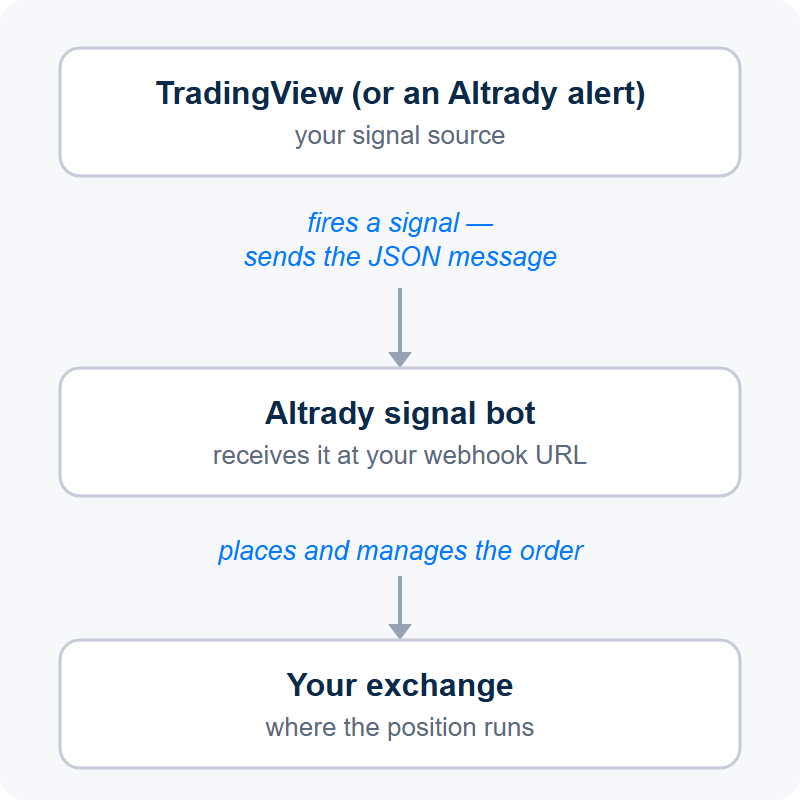
A webhook signal is a small JSON message that tells an Altrady signal bot what to do — open, adjust, or close a position, or start and stop the bot itself. The message can be sent from a TradingView alert, an Altrady alert, or your own code, so your own indicators and strategies can place and manage trades for you automatically.
 🔍 Click the image to see a larger version
The two kinds of webhook signal
- Position signals — open, increase, reduce, close, or reverse a position. Full field list: Webhook Signal Reference.
- Bot signals — start or stop the signal bot itself. These use a separate endpoint; see Webhook signals: start or stop a signal bot.
How the pieces fit together
- A webhook signal bot receives the messages and turns them into real orders on your connected exchange. Set it up first — see How to connect TradingView alerts to Altrady with webhooks.
- The webhook message (JSON) carries the instructions: which market, which action, and any entry, take-profit, and stop-loss details. Your bot’s Webhook Builder tab can generate a basic payload for you, and every field is documented in the Webhook Signal Reference.
- The alert sends the message when your condition is met. In a TradingView alert you enable the Webhook URL option, paste in Altrady’s webhook URL, and put the JSON in the message box. You can also fire a signal from an Altrady price, time, or trendline alert instead of TradingView.
A signal bot’s job is simply to receive these signals — TradingView is just one possible sender; an indicator, a strategy, or a third-party signal provider can send them too.
Where to go next
- How to connect TradingView alerts to Altrady with webhooks — create the webhook bot and the TradingView alert, step by step.
- Webhook Signal Reference — every action and field.
- Webhook signals: start or stop a signal bot.
- Troubleshooting: TradingView webhook signals not triggering orders — when an alert fires but no position opens.
Still stuck?
If you’re not sure where to start, reach out through support chat and we’ll point you to the right guide.