
How to Connect TradingView Alerts to Altrady with Webhooks
New to webhooks? Start with How webhook signals work.
You can connect TradingView alerts to Altrady so that when your alert fires, Altrady opens or manages a position on your exchange automatically. This works through a webhook signal bot: TradingView sends a JSON message to Altrady’s webhook URL, and the bot acts on it.
Quick answer: how the connection works
- Your alert fires in TradingView.
- TradingView sends a JSON message to Altrady’s webhook URL.
- Your Altrady signal bot receives that message and opens or manages the position on your connected exchange.
A signal bot’s job is to receive webhook signals; TradingView is just one possible sender among others (indicators, strategies, or third-party signal apps).
To make this work you need:
- A connected exchange API key
- A webhook signal bot in Altrady
- A TradingView plan that supports webhook alerts
Step 1: Create a webhook signal bot in Altrady
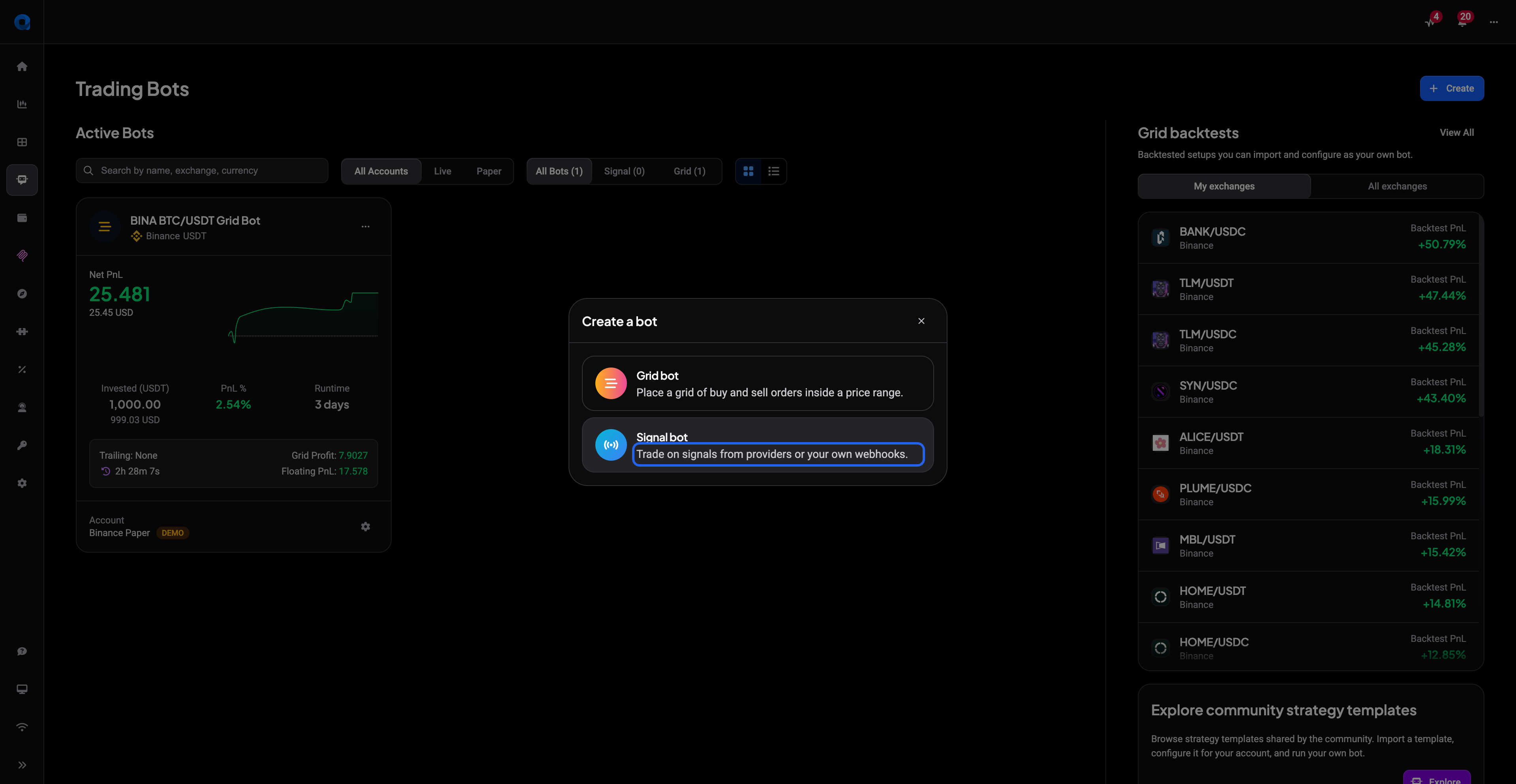
- Open the Bots tab in the left-side menu, then click Create on the Trading Bots page.
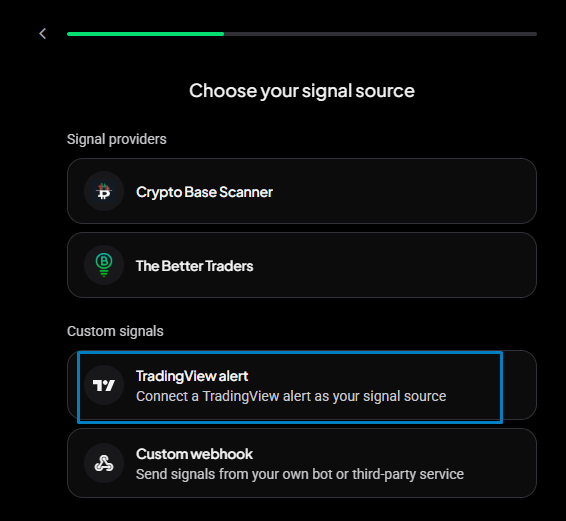
- Choose Signal bot in the Create a bot dialog, then pick its signal source: TradingView alert (or Custom webhook if the signals come from your own bot or a third-party service).
 🔍 Click the image to see a larger version
You must create the bot first. The webhook tools described below don’t appear until a Webhook bot exists.
🔍 Click the image to see a larger version
You must create the bot first. The webhook tools described below don’t appear until a Webhook bot exists.
 🔍 Click the image to see a larger version
The general bot settings, such as exchange account, quote currency, allocation, entry and exit settings, work the same as any signal bot. See How to set up and configure a DCA / signal bot for those; this article only covers the webhook-specific parts.
🔍 Click the image to see a larger version
The general bot settings, such as exchange account, quote currency, allocation, entry and exit settings, work the same as any signal bot. See How to set up and configure a DCA / signal bot for those; this article only covers the webhook-specific parts.
Step 2: Open the Webhook Builder
 🔍 Click the image to see a larger version
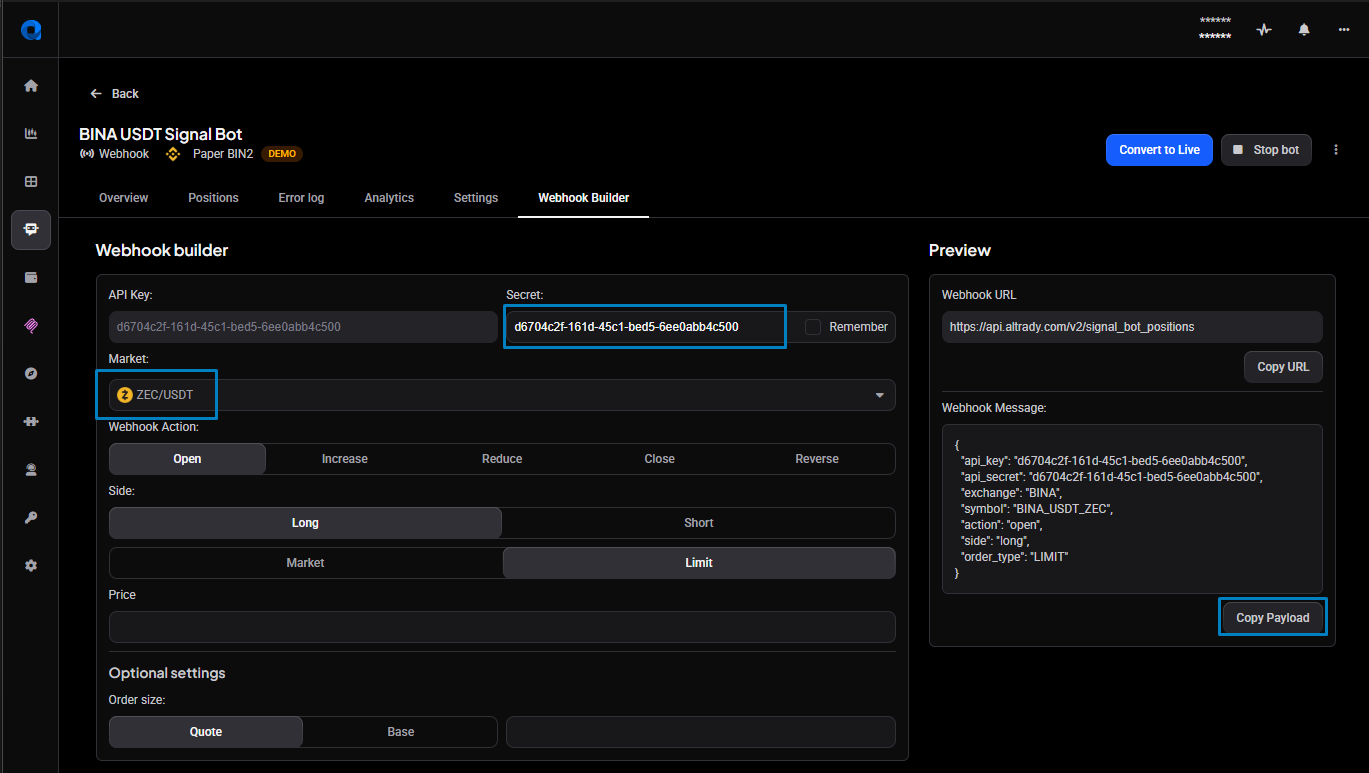
Once your Webhook bot is created, open its bot settings. The Webhook Builder is on the far right of that screen. It generates a ready-to-use JSON payload, pre-filled with your bot’s
🔍 Click the image to see a larger version
Once your Webhook bot is created, open its bot settings. The Webhook Builder is on the far right of that screen. It generates a ready-to-use JSON payload, pre-filled with your bot’s api_key and api_secret, that you’ll paste into TradingView in the next step.
Choose a market from the dropdown list.
And select the options on the left for the type of signal you want.
Step 3: Create the alert in TradingView
- In TradingView, create an alert on your indicator or strategy.
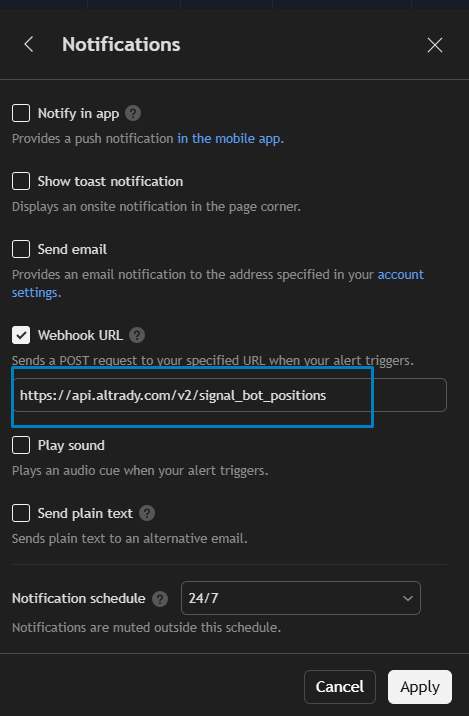
- Enable the Webhook URL option in the alert settings and paste in Altrady’s webhook URL (from the Webhook Builder).
 🔍 Click the image to see a larger version
2. Paste the JSON generated by the Webhook Builder into the alert’s message box.
🔍 Click the image to see a larger version
2. Paste the JSON generated by the Webhook Builder into the alert’s message box.
This works for both indicators and strategies.
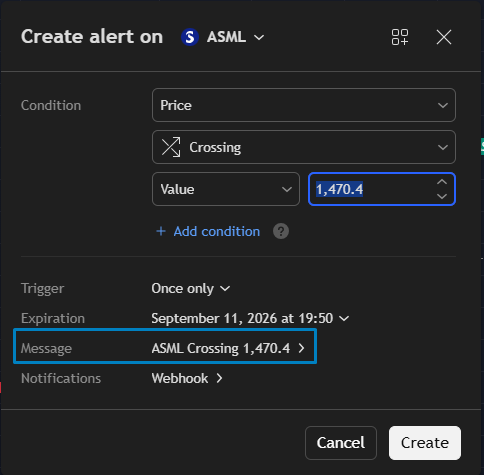 🔍 Click the image to see a larger version
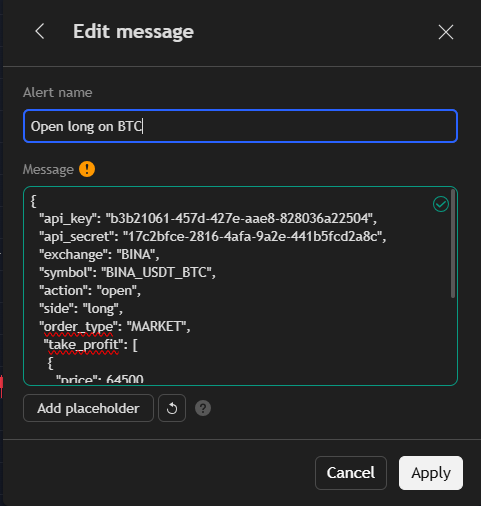 🔍 Click the image to see a larger version
## The webhook message
🔍 Click the image to see a larger version
## The webhook message
The message is a JSON object. At a minimum it carries your bot’s api_key and api_secret (from the Webhook Builder), the market, and an action (which defaults to open). It can also carry the whole exit plan — take-profit, stop-loss, and DCA orders — so the position is managed from the moment it opens.
Specify the market one of two ways: a fixed exchange + symbol (in EXCHANGE_QUOTE_BASE form, for example BINA_USDT_BTC — see valid exchange and symbol values), or the TradingView placeholders tv_exchange + tv_ticker, which let one alert trade whatever chart it fires on. side (long or short) is required on trade actions.
A complete open signal with two take-profits and a stop loss:
{
  "api_key": "YOUR_API_KEY",
  "api_secret": "YOUR_API_SECRET",
  "action": "open",
  "side": "long",
  "tv_exchange": "{{exchange}}",
  "tv_ticker": "{{ticker}}",
  "order_type": "market",
  "take_profit": [
    { "price_percentage": 2, "position_percentage": 50 },
    { "price_percentage": 4, "position_percentage": 50 }
  ],
  "stop_loss": { "stop_percentage": 3 }
}
Beyond open, the same webhook also handles increase, reduce, close, and reverse (futures only). Starting or stopping the bot itself uses a separate endpoint — see Webhook signals: start or stop a signal bot.
For every action, field, default, and constraint, see the Webhook Signal Reference.
Which markets and exchanges are supported
TradingView signals can trigger orders on any spot or futures exchange you’ve connected to Altrady, including futures exchanges like BingX futures and exchanges such as Hyperliquid.
For DEX or other integrations, the same rule applies: only exchanges Altrady supports can receive webhook signals. If you’re using a third-party signal provider (for example Fox Signals) to generate and forward alerts, that provider needs its own valid subscription, and any in-app steps, like where to enter your Altrady ID, are supported by that provider, not by Altrady.
Costs, plans, and known limitations
- Altrady only charges its subscription fee (plus any optional add-ons). There’s no percentage-based commission on trades placed through a signal bot; your exchange’s own trading fees still apply.
- Every plan supports sending webhook JSON signals to a signal bot, including during the 5-day trial.
- Webhook signals don’t support Post-Only (ALO) orders or Time-in-Force settings, for either entries or take-profits. Signal bot positions are handled as Smart Positions instead.
- The TradingView chart shown inside Altrady is tied to your Altrady account and runs separately from a paid tradingview.com account; you can’t link the two together.
Next steps
- Webhook Signal Reference: full documentation of the JSON payload fields.
- Troubleshooting: TradingView Webhook Signals Not Triggering Orders in Altrady: for when alerts fire but no position opens.
Still stuck?
If your webhook still isn’t connecting after following these steps, reach out through support chat in Altrady and we’ll take a look with you.