
Troubleshooting: TradingView Webhook Signals Not Triggering Orders in Altrady
When a TradingView alert fires but no order appears in Altrady, the cause is almost always one of two things: the signal arrived fine but a bot filter blocked it, or the JSON payload has a small mistake. Both are quick to find once you know where to look, and this article walks you through it in order.
This guide covers the signal side: JSON payloads, TradingView alert setup, API keys, symbols, and filters. If the issue is on the bot side instead (the bot is inactive, the exchange API key is broken, or there isn’t enough balance), use Signal Bot Not Trading? A Troubleshooting Checklist.
Check these six things first
- Open the bot’s error log and look for a “Filters did not match” message.
- Validate your JSON in Swagger.
- Confirm the
api_keyandapi_secretin the payload belong to the correct bot. - Confirm the
symbolexists and is tradeable on that exchange. - Confirm
sideis included on every signal, including close signals. - Check the order size and account balance.
Most “ignored” signals were actually received by Altrady and blocked by a filter or error, not lost in transit. That’s good news: it means the fix is usually a settings or payload change, not a connection problem.
Start with the bot’s error log
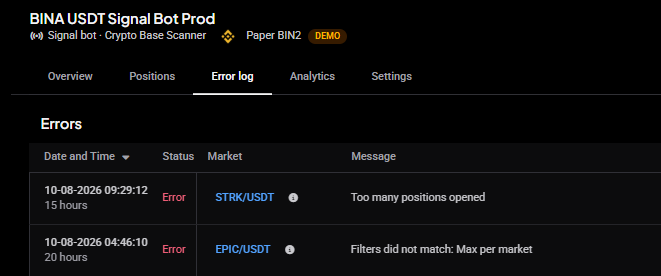
The bot’s error log is where Altrady records every signal it rejected due to filter mismatch, and why, so it answers most cases on its own. A common entry is:
“Filters did not match: Max per market”: the bot already has an open position on that market, so it skips the new open signal instead of stacking a second position on top of it. If your strategy sends frequent signals, it can look like only some of them “arrive”; in reality each skipped one is sitting in the log with this message.
If your strategy needs to add to an existing position rather than open a new one, send an action: increase signal instead of open. See the Webhook Signal Reference for the payload format.
Other entry filters, such as a max concurrent positions limit, block signals the same way. Whatever the reason, the log shows it,
 🔍 Click the image to see a larger version
so always check here before changing anything else.
🔍 Click the image to see a larger version
so always check here before changing anything else.
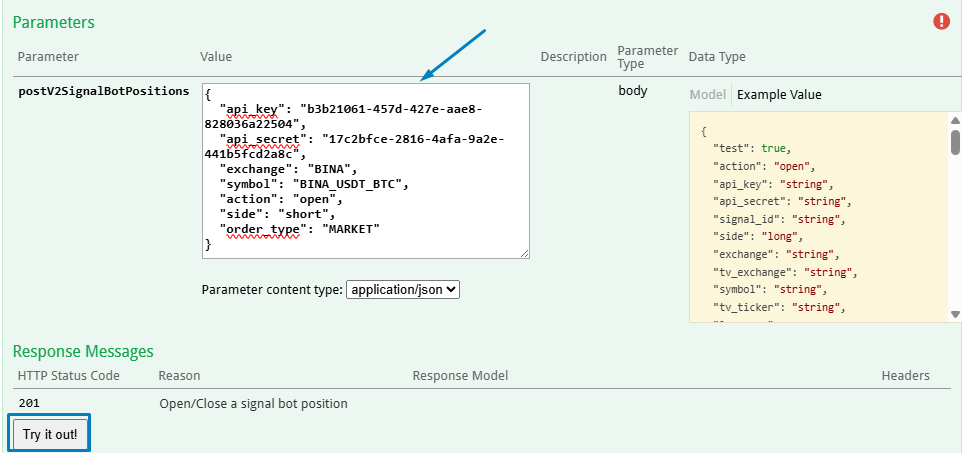
Test your JSON in Swagger
Before wiring a payload into a TradingView alert, test it directly against Altrady’s API: open the signal bot positions endpoint in Swagger, paste your JSON into the test form, and submit it. This is the fastest way to confirm the JSON itself is valid and would be accepted, without waiting on a live alert to fire.
Be aware that the test form makes real requests: with a valid api_key and api_secret, a valid open payload will place an actual order unless you add the test flag to it:
"test": true
Remove that flag before going live. A payload with the test flag still in place can process as a zero-value or paper-only result instead of placing a real order.
If you have Trading View variables in your JSON these will not be recognised by Swagger; it does not have access to TV nor your indicator or strategy. They must be substituted for valid values.
Error messages and what they mean
The webhook (and the Swagger test form) answers a rejected request with a specific error, and the HTTP status code is a quick tell: a 400 usually means the JSON itself is malformed (a syntax error), while a 422 means the JSON is valid but a value inside it is wrong. The specific message pins down which. Here’s each message and the fix:
Credentials and bot state
-
“Signal bot not found”: the
api_keydoesn’t match any bot. Copy the payload fresh from the bot’s Webhook Builder. -
“Invalid secret”: the
api_keyis right but theapi_secretisn’t. Copy both from the same bot’s Webhook Builder. - “Signal bot is not a webhook bot”: the credentials belong to a bot whose signal source isn’t Webhook. Create a webhook bot or switch to the right bot’s keys.
-
“Signal bot stopped”: the bot is inactive. A stopped bot only accepts
start_bot,start_and_open,increase,reduce, andclose; start the bot (in the app or with astart_botsignal) before sending open signals.
Market and symbol
-
“Exchange missing” or “Exchange used in tv_exchange does not exist”: the
exchangeortv_exchangevalue wasn’t recognized. The error response includes the accepted values, so pick yours from that list. -
“Market not found using symbol: …, or tv_ticker: …”: the pair doesn’t exist on that exchange, or the
symbolformat is off. Use the exchange’s own symbol or Altrady’sEXCHANGE_QUOTE_BASEform, for exampleBINA_USDT_BTC.
Order and position limits
-
“Order Type X is not supported for this exchange”: the exchange doesn’t offer that order type here; switch between
limitandmarket. -
“Market order doesn’t support quote currency” or ”… base currency”: for a market order, that exchange accepts only one of the two size fields and you used the other (some exchanges accept either, some only base, some only quote). Switch to the other sizing field —
base_amountinstead ofquote_amount, or the reverse. To see which a given exchange allows before you build the signal, open that market in the Trading widget: the market-order size options shown (base and/or quote) are the ones it permits. See Placing a market order. - “Too many positions opened”: the bot is already at its maximum number of concurrent positions. Close a position or raise the bot’s limit.
-
“Too many open orders, cannot add more LIMIT orders”: an
increaseorreducesignal would exceed the open-order limit on that position. Wait for orders to fill or cancel some first. -
“Reverse is only supported on futures exchanges”:
action: reversedoesn’t work on spot markets; send aclosefollowed by anopeninstead.
The bot’s own market filters (reported as validation errors such as “Does not match quote currency”, “Does not match the minimum volume”, “Does not match the maximum volume”, “Does not match the minimum price”, “Does not match the maximum price”, or “Does not match exchange”): the signal’s market or price falls outside what you configured in the bot’s settings. Adjust the bot’s quote currency, volume, or price filters, or send the signal to a bot configured for that market.
A malformed payload (missing side, both symbol and tv_ticker at once, invalid JSON from an unquoted TradingView placeholder) is rejected with a field-level validation message before any of the above. The Swagger test form shows these instantly.
In the bot’s error log, filter rejections all start with “Filters did not match”, followed by the reason:
- Max per market: the bot already has an open position on that market.
- Max per market single mode: a One-Way futures market already holds a position, so a second one can’t open in either direction.
- Max per market hedge: a hedge-mode futures market already holds a position on that same side.
- White list / Black list: the market is excluded by the bot’s whitelist or blacklist. See Signal Bot Whitelists, Blacklists and Market Filters Explained.
 🔍 Click the image to see a larger version
## Check the keys and the symbol
🔍 Click the image to see a larger version
## Check the keys and the symbol
Every signal bot has its own api_key and api_secret pair. A close or sell alert must use the credentials of the same bot that opened the position. Sending it with a different bot’s keys will not close the first bot’s position, even if the symbol and side match.
If the same JSON works for one ticker but fails on another, the usual cause is the symbol value: either it’s formatted incorrectly or that market isn’t available on the exchange you’re targeting. Save the exact JSON from the failing alert; support will ask for it to pinpoint the symbol issue.
Close signals being ignored
When a close signal appears to be ignored:
- Confirm
sidein the payload matches the side of the open position; this is what Altrady uses to match the signal to it. - Confirm the
api_key/api_secretbelong to the bot that actually holds the position (see above). - Test the exact close payload in Swagger to rule out a JSON error before assuming it’s a platform issue.
What the webhook response can and can’t tell you
The HTTP response returned to TradingView only confirms the request was received. It does not explain why a position wasn’t opened later (for example, a max-per-market filter blocking it). Synchronous problems come back as the error messages listed above; asynchronous rejections only show up in the bot’s error log inside Altrady, so check the log rather than relying on the webhook response alone.
Still stuck?
If you’ve checked the filters, validated the JSON in Swagger, and confirmed the keys and symbol, reach out through support chat with:
- The bot’s label
- The exact JSON payload from the alert
- The time the alert fired
With those three details the team can trace exactly what happened to your signal and take it from there.