
Signal bot whitelists and blacklists: how matching works
Whitelist and blacklist entries are matched as substrings, not exact coin names. If you don’t anchor them, a short entry like “SOL” will also match coins like BBSOL. This article explains the syntax, why it surprises people, and how to write an exact list.
For the other market filters on that tab, volume, price, success rate and the cool-downs, see How to set up and configure a DCA / signal bot.
The short answer: whitelist syntax
Whitelist entries are comma-separated. You can leave off the quote currency, since the bot only ever receives signals for the quote currency it’s set up to trade: there’s no need to repeat “USDT” on every entry.
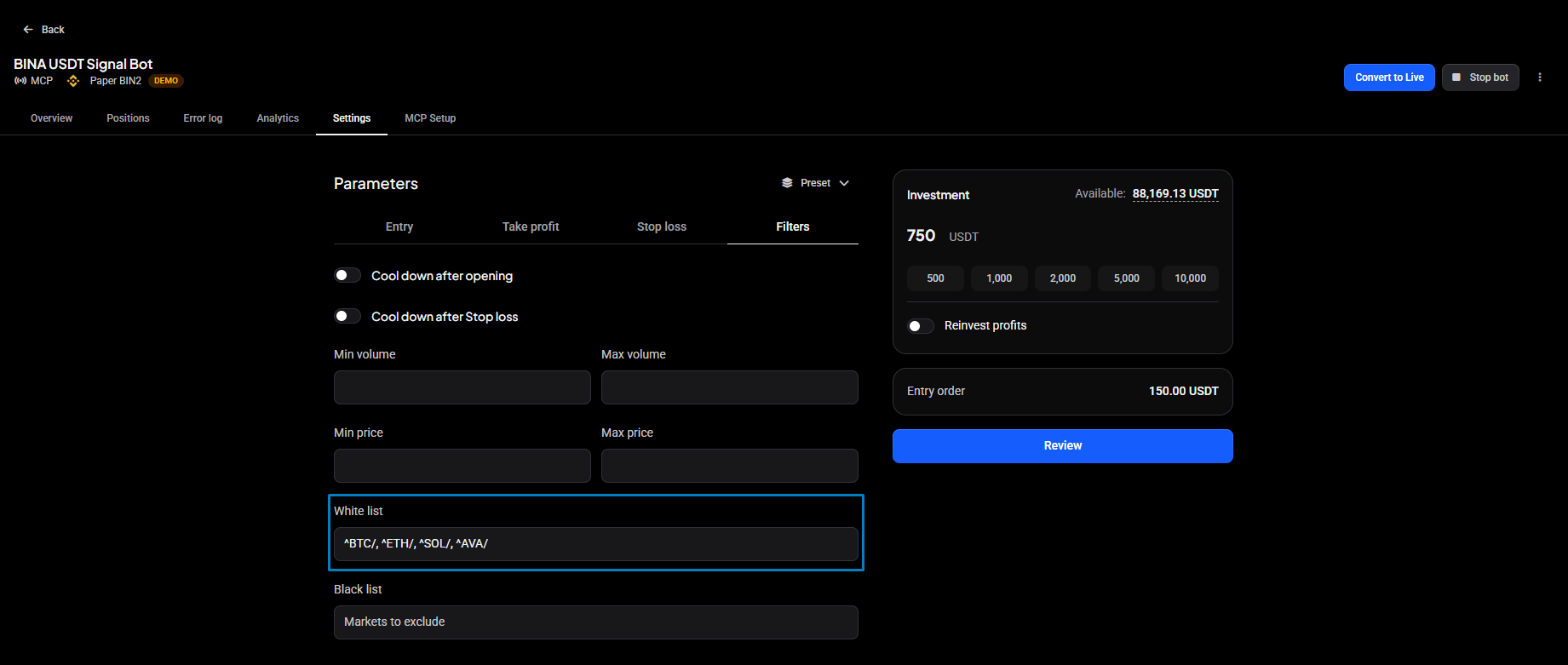
Use ^ at the start and / at the end to anchor a match to an exact base currency. For example:
^BTC/, ^ETH/, ^SOL/, ^AVA/
This tells the bot to trade only BTC, ETH, SOL and AVA against its quote currency, and nothing else.
How matching works (and why it surprises people)
Whitelist and blacklist entries are matched as plain substrings against the market symbol unless you anchor them. That means the entry you type can match more markets than you expect.
Using a quote currency of USDT as an example:
-
AVAmatches AVA/USDT, KAVA/USDT, and AVAX/USDT, because all three contain the letters “AVA”. -
AVA/matches AVA/USDT and KAVA/USDT. Adding the slash rules out AVAX/USDT, but KAVA/USDT still matches because “AVA/” appears inside it. -
^AVA/matches only AVA/USDT. The^anchors the match to the start of the symbol, so nothing can appear before “AVA”.
This is exactly why a bot can end up opening positions in markets you never intended to whitelist. A whitelist entry of SOL will also match BBSOL, and ETH will also match STETH, because both are legitimate substring matches even though they’re different coins entirely. If your bot has opened positions in markets you don’t recognize, an un-anchored whitelist entry is the most common cause.
Building an exact whitelist step by step
Say you want your bot to trade only BTC, ETH, SOL and AVA, and nothing else: no wrapped versions, no unrelated coins that happen to share letters.
- List the coins you want, one per entry: BTC, ETH, SOL, AVA.
- Add
^to the front of each one, so the match can only start at the beginning of the symbol. - Add
/to the end of each one, so the match stops right after the base currency and doesn’t bleed into a longer ticker. - Join them with commas.
The result:
^BTC/, ^ETH/, ^SOL/, ^AVA/
Each entry now matches exactly one market per quote currency, BTC/USDT, ETH/USDT, SOL/USDT and AVA/USDT, and nothing else.
 🔍 Click the image to see a larger version
## Blacklists follow the same rules
🔍 Click the image to see a larger version
## Blacklists follow the same rules
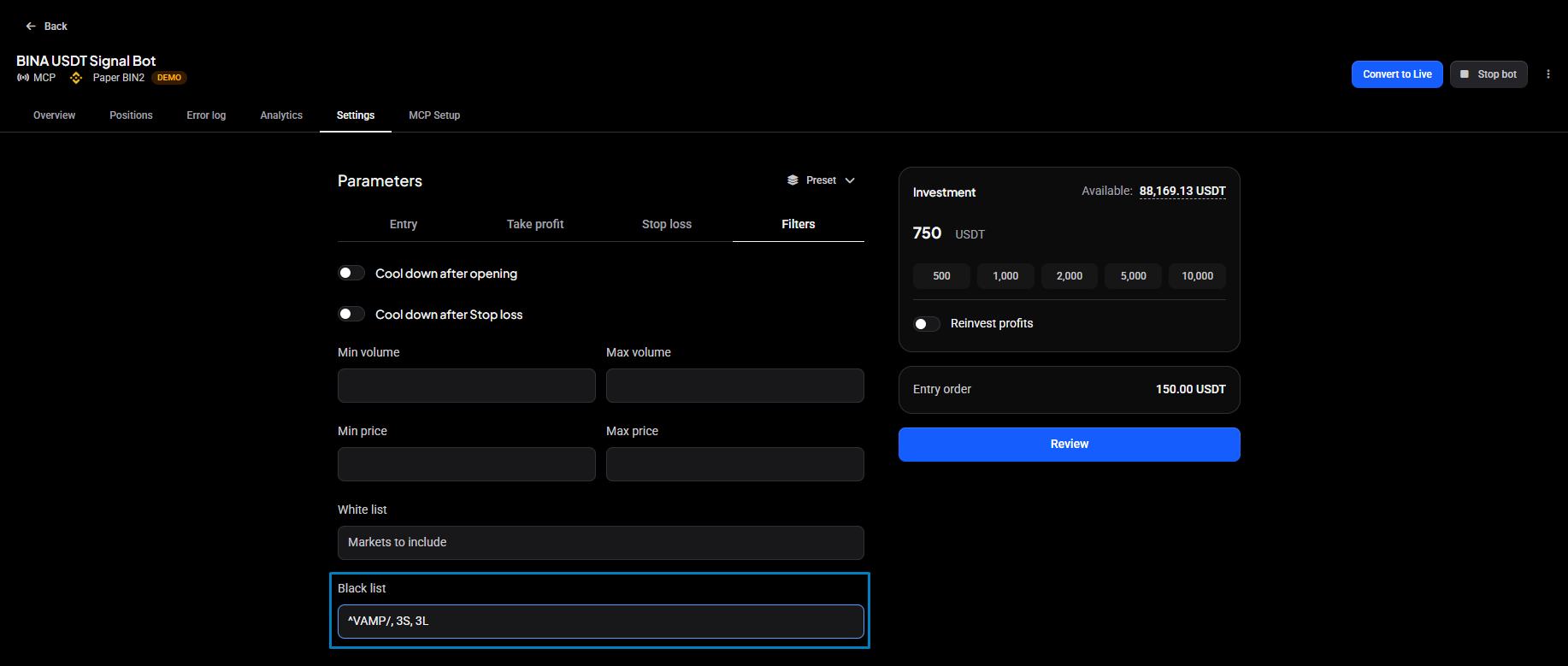
Blacklists use identical syntax and matching behavior, just in reverse: anything that matches an entry is excluded instead of allowed.
The same substring risk applies. A blacklist entry of SOL will also block BBSOL, and an entry of AVA will also block KAVA and AVAX, not just the coin you meant to exclude. If you want to block exactly one market and nothing else, anchor the entry the same way: ^SOL/ blocks only SOL, not every symbol that contains those letters.
 🔍 Click the image to see a larger version
## How the lists interact with signals
🔍 Click the image to see a larger version
## How the lists interact with signals
When a signal arrives for a market that isn’t allowed by your whitelist, is excluded by your blacklist, or doesn’t pass another market filter, the bot doesn’t silently ignore it. It logs the signal and records why it was blocked in the Error Log, typically something like “Filters did not match”
If you’re not sure whether your bot is receiving signals at all, or you see them arriving but never turning into trades, check the bot’s error log first. For the full diagnosis flow, including what to check when signals aren’t arriving at all versus arriving but being blocked, see Signal Bot Not Trading? A Troubleshooting Checklist.
Common mistakes
- Using spaces instead of commas. Entries must be comma-separated. A space-separated list won’t be parsed as separate entries.
-
Including the quote currency. You don’t need to write BTC/USDT: the bot already knows its quote currency, so just BTC (or
^BTC/) is enough. -
Forgetting anchors. If you want an exact match and only an exact match, both the
^prefix and the/suffix matter. Leaving off either one reopens the door to substring matches like KAVA, AVAX, BBSOL or STETH sneaking into a list you meant to keep short.
Still stuck?
If your bot is still trading markets you didn’t intend, or a whitelist entry isn’t behaving the way you expect, reach out through support chat with the bot name and the exact whitelist/blacklist text you’re using, and we can check the signal log with you.