
What happens when a delisting alert triggers?
When a delisting is recorded for an exchange, Altrady sends a notification reading “The following markets will be delisted on Binance: FOO/USDT.” It goes to every account that still has that exchange selected, on three channels: an in-app notification row, a mobile push, and a desktop broadcast.
It is an exchange-wide warning, not a per-position alert
It is tempting to assume the alert only fires if you hold the market being delisted. It does not. Altrady sends it to every account that has not removed that exchange from its notification settings, regardless of what that account holds, or whether it has ever traded the market in question.
So an alert about a coin you have never touched is expected, not a glitch. If you would rather only hear about certain exchanges, remove the rest: see How do I turn on delisting alerts for an exchange?.
The three places the alert shows up
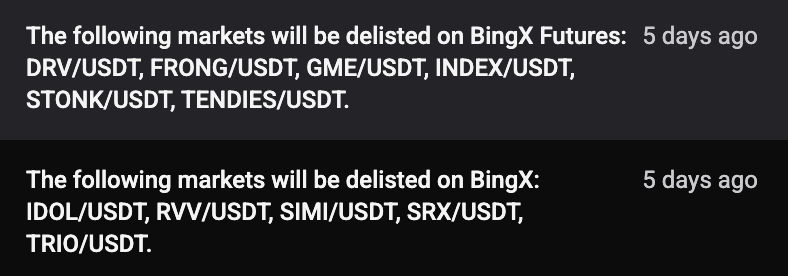 🔍 Click the image to see a larger version
- An in-app notification row inside Altrady. This one links to altrady.com.
- A mobile push notification on any device where you are logged into the Altrady app. Tapping it deep-links to the market inside the app, so you land on the affected market rather than a web page.
- A desktop broadcast, so the alert reaches you on the web and desktop app while you are working.
There is no email channel for delistings. If you were watching your inbox, that is why nothing arrived.
The wording you will see
Every channel carries the same sentence: “The following markets will be delisted on <exchange>: <markets>.” When an exchange delists a long list of markets at once, the in-app copy is cut off at 255 characters, so you may see the message end mid-list. Nothing is wrong; open the exchange’s own delisting notice for the full list.
Where the delisting information comes from
Delistings are picked up automatically from Altrady’s market-data provider. A daily sweep collects newly announced delistings, and updates triggered by the provider bring in changes in between. Altrady staff can also enter a delisting directly when needed.
Because of that daily rhythm, an announcement can surface up to a day after the exchange published it if an automated update is missed. If you see delisting news elsewhere first, that timing is normal.
What happens to the coin across the rest of Altrady
Recording a delisting does more than send a message. Altrady marks that coin as delisted on every exchange it tracks, not only the one dropping it, and for the next seven days it stops producing signals for that coin anywhere. A signal sent to Altrady for a market in that state is rejected with Market delisted.
The reason is that the same coin usually trades on several venues, and once one exchange drops it the price behaviour elsewhere tends to change too. After seven days the coin goes back to normal handling unless another delisting is recorded for it.
So if one of your bots stops opening positions on a coin shortly after a delisting notice, that is this rule at work rather than a fault.
Your positions are not checked before sending
Altrady does not compare each account’s holdings against the delisted markets. Whether you receive the alert depends on one thing only: whether that exchange is still selected in your Delisting Notifications card. This is worth knowing when you decide what to keep selected, because a delisting on a large exchange you do not trade on can still move a coin’s price on the exchange where you do hold it.
Turning an exchange’s alerts off
Removing an exchange from the multi-select in Settings > Notifications > Global Notification Settings stops its delisting alerts as soon as you click Update. There is no waiting period. Add it back the same way to resume. The exact steps are in How do I turn on delisting alerts for an exchange?.
If the alert never arrives
Two account-level things can stop a delisting notification reaching you:
- An expired subscription. Your device is excluded from the whole notification, including the in-app row, not just the push. Nothing is delivered late once you renew.
- An unregistered device. Push notifications only go to devices Altrady has registered. See Device not registered.
For a fuller walkthrough, including how to confirm the exchange is still selected, see Why am I not getting delisting alerts?.
Still stuck?
If what you are seeing does not match this, reach out through Altrady’s support chat and the team can check your notification settings and what was sent to your account.