
Why did an order fail after my position opened?
Once a position is open, a later order can still fail: an entry that was waiting on a trigger, a take profit, a stop loss, or a bot’s safety order. Every failure is notified, so check your notifications, in the app or by email, for the exact error first. The usual causes are the balance the order needs not being free when it’s placed, the order size, a stop-price timing issue, or, for bots, something that could only be checked once the position opened.
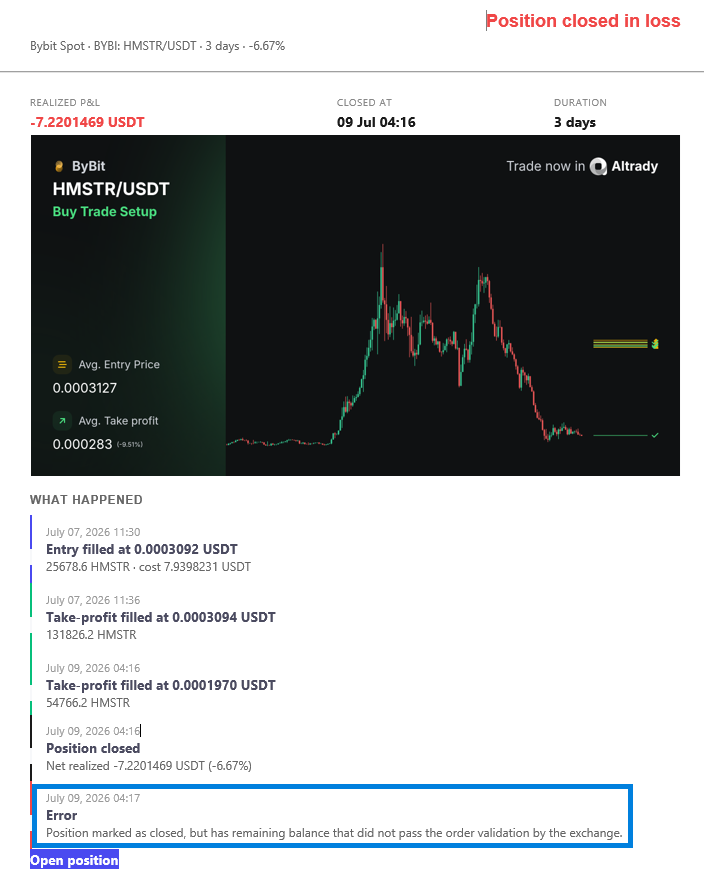 🔍 Click the image to see a larger version
Insufficient balance when a later order is placed
Delayed and conditional orders don’t reserve their funds up front. The money is only needed when the order actually goes to the exchange, so if it’s been used elsewhere by then, the order comes back short. The common cases:
- A waiting entry. A stop-market entry, or a smart order with a price or time entry condition, isn’t reserved until its trigger is reached. If the funds have gone by then, the entry fails. The same applies to bot positions.
- A trailing take profit. Its order isn’t reserved until the trailing stop is reached, so if the balance it needs has been spent, it fails when it tries to place.
- A position converted from a spot holding. If the orders you selected when converting don’t match your actual balance, the later orders fall short. This usually traces to a wrong start date, or the wrong orders being selected at conversion.
- A take profit or stop loss right after the entry fills. The exchange may not have transferred the balance from the just-filled entry in time to place the exit. Altrady retries twice. It’s most likely on a quick wick, where the entry fills and the take profit or stop loss triggers within the same minute, and some exchanges are slower to move the balance. If everything else looks right, do a Resync to force a balance update (see how do I manually refresh or resync my balances?). Once the balance is there, edit the smart order and place it again without changing anything: it will retry the order.
- Kraken with 100% of your balance in the entry. Fees are meant to come from your quote currency, but if there isn’t enough, Kraken quietly takes them from the base currency you just bought, with no notification, which can leave your last exit order short. Use 98% or less of your available balance for an order so there’s room for fees.
- A short spot position hitting its stop loss. Closing a spot short buys the coin back, so if there isn’t enough quote currency for the cost plus slippage, the stop-loss order fails. See how do spot short positions work?.
Order size too small or too large
A smart order also fails if its size falls outside the market’s limits. Too small is below the market’s minimum order size; too large is above its maximum, which is most likely on futures when you add an extra entry to a position. Adjust the size so it sits within the market’s limits.
Bot orders: checked only when the position opens
A bot is different from a smart order: nothing is validated up front, so a problem only surfaces when the bot tries to open the position. The common ones:
- Entries too small. The base order, or a split entry, is below the market’s minimum, check the minimum shown in the trading widget.
- Exits too small. The first entry is split across several take-profits, and one of those slices falls below the minimum.
- Currency not tradable. Usually a restriction for your location under the exchange’s KYC rules.
- Order type not accepted. Some exchanges don’t accept certain order types on certain pairs, for example MEXC doesn’t allow market orders on some pairs, see Connect MEXC.
- Margin, leverage, or hedge-mode mismatch. The margin mode, leverage, or hedge/one-way setting doesn’t match what the exchange expects.
- Limit price too far from the current price. The exchange rejects a limit order placed too far from the market.
“Stop price is above/below the current price”
Stop-limit and trailing-stop-loss orders placed from the top of the order form use the exchange’s own native stop-limit order, which requires the stop price to sit on the far side of the current price (a sell-stop has to sit below the market, for example). Altrady checks this against the price when you place the order, but if the price has already moved past it by the time the order is sent, the exchange can still refuse or trigger it.
For a trailing stop loss, the stop-limit is re-placed each time the trigger price moves. When price reverses, that stop-limit has to already be sitting on the exchange for the stop to fill. If your stop price is very close to the trigger price, there may not be time to place it before price gets there, and you see this error. It can also mean the trigger and stop prices weren’t in the right relationship when you set the order up. See how do OCO and trailing stop orders work? for setting the trigger and stop distances.
Still stuck?
If a later order keeps failing after you’ve checked the notification, the balance, and done a Resync, send us the position, the exchange, and the exact error text and we’ll trace what happened at the moment the order was placed. You can reach our support team anytime through the chat bubble in the bottom-right corner of our Help Center at help.altrady.com.