
Using a signal bot on a futures exchange
A signal bot runs on futures accounts as well as spot, with both Crypto Base Scanner and webhook signals. The difference is a handful of extra settings that appear on the Entry tab when the account you picked is a futures account: margin type, leverage, and how order size is worked out. This article covers those, and what changes about running the bot once leverage is involved.
If you’re new to futures itself, read How Do I Trade Futures with Leverage on Altrady? first. This article assumes you already know what margin and leverage are.
The extra settings on a futures account
 🔍 Click the image to see a larger version
Margin type
Choose Isolated or Crossed margin for the positions this bot opens. Which one suits you is a futures decision, not a bot one: see Margin mode, leverage, and liquidation price explained.
Leverage
Enter the leverage the bot should use. One thing to know: the bot can’t check that the value is valid for the market. The maximum leverage differs by market and by exchange, so if you enter more than a market allows, the bot doesn’t catch it up front, the order simply fails at the exchange when it tries to open. If a futures bot won’t open positions, an out-of-range leverage value is worth checking first.
Positions per market and the per-side limit
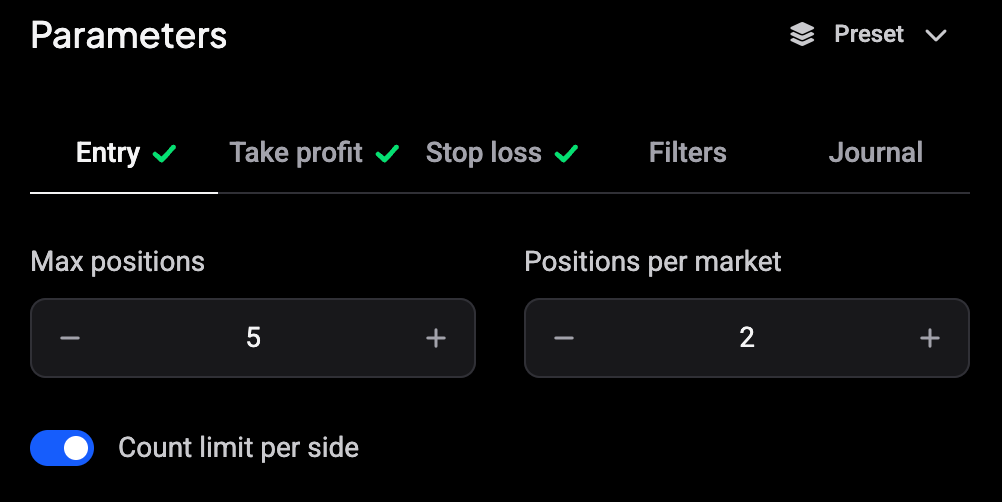
Positions per market (called Max positions per market on the Filters form of an older bot) caps how many positions the bot may hold open on one market. On a futures account a Count limit per side switch appears right under it, and it decides how that number is counted:
- Off (the default): the number is the total for the market, and the bot holds at most one position per side. A limit of 2 in hedge mode means one long plus one short, never two longs.
- On: the number applies to each side on its own. A limit of 2 means up to two longs and up to two shorts on the same market, so a second signal in the same direction can stack a new position next to the open one.
In one-way mode the exchange only allows one direction per market, so the bot never opens the opposite side, whichever way the switch is set. Which mode your account is in is set on the exchange: see Hedge mode vs One-Way mode for futures positions. Spot bots have no switch, since spot has no sides.
Order size
The order size fields show the leveraged size, so what you commit as margin and what the position is worth on the exchange are different numbers. You size it one of two ways:
- % of Total Balance: enter a percentage, and the estimated order size shown below updates with your available balance and the leverage.
- Fixed Amount: enter the leveraged amount directly, and check the estimated size.
Avoid 100% of balance. Price moves between the moment the bot calculates the order and the moment it places it, so a full-balance order can tip over the available margin and fail with a “No entry orders to create” error. Leave some headroom.
DCA orders scale from the entry order: each one is the entry size multiplied by its quantity setting, and the estimated sizes are shown as you build the ladder.
Binance Futures multi-asset mode
If your Binance futures account is in multi-asset mode, use a fixed entry size only. Percentage-of-balance sizing doesn’t work in that mode and produces position errors.
Leverage and liquidation
Leverage decides how far a losing position can run before it’s liquidated. For an isolated-margin position the liquidation price sits roughly 100 / leverage percent from your average entry, before fees: about 5% away at 20x, and closer the higher you go. The full explanation, including crossed margin, is in Margin mode, leverage, and liquidation price explained.
This matters for how you set up the exit side of the bot. Some traders run CBS futures bots without a stop loss, relying on a deep DCA ladder to average the entry down instead. That’s a real trade-off rather than a free lunch: with no stop, a position that keeps moving against you rides down toward its liquidation price, and the more leverage, the sooner that point arrives. A DCA ladder deep enough to matter also commits far more margin than the first entry alone, so check the Full position cost figure on the Entry tab before you start.
Crypto Base Scanner signals on futures
CBS signals work the same as they do on spot, with leverage applied to the resulting position. Everything on the Filters tab behaves as it does for a spot bot.
Webhook signals on futures
Webhook signals can open both long and short positions on futures. They also carry four actions that manage a position once it’s open: Increase, Reduce, Reverse, and Close. Reverse is futures-only: it closes the current position and opens one the same size in the opposite direction. The full field reference is in Webhook Signal Reference.
Errors you’ll see only on futures
A few failures are specific to futures accounts:
- Leverage above the exchange maximum for that market, since the bot couldn’t validate it in advance.
- A position is already open on the market, in one-way mode or at the per-market limit. With Count limit per side off, a signal bot won’t open a new position if one is already open for the same side.
- Order size below the exchange minimum, which futures markets set higher than spot and vary by contract and exchange.
- “No entry orders to create”, from a full-balance order that no longer fits, an order size that is too small, or from percentage sizing on a Binance multi-asset account.
Still stuck?
If a futures bot isn’t opening positions and none of the above explains it, reach out through support chat with the bot’s name, the exchange and market, and the leverage and margin type you set, and the team can check it against the exchange’s limits with you.