
My positions look wrong or trades are missing: fixing your position data
If a closed position shows no profit or loss, sits stuck in Needs review, or an account’s Journal looks emptier than it should, Altrady gives you two levels of repair: a notice on the individual position, and the Position data screen that works through a whole account.
Fix a single broken position
 🔍 Click the image to see a larger version
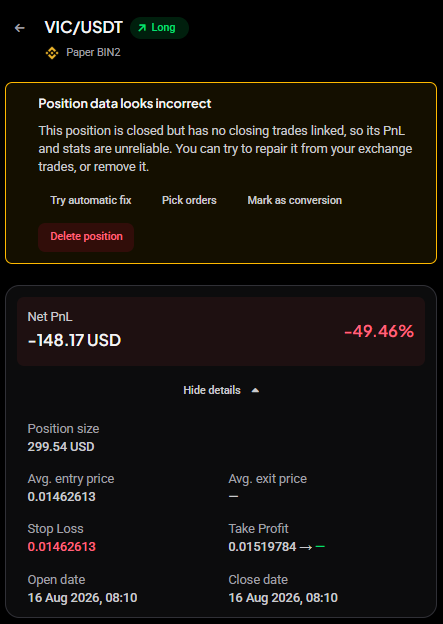
If it is one trade rather than a whole account, open the position from the Journal: in Journal > Positions, a broken position carries a red Needs fix badge that takes you straight to it. The same notice also shows in the trading terminal’s Position Info widget when you select the position there. A broken one carries a Position data looks incorrect notice at the top explaining what is wrong, for example that the position is closed but has no closing trades linked to it, so its PnL and stats cannot be trusted.
The notice offers four ways out:
- Try automatic fix rebuilds the position from your exchange trades. Start here; it resolves most cases on its own.
- Pick orders lets you choose the orders that belong to this position by hand, for when the automatic match cannot work out which fills go together. The orders the position holds now are already ticked; saving replaces the whole set with your selection.
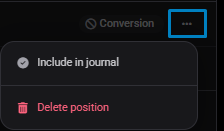
- Mark as conversion tells Altrady this was a coin-to-coin swap rather than a real trade. The position stays in your positions list, greyed out with a Conversion tag, but is left out of every number the Journal calculates: PnL, win rate, reports, the calendar and strategy stats. To undo it, open the … menu at the end of the position’s row and choose Include in journal. To relabel it instead, choose Change exclusion reason.
- Delete position removes it entirely. Use this only when the position should not exist at all, since it cannot be undone.
 🔍 Click the image to see a larger version
 🔍 Click the image to see a larger version
A position in this state usually shows an average exit price of a dash and a PnL figure that looks wrong. That is the tell that the number is not real, rather than a genuine loss.
If several positions on the same account are affected, fix them together from the Position data screen instead of one at a time.
Fix a closed position that does not balance
A closed position can also have its closing trades but the wrong amount of them: it bought more than it sold, or the other way round. The leftover is still valued at the live price, so the PnL keeps changing after the close. The review page (and the Position Info widget in the terminal) then shows a This position does not balance notice with the Bought, Sold and Unaccounted amounts and a Fix position button. In the positions list it carries the same Needs fix badge.
Fix position opens a short wizard. Pick what happened (a trade is missing, some trades belong to a separate position, it is part of another position, or it is a duplicate); Altrady marks the cause it can detect as Suggested. You then see the position as it would look after the change, with the balance reading Balanced, PnL locks when the books close, before you confirm. Nothing is sent to the exchange, and the Journal stats recalculate afterwards. The full walkthrough is in fixing a position that does not balance.
Open the Position data screen
- Open the Journal from the main menu.
- Go to the Settings tab, then Position data.
Altrady builds your positions from the raw trades it pulls from each exchange. Most of the time that happens automatically, but when the trades do not add up cleanly (a transfer in or out, a gap in the history, a coin-to-coin swap) it needs a decision from you before it can finish. Everything on this screen is about giving it that decision.
Read the needs-input summary
 🔍 Click the image to see a larger version
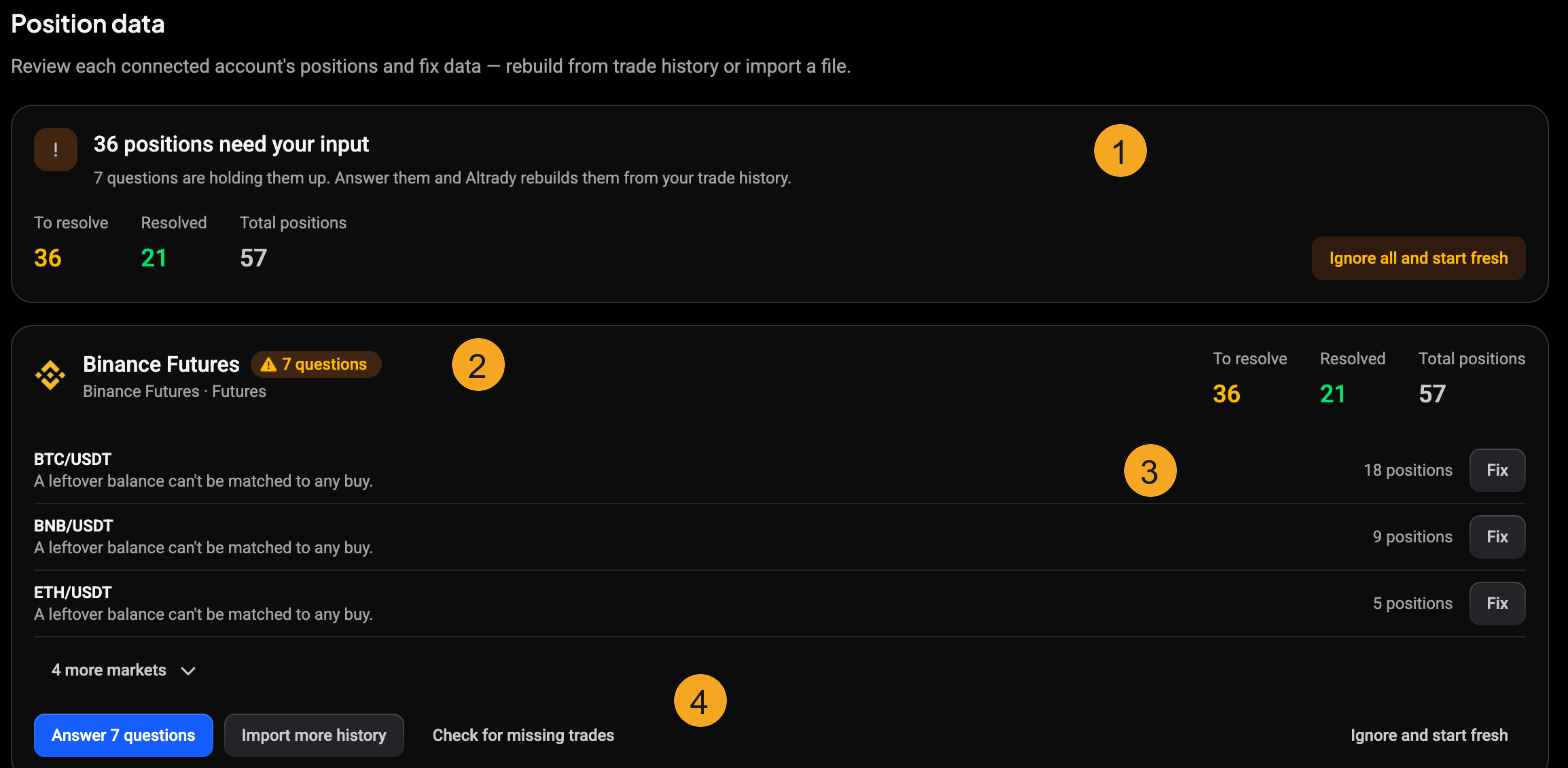
The numbered markers above:
- The summary banner totals every position waiting on you across all accounts, split into To resolve, Resolved and Total positions. Ignore all and start fresh rebuilds every account from scratch instead (see the last section).
- Each connected account has its own card, labelled with the exchange and market type (for example Binance Futures · Futures) and a questions badge when it holds positions Altrady could not place.
- Under the card, the affected markets are listed with a short reason such as “A leftover balance can’t be matched to any buy”, the number of positions involved, and a Fix button that resolves just that market. Use N more markets to see the rest.
- The action buttons run the fixes for that account: Answer questions, Import more history, Check for missing trades, and Ignore and start fresh.
An account with nothing wrong shows No positions yet, or simply carries no questions badge, and needs no action.
Answer the questions to rebuild
Select Answer questions (or Fix on a single market) to work through them one at a time. Altrady shows you what it could not work out on its own and asks you to choose: whether a leftover balance is really an open position, whether two trades were a coin-to-coin conversion rather than a real trade, or where to draw the line when the history has a gap it cannot balance.
Nothing changes until you submit an answer, so it is safe to read each one over first. Once you answer, Altrady finishes rebuilding those positions and the counters move from To resolve to Resolved.
Import more history
If the exchange’s own API does not reach back far enough, or never exposed the trades you are missing, choose Import more history and upload a trade-history file exported from your exchange. Altrady reads the file and shows you a preview so you can confirm the columns and the times look right before anything is added. Importing the same period again replaces what you imported before, so you will not end up with duplicates.
Check for missing trades
Check for missing trades is the safe first thing to try when the Journal is simply missing some closed trades. It looks for trades that are not yet linked to a position and attaches them, without disturbing the positions you already have.
Fix one market, or start fresh
There are two levels of repair, and it is worth reaching for the gentle one first:
- Fix (one market) and Answer questions (one account) resolve the flagged positions while leaving everything else intact. Start here.
- Ignore and start fresh (one account) and Ignore all and start fresh (every account) rebuild positions from your raw trades from scratch, discarding the pending questions instead of answering them. Use these only when an account’s positions look structurally wrong and you would rather rebuild the account than resolve it one question at a time. Because it rebuilds the account completely, it replaces that account’s current positions, so any answers or manual fixes you already made on it are redone from the trade data.
If the Journal still looks empty afterwards
Repairing your position data fixes the trades themselves. It does not mark them reviewed, and the Journal’s reports only count reviewed positions. If your trades now look correct on the Positions tab but the Overview and Reports tabs are still empty, mark them reviewed: see how do I review, rate and tag my trades.
Still stuck?
If a rebuild or import still leaves a position looking wrong, reach out through support chat in the app. Tell us the exchange account and the market involved, that lets us look at the raw trade data directly.