
Converting between smart and manual positions
You can convert a position between manual and smart at any time, within the limits below. Converting doesn’t close the position or change what you hold; it only changes what the position can do.
A manual position records and analyses your trades. A smart position does that too, and also manages orders for you: it places entries, adds and updates take-profit orders as entries fill, tracks stops, and closes the position when your conditions are met. For more on the two types, see an overview of positions.
| Convert to smart | Convert to manual | |
|---|---|---|
| You get | Order management and automation | Analytics only |
| Main reason | To use a smart feature: take profit, stop loss, more entries, timers, or triggers | To stop the automation, or to mark the position as closed |
| Does it remove anything? | No | Yes: pending take-profit and stop-loss orders are removed |
| Blocked when | An exit order has filled or partly filled, or the position is built from imported trades | The position is already manual |
Converting a manual position to smart
Every position control except Close needs a smart position, so if you want to add any of these, convert first:
- Take profit
- Stop loss
- More entry orders (DCA)
- An auto-close timer
- A start condition or an expiration
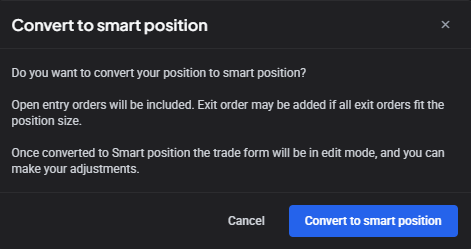
You usually don’t start the conversion yourself. Select any of those controls on a manual position and Altrady offers to convert it.
 🔍 Click the image to see a larger version
Accept, and the position converts and drops straight into edit mode with your chosen control ready to set. Once converted, Altrady links your existing orders to the position and manages them for you, updating take-profit prices and sizes automatically as further entries fill.
To convert it directly instead, open the 3-dot menu in the position controls and choose Convert to smart.
Two limits: conversion won’t work once an exit order has filled or partly filled, and Convert to smart is greyed out if the position is already smart.
Converting to smart also needs the orders behind the position’s trades, not just the trades. Only trades can be imported (orders can’t), so a position built from imported trades can only ever be manual.
Converting a smart position to manual
There are three common reasons:
- To mark it as closed. Mark as Closed records an end date without placing an order, and it’s only available on manual positions, so a smart position has to be converted first.
- To stop a bot managing it (see Bot positions below).
- To drop the automation but keep the position. If you’d rather manage the market by hand from here, converting to manual stops Altrady managing the exits while the position keeps tracking your trades and PnL.
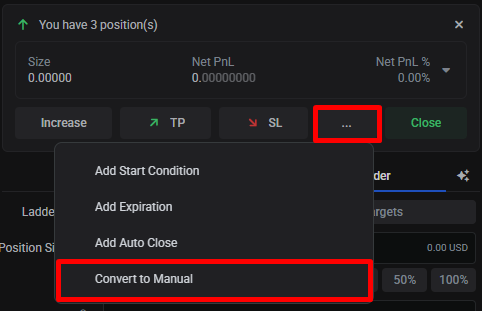
To convert, open the 3-dot menu in the position controls and choose Convert to manual.
 🔍 Click the image to see a larger version
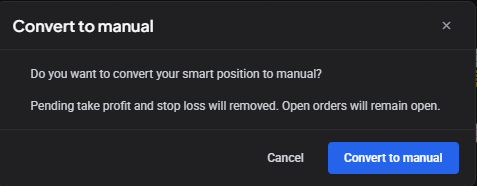
A confirmation window appears; click Convert to manual again to confirm.
 🔍 Click the image to see a larger version
Converting to manual removes the position’s pending take-profit and stop-loss orders. Other orders stay open. This leaves the position unprotected, so if you want to keep a stop after converting, place one yourself.
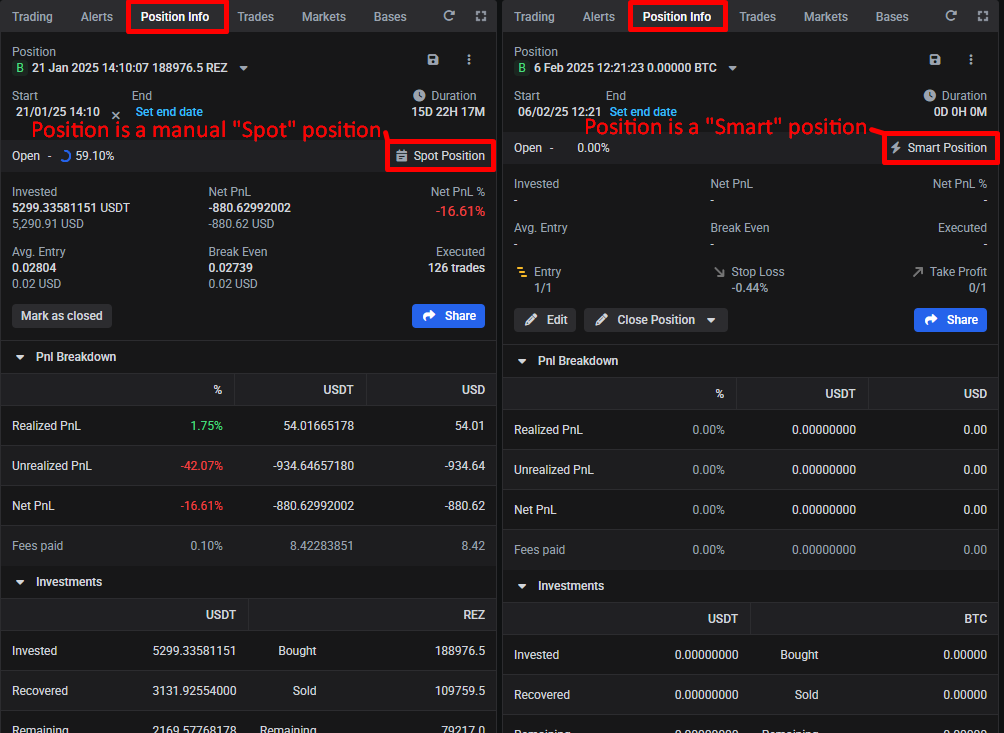
The converted position then appears as a manual (Spot) position in the My Positions or Position Info widget.
 🔍 Click the image to see a larger version
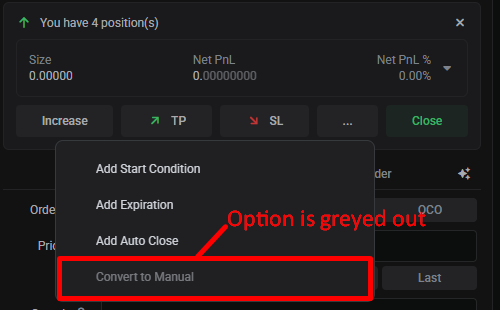
Convert to manual is greyed out if the position is already manual.
 🔍 Click the image to see a larger version
Bot positions
Signal Bot and Grid Bot positions are smart positions, and convert to manual the same way.
Converting a bot position to manual takes it away from the bot: the bot stops managing it, and a bot position slot is freed up, which lets the bot open a new position elsewhere. Convert it if you want to hold the trade yourself while the bot carries on; leave it if you didn’t mean to release the slot.
Watch it
Related articles
- An overview of positions: what positions are, and the two types.
- How do I close, exit, or cancel a position?: including Mark as Closed.
- Creating a position from existing orders.
- How do I set up a smart position with take profit and stop loss?.
Still stuck?
If a conversion is greyed out and you’re not sure why, or the position doesn’t look right after converting, reach out through support chat in the app with the market and the account.