
How Do I Cancel My Subscription or Turn Off Auto-Renewal?
Cancelling in Altrady doesn’t cut off your access right away; it turns off auto-renewal. You keep everything you’re paying for until your current billing period ends. Altrady will also email you a reminder a few days before your subscription is due to expire. This article walks you through cancelling on the website, how your payment method affects cancellation, and what happens to your bots and open positions once the subscription expires.
Cancel = turn off auto-renewal (access until period end)
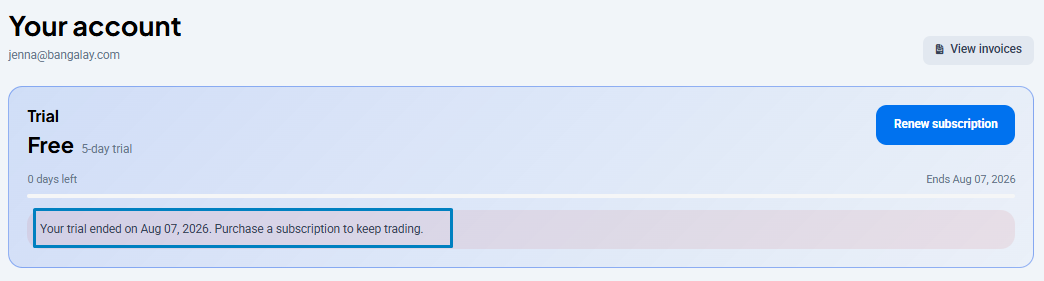 🔍 Click the image to see a larger version
When you click “Cancel,” Altrady stops the next automatic charge. Your plan stays active (full features, running bots, everything) until the date your current period was due to renew.
🔍 Click the image to see a larger version
When you click “Cancel,” Altrady stops the next automatic charge. Your plan stays active (full features, running bots, everything) until the date your current period was due to renew.
You won’t be charged again after cancelling, and you don’t lose access early. You’ll still get the expiry reminder email a few days beforehand, even after cancelling.
Step-by-step cancellation on the website
- Log in to your Altrady account.
- Open the Settings sidebar and click Manage subscription.
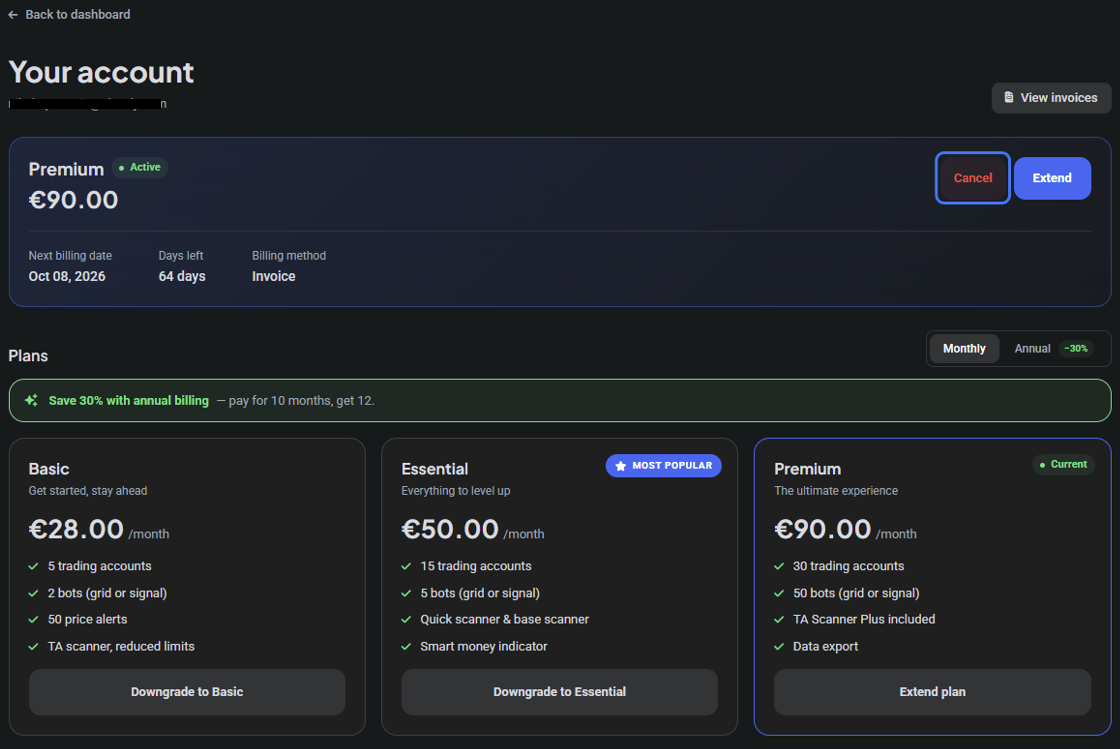
- On the Account page, find your active plan and the Cancel button next to it.
- Click Cancel and confirm.
 🔍 Click the image to see a larger version
Your plan now shows as “cancels on [date]” instead of auto-renewing. You can come back to this same page any time before that date and click Extend if you change your mind.
🔍 Click the image to see a larger version
Your plan now shows as “cancels on [date]” instead of auto-renewing. You can come back to this same page any time before that date and click Extend if you change your mind.
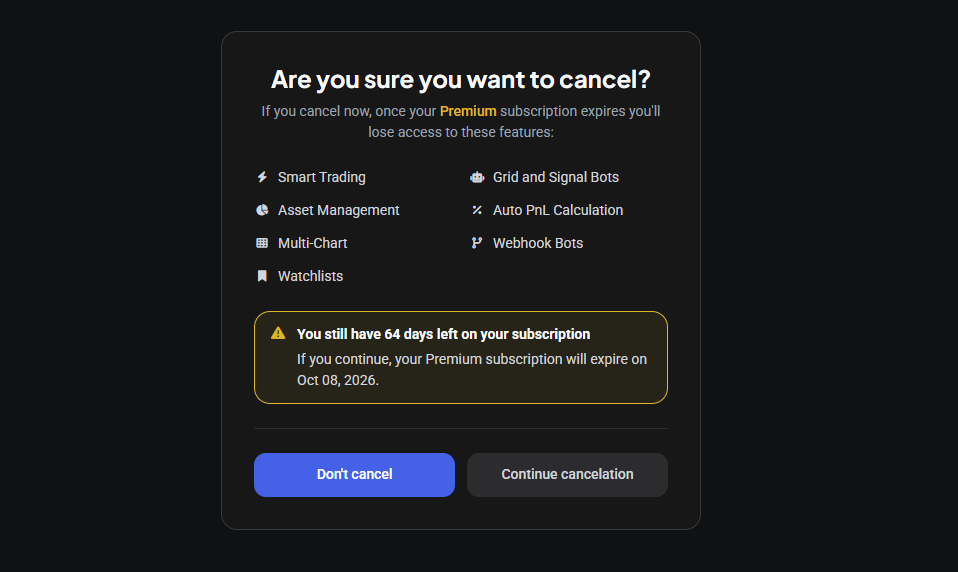 🔍 Click the image to see a larger version
Recurring payments only run through your card, so there’s no separate PayPal agreement to cancel
Automatic (recurring) subscription payments in Altrady are only available using a credit/debit card. PayPal is only offered as a one-time payment option, which is handy if your card gets rejected, since the PayPal credit-card option doesn’t require you to have a PayPal account.
Because of that, there’s no recurring billing agreement sitting on PayPal’s side that you also need to cancel: a payment made through PayPal is a one-off and simply won’t renew itself. Clicking Cancel on the Altrady website (or, if you paid one-time via PayPal, just not making another payment) is enough to stop future charges no matter which payment method you used.
If you actually want to switch which card is used for future renewals rather than cancel altogether, click Cancel to remove the current recurring payment method, then add your new card under the Automatic Payment option (without completing a new payment).
What happens to bots and positions after expiry
When your subscription period ends without renewal, Altrady disables your exchange API keys from the expiry date.
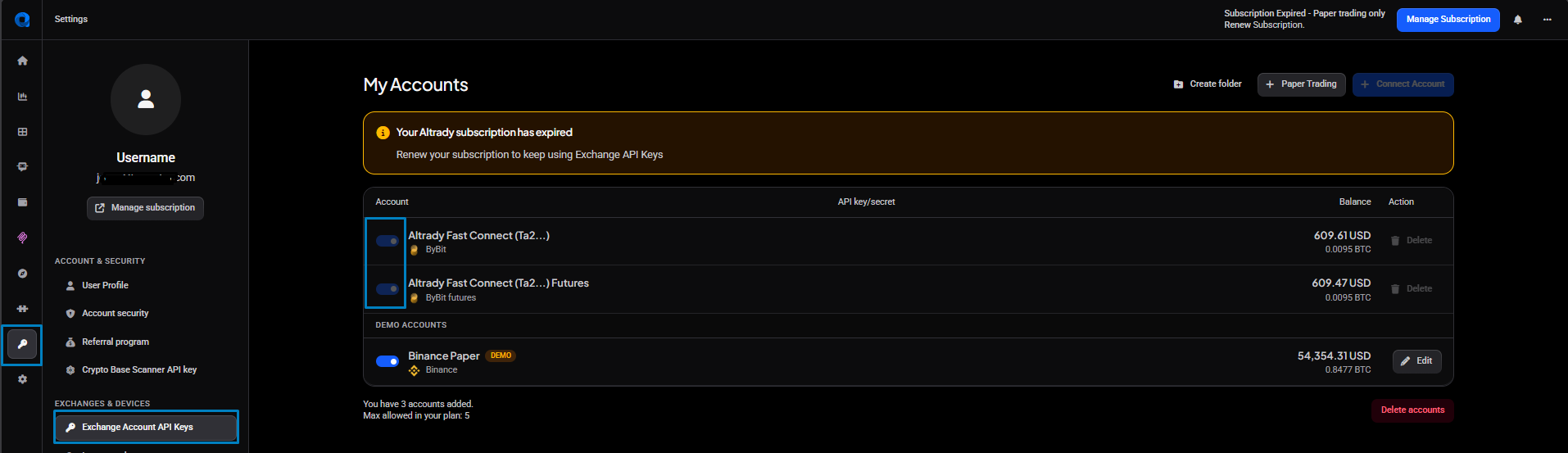 🔍 Click the image to see a larger version
In practice, that means:
🔍 Click the image to see a larger version
In practice, that means:
- Altrady can no longer access or manage your orders, positions, trades, or balances on the exchange.
- Existing orders, trades, positions, and balances stay visible in your account as a record, but they stop updating with new data.
- You lose access to your exchange accounts through Altrady (you can still manage them directly on the exchange itself).
- Orders already placed on the exchange stay open on the exchange and can be edited or deleted there, just not through Altrady anymore.
- Pending orders and any “smart” functions Altrady was managing stop being actioned. This includes Smart Order exits (TP/SL), Stop Loss Cooldowns, Entry Expiries, Time-based Auto-close, and Trailing Stops. If any of these were already placed as live orders on the exchange, they remain placed, but Altrady won’t update or replace them anymore.
- Signal bots stop accepting signals and stop placing new orders, and stop managing any positions they had already opened.
- Grid bots keep whatever orders were already placed on the exchange, but Altrady won’t place new grid orders, and Take Profit, Stop Loss, and Time-Based Auto-Close settings won’t be actioned.
In short, nothing is closed or cancelled for you automatically. Any open position or order stays exactly as it is on the exchange until you either renew and let Altrady resume managing it, or handle it manually from the exchange directly. Check your open positions and any pending smart-orders before your period ends so you aren’t caught off guard.
Paper trading accounts aren’t affected
If you also use a paper trading account, it keeps working as normal when your trial or paid subscription expires. Most Altrady features, including up to 2 bots, stay available in paper/free mode. The main things you lose access to are the Quick Scan and Base Scanner tools.
Reactivating later
You can resubscribe at any time from the same Manage subscription page; reactivating simply turns billing back on. If you use the same account:
- Your previous orders, positions, trades, and balances, up to the date you cancelled, are still there in the same status they were in. For example, a position that was open when you cancelled will still show as open.
- Any smart order settings (TP/SL, cooldowns, expiries, trailing stops, etc.) are gone and will need to be set up again.
- Your API keys are reactivated automatically; any that expired while you were inactive will need to be edited or re-entered.
- Trades, orders, and balance changes that happened on the exchange while your account was inactive aren’t pulled in automatically. Afterward, you can manually import any missing trade history.
Note that the 5-day free trial is only available once per account and won’t reappear after you’ve already used it.
Would a refund suit you better than cancelling?
If you’d rather get a refund than just stop future renewals, refunds are generally only available within one month of your first payment on a subscription (within one week for automated/recurring payments). You can reach our support team anytime through the chat bubble in the bottom-right corner of our Help Center at help.altrady.com to request one.