
Smart Sell: manage coins you bought elsewhere
Bought coins on another platform, or manually on your exchange, and want Altrady to manage the exit? Smart Sell lets you hand those coins to Altrady with a take profit and stop loss, without placing a new buy order. Setting it up takes about a minute.
What Smart Sell does
You tell Altrady the quantity you hold and the average price you paid, and Altrady creates a smart position that manages the exit as if it had opened the trade itself. No buy order goes to the exchange; Altrady only places and manages the take profit and stop loss orders, and uses your entered buy price to calculate profit and loss.
One thing to check first: the coins need to actually be in the connected exchange account. If they are still on another platform or in a wallet, the take profit and stop loss orders can fail when they try to sell.
Smart Sell works on spot markets, for coins you hold (the buy side). It is not available for futures, and it appears in the advanced trade form only, not in simple mode.
Setting up a Smart Sell
- Open the trade form (the smart trading widget) on the spot market of the coin you hold.
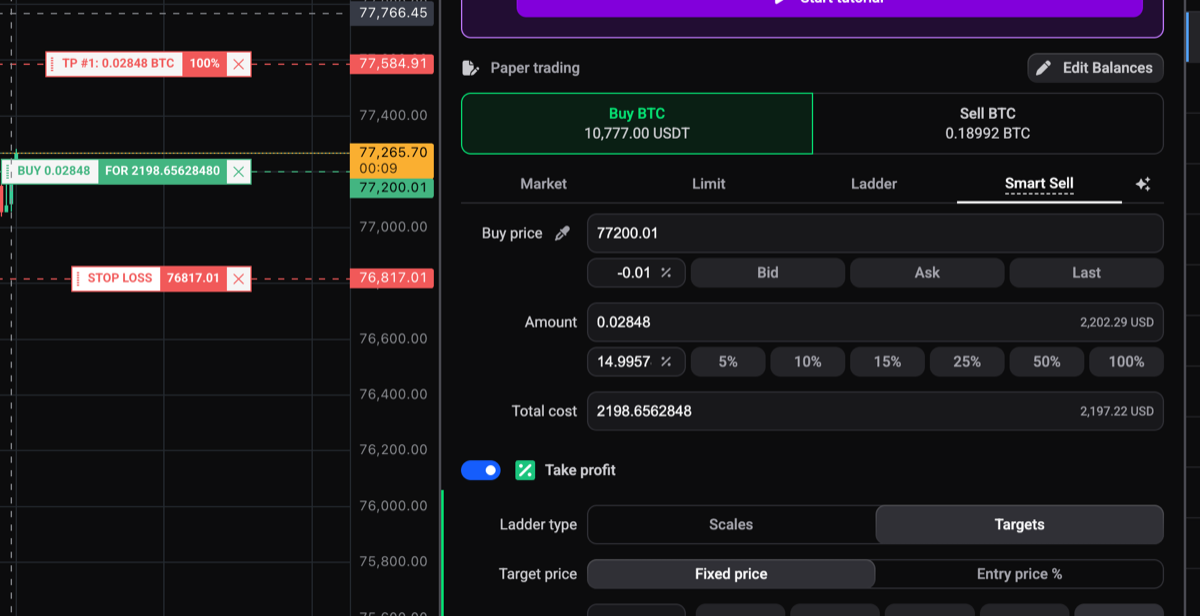
- Next to the entry order types (Market, Limit, Ladder) select the Smart Sell tab. Hovering it shows a short explanation of the feature.
- Fill in the three fields:
- Buy price: the average price you paid for the coins.
- Amount: the quantity of coins you hold. The max button fills your available balance.
- Total cost: quantity times price. The three fields stay in sync, so editing any one recalculates the others.
- Set your take profit and stop loss in the trade form as usual, then submit.
 🔍 Click the image to see a larger version
Altrady now tracks the position with your entered buy price and manages the exit orders, just like any other smart position. New to take profit and stop loss settings? See how do I set up a smart position with take profit and stop loss? and smart order stop loss and protections: an overview.
If you see a balance warning
If the amount you enter is higher than the available balance in that exchange account, Altrady shows a warning: the take profit and stop loss orders can fail if the coins are not in this exchange account. It is a warning, not a block, so you can still submit. Don’t worry if you see it right after a transfer; balances can take a moment to sync. If the coins really are elsewhere, move them to the connected exchange account first.
Smart Sell and simple mode
Smart Sell is part of the advanced trade form. If you switch the trade form to simple mode while Smart Sell is selected, the entry reverts to a Limit order and Altrady flags Smart Sell as not available in simple mode. Switch back to the advanced form to use it.
Still stuck?
If a Smart Sell position doesn’t behave as expected, reach out through the in-app support chat with the market and the exchange account, and the team will look at the exact order history with you.