
Trailing take profit on a smart order
A trailing take profit (TTP) lets your final exit follow price up instead of closing at a fixed target, so you can capture more of a run and exit when price turns. It’s set on the last take-profit target of a smart order.
How it works
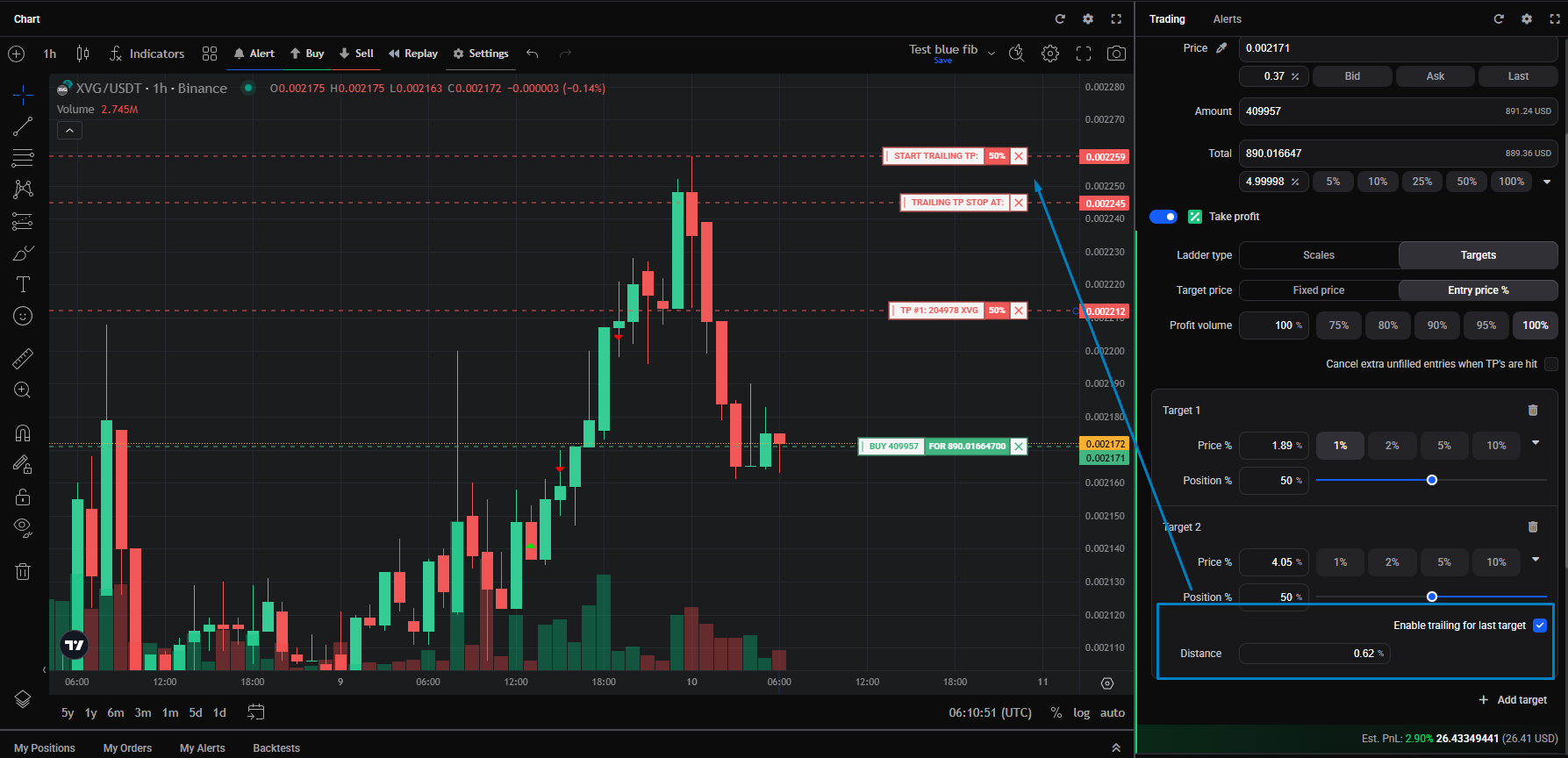
A TTP uses a trigger price and a stop price a set distance below it (for a long): Stop price = TTP price × (1 − Distance), so a TTP at 100 with a 1% distance stops at 99. The trigger can only move one way: up for a long, down for a short. While it’s trailing, the order is pending and no funds are reserved; when price reverses to the stop, it closes at market. The trigger line turns from blue to green once trailing begins.
Turning it on
 🔍 Click the image to see a larger version
TTP is set on the last take-profit target, and only when the take profit is in Targets ladder mode (not Scales):
🔍 Click the image to see a larger version
TTP is set on the last take-profit target, and only when the take profit is in Targets ladder mode (not Scales):
- Set up your entry and turn on Take profit.
- Set the ladder type to Targets and add your targets.
- On the last target, tick Enable trailing for last target.
- Enter the Distance as a percentage, or drag the handle on the chart.
A larger distance can capture more profit but also gives back more before the exit fires. On a signal bot, a TTP can only be added to a Custom take profit.
It replaces the stop loss
A trailing take profit and a stop loss can’t both be active on a position. Once the TTP triggers, Altrady cancels the stop loss, so you’re choosing one kind of protection over the other. See stop loss and protection modes.
Edge cases worth knowing
- Below the minimum order size. If the TTP amount is smaller than the market’s minimum order size and every other exit has already filled, the TTP is cancelled and the position is force-closed, which can leave a small amount of coins in your balance.
- Funds not available. If the balance the order needs isn’t free when the stop is hit, the position closes without the TTP order being placed.
- Editing an active TTP stops the trailing. Changing a TTP after trailing has started stops it, even if you didn’t touch the TTP itself. It only restarts if the TTP price moves back to or below the current price.
- Fixed price vs Entry price %. A target can use a fixed price or a percentage from your average entry. To move a target below your average entry in Entry price % mode, switch it to Fixed price first.
Still stuck?
If a trailing take profit didn’t behave as expected, reach out through support chat with the market and the position and we’ll trace what happened.