
What keyboard shortcuts does Altrady support?
Altrady has a set of keyboard shortcuts for switching markets and charts, placing trades, and stepping through a replay. Press Ctrl+H (Ctrl+Cmd+H on Mac) at any time to open the built-in Hotkeys window and see every shortcut, grouped by tab.
Open the Hotkeys window
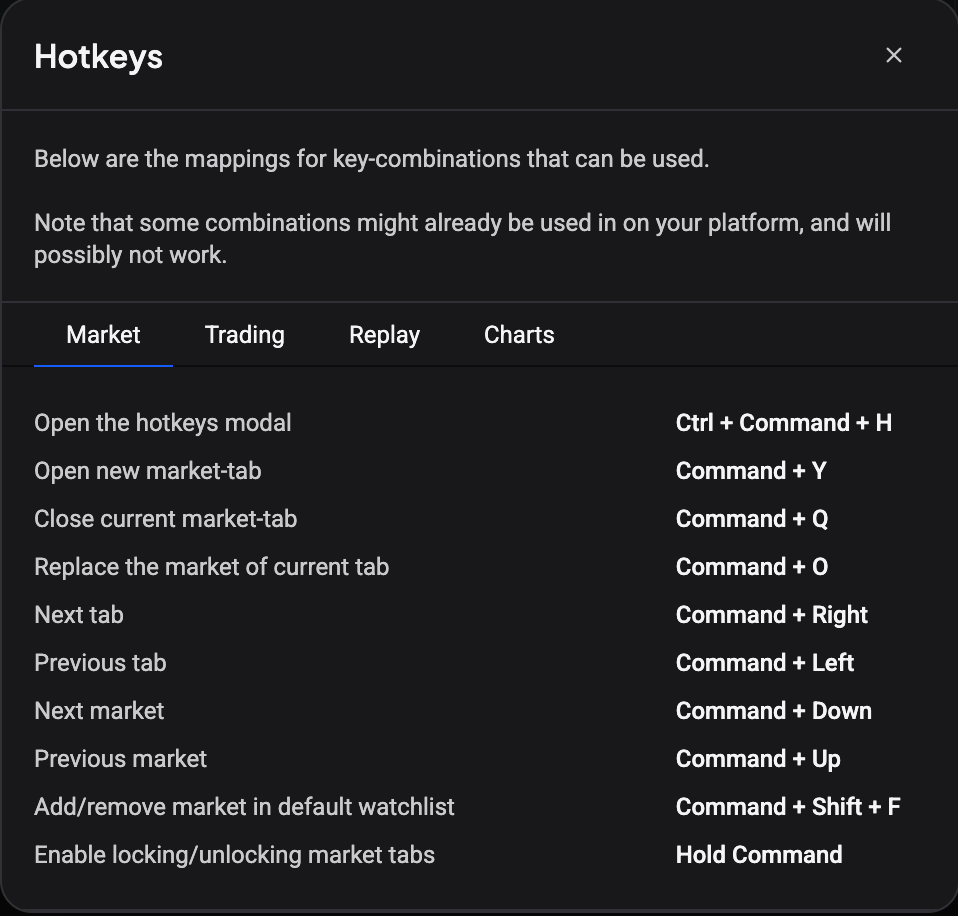 🔍 Click the image to see a larger version
Anywhere in Altrady, press Ctrl+H on Windows or Linux, or Ctrl+Cmd+H on Mac. A window titled Hotkeys opens with four tabs across the top: Market, Trading, Replay, and Charts. Each tab lists its actions with the key combination next to them, so there is nothing to memorize: the window is always one keypress away.
At the top, Altrady notes that these are the mappings for the key combinations that can be used, and that some combinations may already be claimed by your platform and might not work. Worth knowing before you assume a shortcut is broken: your browser or operating system may be swallowing it first.
Market tab
Two of these differ between the desktop app and Altrady in a browser, because the browser reserves Ctrl+T and Ctrl+W for its own tabs.
| Action | Combination |
|---|---|
| Open the hotkeys modal | Ctrl+H (Ctrl+Cmd+H on Mac) |
| Open new market-tab | Cmd/Ctrl+T in the desktop app, Cmd/Ctrl+Y in the browser |
| Close current market-tab | Cmd/Ctrl+W in the desktop app, Cmd/Ctrl+Q in the browser |
| Replace the market of current tab | Cmd/Ctrl+O |
| Next tab / Previous tab | Cmd/Ctrl+Right / Cmd/Ctrl+Left |
| Next market / Previous market | Cmd/Ctrl+Down / Cmd/Ctrl+Up |
| Add/remove market in default watchlist | Cmd/Ctrl+Shift+F |
| Enable locking/unlocking market tabs | Hold Cmd/Ctrl |
That last one is not a normal combination: holding the key puts the market tab bar into lock mode so you can lock or unlock a tab.
Trading tab
These act on the market you are currently trading.
| Action | Combination |
|---|---|
| Initiate new buy order | Shift+B |
| Initiate new sell order | Shift+S |
| Initiate new alert | Shift+A |
| Toggle show closed orders in chart | Shift+P |
| Increase current position | Shift+I |
| Reduce current position | Shift+D |
The Trading tab is the only tab whose combinations you can change yourself: see How do I customize or reassign a hotkey in the Trading tab?. It also holds the reduce hotkeys, which close a set percentage of your position with one key: see How do I set up reduce-position hotkeys?.
Increase and reduce need an open or pending position on the active market tab. If the position is a manual one, Altrady first asks to convert it to a smart position.
Replay tab
While a replay session is running:
| Action | Combination |
|---|---|
| Play/pause/restart replay session | Shift+Down |
| Make replay step | Shift+Right |
| Back to start | Shift+R |
| Stop replay session | Shift+Q |
| Replay buy / Replay sell | Shift+B / Shift+S |
Charts tab
| Action | Combination |
|---|---|
| Open the hotkeys modal | Ctrl+H (Ctrl+Cmd+H on Mac) |
| Add new chart | Cmd/Ctrl+T in the desktop app, Cmd/Ctrl+Y in the browser |
| Close current chart | Cmd/Ctrl+W in the desktop app, Cmd/Ctrl+Q in the browser |
| Change current chart market | Cmd/Ctrl+O |
| Add/remove market in default watchlist | Cmd/Ctrl+Shift+F |
| Enable locking/unlocking market tabs | Hold Cmd/Ctrl |
Why a shortcut sometimes doesn’t respond
Three things explain almost every case, and none of them is a bug.
Altrady is platform aware: it shows Cmd as the modifier on Mac and Ctrl on Windows and Linux. If a combination does nothing, check you are using the modifier for your own platform, and remember that the browser and the operating system get the keypress before Altrady does. Combinations like Cmd/Ctrl+T and Cmd/Ctrl+W are the classic example, which is why the browser version of Altrady uses Y and Q for those instead.
While your cursor is in a text field, most shortcuts stay quiet so you can type. The market and chart navigation combinations (open or close a tab, replace the market, the watchlist toggle, and the hotkeys window itself) still fire; the Trading ones do not.
Inside the chart, the buy, sell, alert, closed-orders, reduce, and preset hotkeys do fire. Chart-focused typing is still the exception: if you are editing a drawing’s text or a chart input, finish there first.
Still stuck?
If a shortcut won’t fire after checking your modifier key, reach out through support chat inside Altrady. Include which shortcut you pressed, on which tab, and whether you were on the desktop app or in a browser: it helps us reproduce it fast.