
Start or stop a regular signal bot from a TradingView alert
You don’t have to turn a signal bot into a webhook bot just to start and stop it automatically. A regular signal bot, one driven by Altrady’s Crypto Base Scanner signals rather than your own webhooks, has a small API of its own that can switch it on and off. The usual reason to use it: stop the bot when conditions across the market turn unfavourable, and start it again on a fresh signal or by hand once things settle.
What this API can and can’t do
This is deliberately limited. The regular-bot API only starts or stops the bot. It does not open, size, or manage positions. The bot’s own Crypto Base Scanner signals still do the actual trading; the API just controls whether the bot is listening.
If you want a signal to open and manage positions directly, that’s a different tool: build a webhook bot instead, covered in How to Connect TradingView Alerts to Altrady with Webhooks.
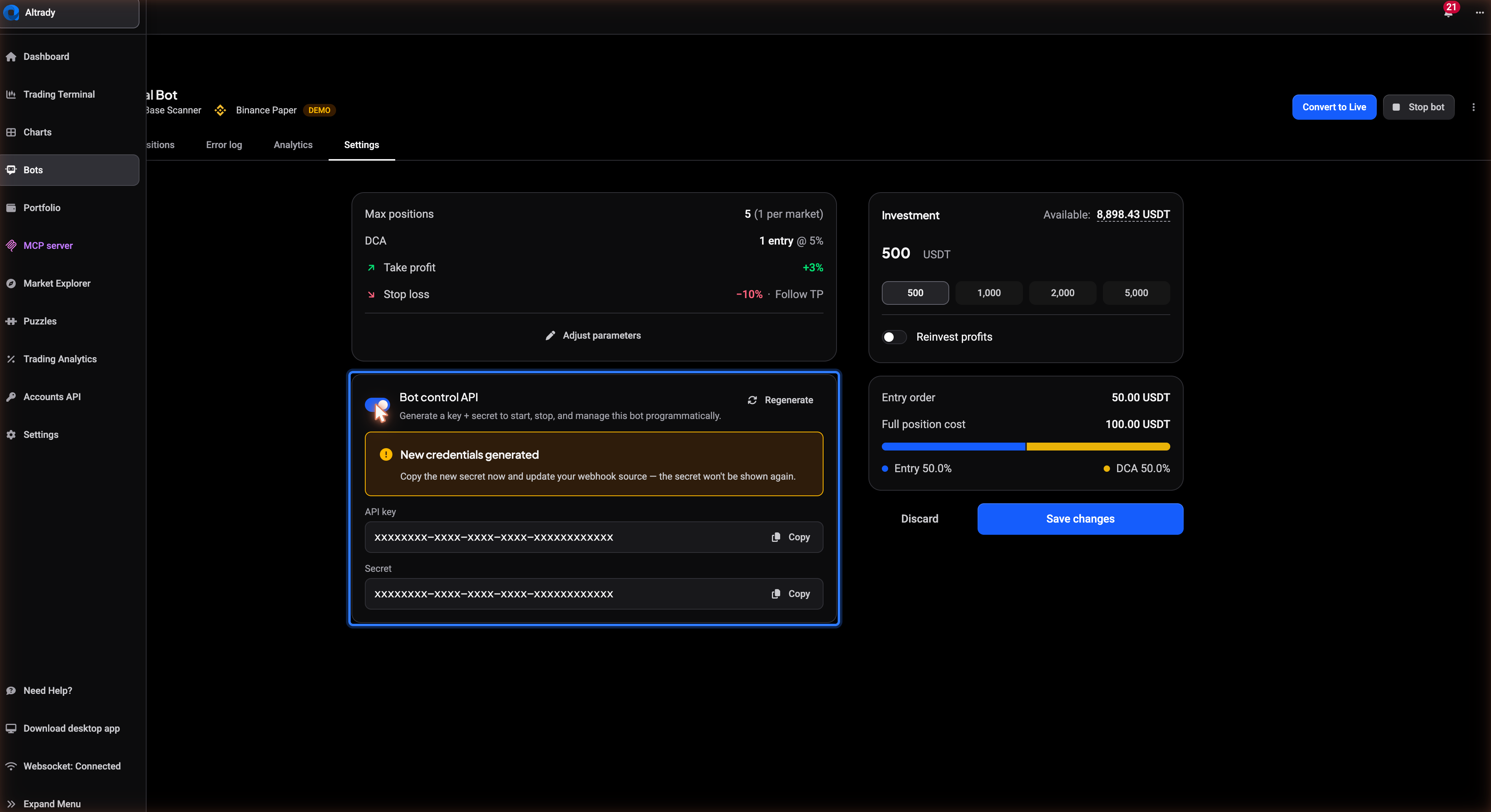
Turn on the bot’s API key
 🔍 Click the image to see a larger version
Each signal bot carries its own key pair, and it’s switched off until you enable it:
- Open the signal bot’s Settings tab and find the Bot control API section.
- Switch the section on. It reveals an API key and a Secret, each with a Copy button.
- Copy both now and store them somewhere safe. The secret can’t be copied again later, though you can always create a fresh pair with Regenerate.
- Save the bot.
The request
Send a POST to:
https://api.altrady.com/v2/signal_bot/start_stop
with this body:
{
  "api_key": "YOUR_BOT_API_KEY",
  "api_secret": "YOUR_BOT_API_SECRET",
  "active": true
}
The active field is what does the work: true starts the bot, false stops it. That is the whole request. There are no other fields, because this endpoint does nothing else.
The key and secret must be the ones from that specific bot: they are what identifies the bot, so there is no bot name or id to send.
Sending it from a TradingView alert
TradingView alerts can post that JSON for you when a condition is met, exactly as they do for webhook bots:
- Create the alert on the condition you want to react to (a price level, an indicator, or a strategy).
- Under the alert’s notifications, switch on Webhook URL and paste the start/stop endpoint above.
- Paste the JSON body into the alert’s message box, with
activeset totrueorfalsedepending on what this alert should do. - Save the alert.
Most people end up with two alerts: one that stops the bot, and one that starts it again.
Still stuck?
If the bot isn’t switching state when your alert fires, check three things: the API key section is switched on in the bot’s settings, the alert posts to /v2/signal_bot/start_stop and not the position endpoint, and the message body contains active rather than an action. If it still won’t work, reach out through support chat with the bot’s name and the exact JSON your alert sends (redact the api_key and api_secret first).