
How Altrady enforces your risk rules when you trade
⭐ Important
Risk rules are a Premium plan feature. See the pricing page to compare.
Once a risk profile is assigned to an account or a strategy, Altrady checks every order against it before it reaches the exchange. This guide shows what that looks like while you trade, including an order being stopped because it would break one of your rules.
Risk protection runs on every order
 🔍 Click the image to see a larger version
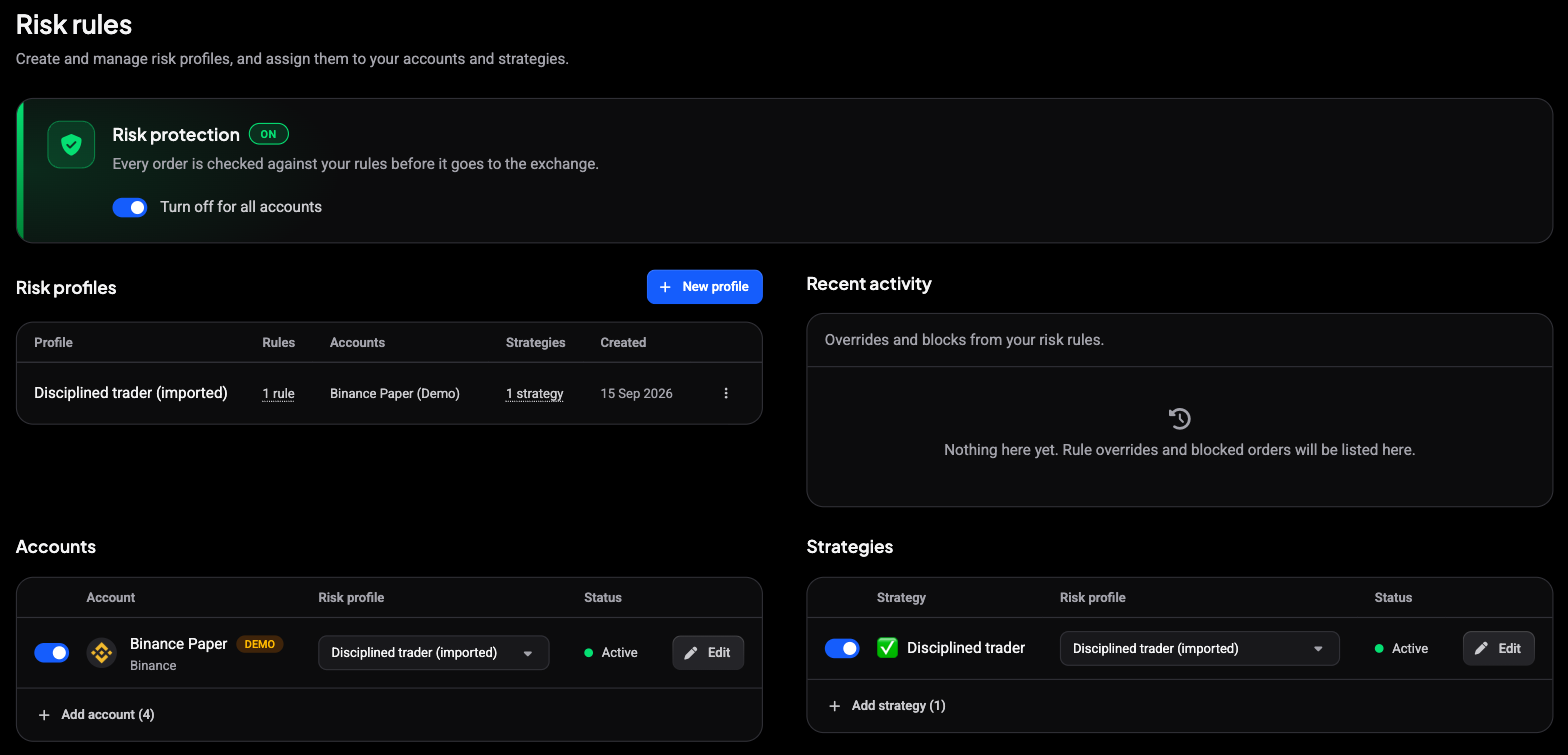
When something has a profile, the Risk management tab shows Risk protection is ON: every order is checked against your rules before it goes to the exchange. A single switch turns protection off for all accounts, and every account and strategy row has its own switch, so you can pause enforcement without losing the profile you assigned.
Which rules are checked depends on the order:
- the profile of the account you are trading on, always
- the profile of the strategy you picked in the order form’s checklist, when you picked one
What a blocked order looks like
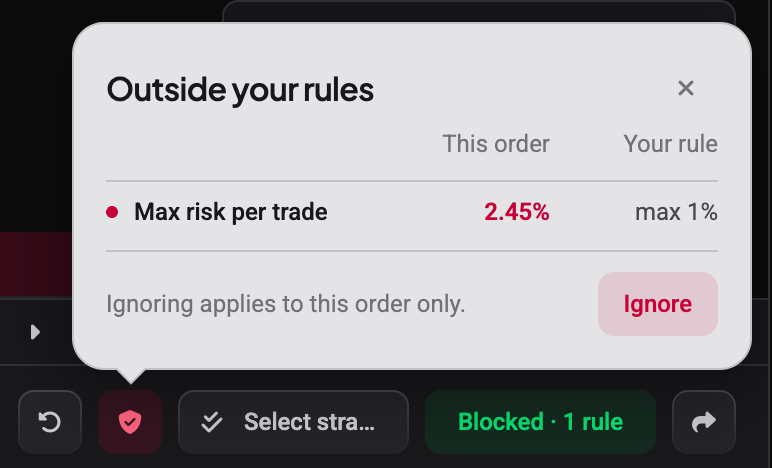
As you fill in an order, Altrady works out its risk live. If the order would break a rule set to Block, the ticket changes before you can send it:
 🔍 Click the image to see a larger version
- Click the red shield next to the order button to open Outside your rules. Each breached rule shows This order beside Your rule: here the order risks 2.45% of equity against a 1% limit.
- Ignore lets this one order through anyway. Ignoring applies to this order only, so the rule is back in force for your next order.
- The Place order button reads Blocked with the number of rules in the way. While it is blocked, the order does not go to the exchange.
More than one rule at once
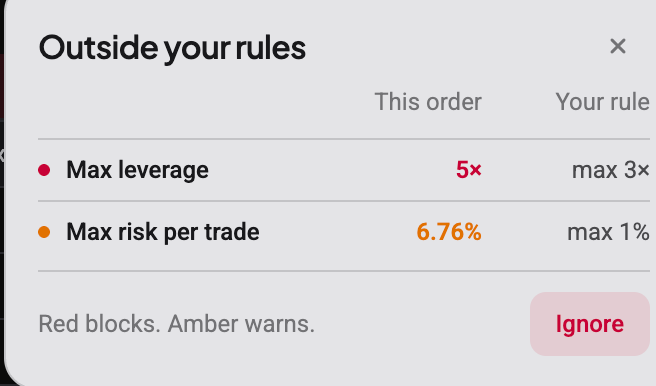
When an order breaks several rules, the shield lists them all together, colour-coded:
 🔍 Click the image to see a larger version
A red row is a Block; an amber row is a Warn. The Place order button counts only the blocking rules, so a single red rule is enough to hold the order even when the amber ones would let it through.
When both the account profile and the strategy profile apply, every rule from both is checked, and a breach of either one counts. Nothing is averaged out: if the account allows 2% risk per trade and the strategy allows 1%, an order at 1.5% breaches the strategy’s rule.
Warn versus Block, at the moment of the trade
The level you chose for each rule decides what happens here:
- a Warn rule lets the order through but flags it: the button reads Place anyway and the shield turns amber
- a Block rule stops the order until you bring it back inside the limit, or choose Ignore for that one order
Either way the check runs inside Altrady before anything reaches the exchange.
When a strategy is required
If the account’s profile has Require a strategy switched on, the order waits until you pick a strategy with the strategy button next to Place order. This makes sure the strategy’s own limits are checked too, instead of being skipped because no strategy was picked.
Backtests and replays
In a backtest, your rules are checked just like in live trading, but against the backtest’s own positions rather than your real account. A real position on the same market will not trip a limit inside the backtest. Once a backtest has finished, orders are no longer checked. A plain chart replay places no orders, so there is nothing to check.
Breaches also show in your notifications
 🔍 Click the image to see a larger version
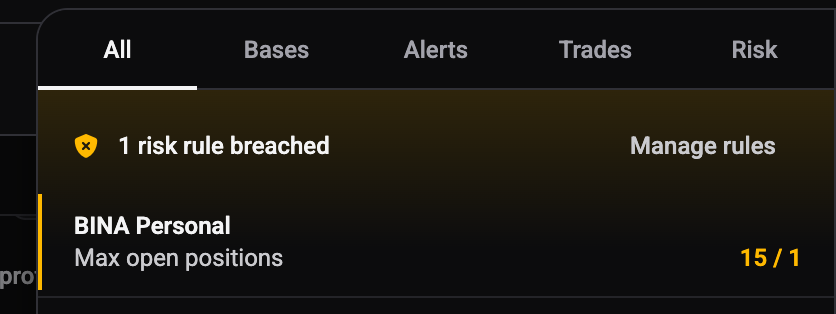
The notifications panel (the bell, top right) has a Risk tab that collects rule breaches across your accounts, each showing the account, the rule, and where the current value sits against your limit, with a Manage rules link back to the Risk management tab. It is where a breach that is already live, rather than one you are about to create, surfaces.
Bringing an order back inside the rules
The quickest fix is usually to change the order rather than the rule: reduce the size, tighten the stop, or lower the leverage until the risk figure drops under your limit. As soon as the order sits inside every rule, the button returns to a normal Place order. Editing the orders of a position that is already open is not checked as a new order; only the on-update rules apply there. If a limit itself is wrong, change the profile on the Risk management tab: see setting risk rules.
Still stuck?
If an order is blocked and you are not sure which rule or why, open the shield on the order ticket to see the comparison, then check which profiles the account and the picked strategy use on the Risk management tab. Reach out through support chat any time.