
Practice with paper trading
Paper trading lets you practice with simulated funds while everything else (prices, markets, order types) comes from the real exchange, live. It’s the safest way to learn Altrady, test a strategy, or try a new exchange before putting real money on the line.
What is a paper trading account?
A paper trading account looks and behaves like a real exchange account, but the money in it isn’t real. You trade against live market prices, so what you see is what’s actually happening on the exchange right now, only your wins and losses are simulated.
Unlike tools that give you one generic practice account, each Altrady paper account is tied to a specific exchange. That means the markets, order types, leverage limits, and fee rates match the real exchange, so your practice results translate directly to live trading.
You can create multiple paper accounts, on the same exchange or different ones.
Plan requirements: Spot paper accounts are available on every plan, including FREE. Futures paper accounts require a paid subscription (BASIC or higher). If your paid plan lapses, futures paper accounts are disabled, but your balances and history are kept and come back when you renew.
How to create a paper trading account
- Open a market on the exchange you want to practice on, pick the exchange and market in the Markets widget.
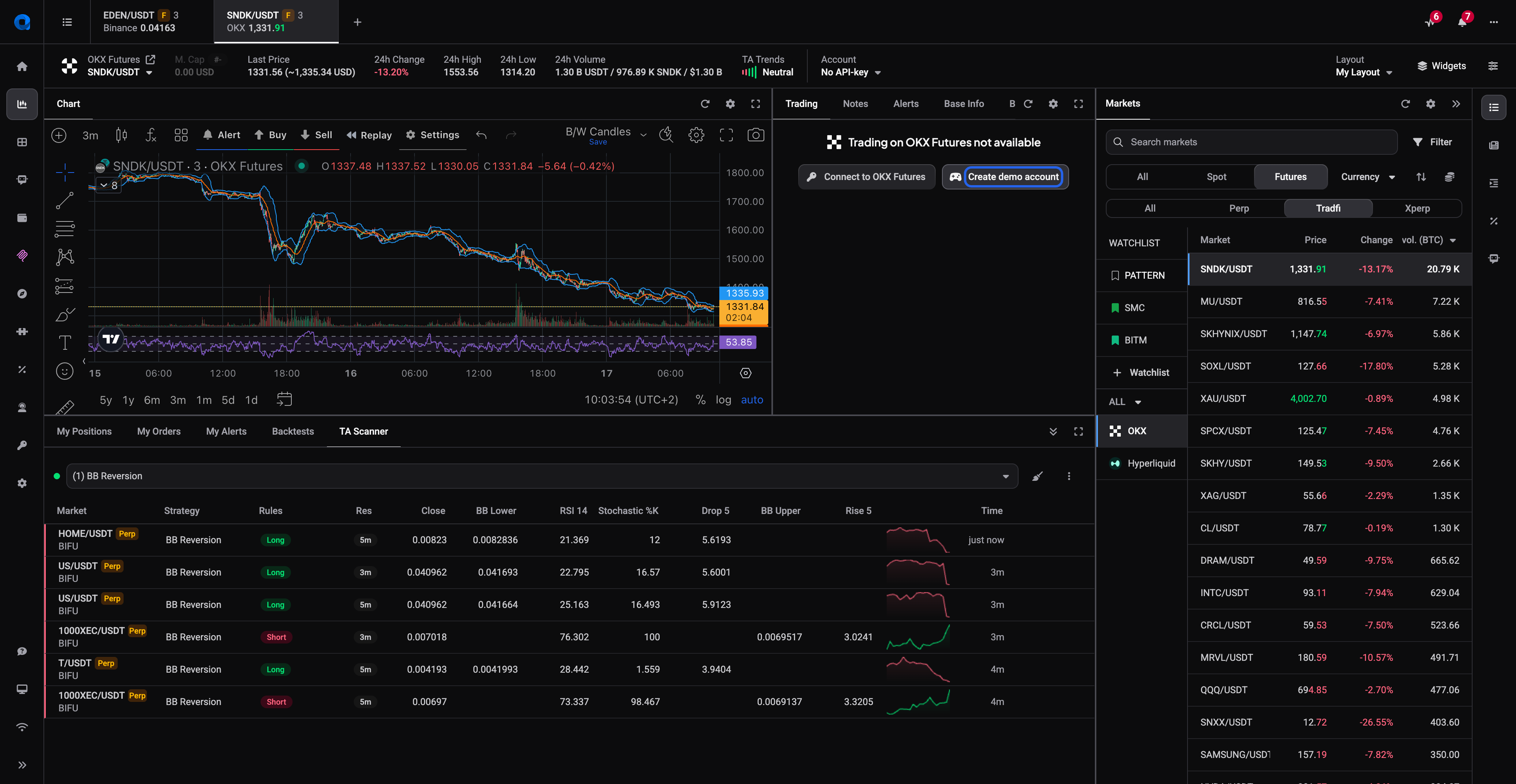
- If you aren’t connected to that exchange yet, the Trading widget shows Trading on … not available. Click Create demo account. No API keys or password are needed.
- That’s it! The paper account is created instantly and selected for you. You can recognize it anywhere by the yellow DEMO badge next to the account name at the top of the screen.
 🔍 Click the image to see a larger version
You can also create and manage paper accounts under Settings > Exchange Account API keys in the left side menu.
🔍 Click the image to see a larger version
You can also create and manage paper accounts under Settings > Exchange Account API keys in the left side menu.
Your starting balance
- Spot paper accounts start with 0.1 BTC and 10,000 USDT (or the exchange’s main quote currency, such as USD or EUR).
- Futures paper accounts start with 10,000 in the stablecoin that exchange uses (USDT or USDC).
Paper balances are never counted in the total balance shown at the top of the app or on the Portfolio page, those totals reflect live accounts only.
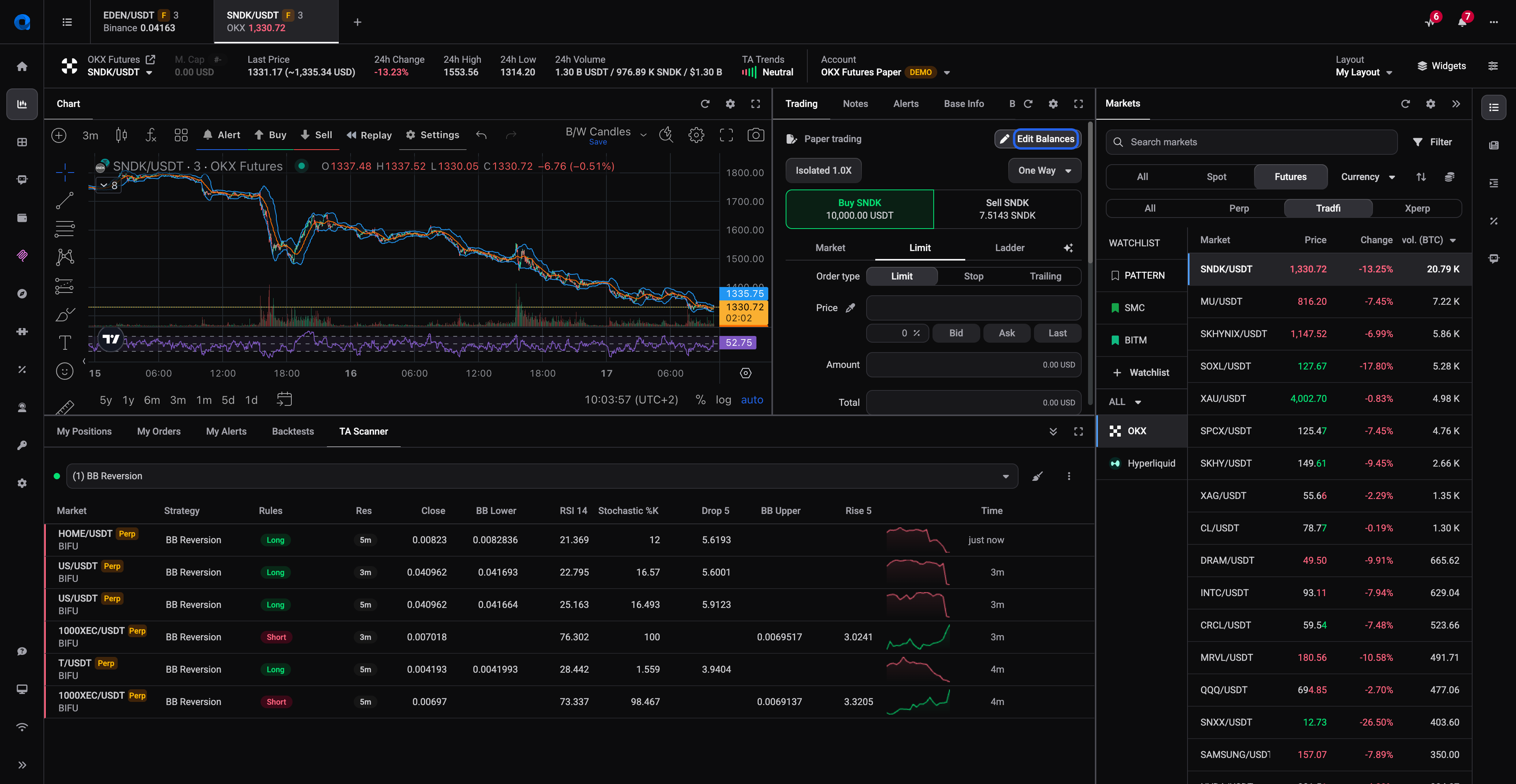
You can edit the coins and balances in a paper account at any time. Open a market on the paper account, then click Edit Balances at the top of the Trading widget. This opens the Edit Paper Trading Assets dialog where you can set any asset to any amount.
 🔍 Click the image to see a larger version
## Using your paper account
🔍 Click the image to see a larger version
## Using your paper account
Anywhere you can pick a trading account in Altrady, you can pick a paper account instead:
- The Trading Terminal - place regular orders, smart orders, and manage positions. Select your paper account from the Trading Accounts list after opening a market on that exchange.
- My Positions and Trading Analytics - track your simulated trades just like real ones. See Tracking Your Results.
- Signal Bot - works on both spot and futures paper accounts.
- Grid Bot - spot paper accounts only (Grid Bot doesn’t support futures anywhere).
- Portfolio - paper accounts are grouped together under “Paper accounts” so you can follow their progress.
What works differently from live trading
Paper orders never actually reach the exchange, so a few things behave differently. Keep these in mind when comparing paper results to what a live account would do:
- Limit order fills. On a live account your order waits in a queue in the order book. On paper, your order is marked as filled as soon as the market trades through your price. That makes paper fills more conservative on slow markets (fewer fills, especially noticeable with grid bots), but paper fills also ignore liquidity, an order fills even if the real order book couldn’t have absorbed it.
- Market orders fill instantly at the last traded price, with little to no slippage. Live market orders can slip, especially in fast markets.
- Fees use each exchange’s highest standard maker/taker rates, always charged in the quote currency. Fee discounts (like paying with an exchange token) aren’t applied, so estimated profits can differ slightly from live.
- Exchange-side checks are skipped. Some restrictions only the exchange can enforce like permission for leveraged tokens, limits on how far an order price can sit from the current price, wallet caps, or order-rate limits. Paper accounts won’t stop you, but a live account might.
- Futures specifics: only Isolated margin is supported (Cross returns an error). A liquidation price is shown for information, but positions are never actually liquidated. Funding rates aren’t simulated, so long-held positions will show different PnL than a live equivalent.
- No exchange slowdowns. During volatile periods some exchanges throttle API requests. Paper accounts don’t talk to the exchange, so they keep running at full speed.
Why practice a full trade on paper first
Before risking real money, run at least one complete trade — entry, stop loss, take profit, exit — on a paper account. It’s the best way to:
- Learn unfamiliar order types. Trailing stops, OCO orders, smart orders, entry expiry, auto-close, try them all with zero risk. See Placing Trades for how each one works.
- Test and compare bot strategies. Run two Signal Bots side by side on separate paper accounts and compare the balances, or test different grid setups. More in Automated Trading Bots.
- Practice with the TA Scanner or Base Scanner and get comfortable acting on what they find.
- Explore a new exchange before opening a real account there. You don’t need live funds on an exchange to paper trade it.
- Practice futures safely. Try position modes, leverage, and opening and closing futures positions without funding a live futures account.
Ran out of paper funds?
No problem, that’s what practice is for. You have three options:
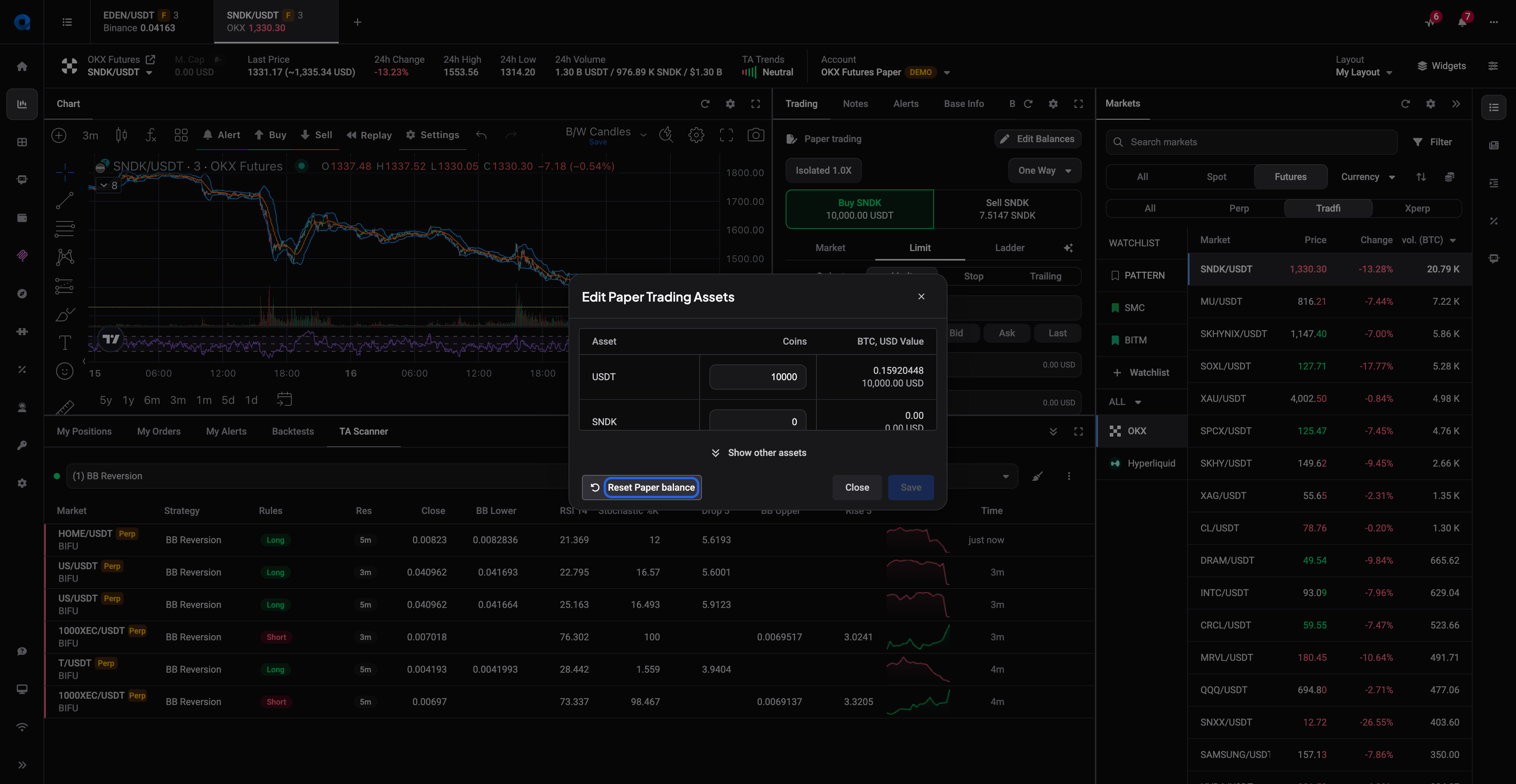
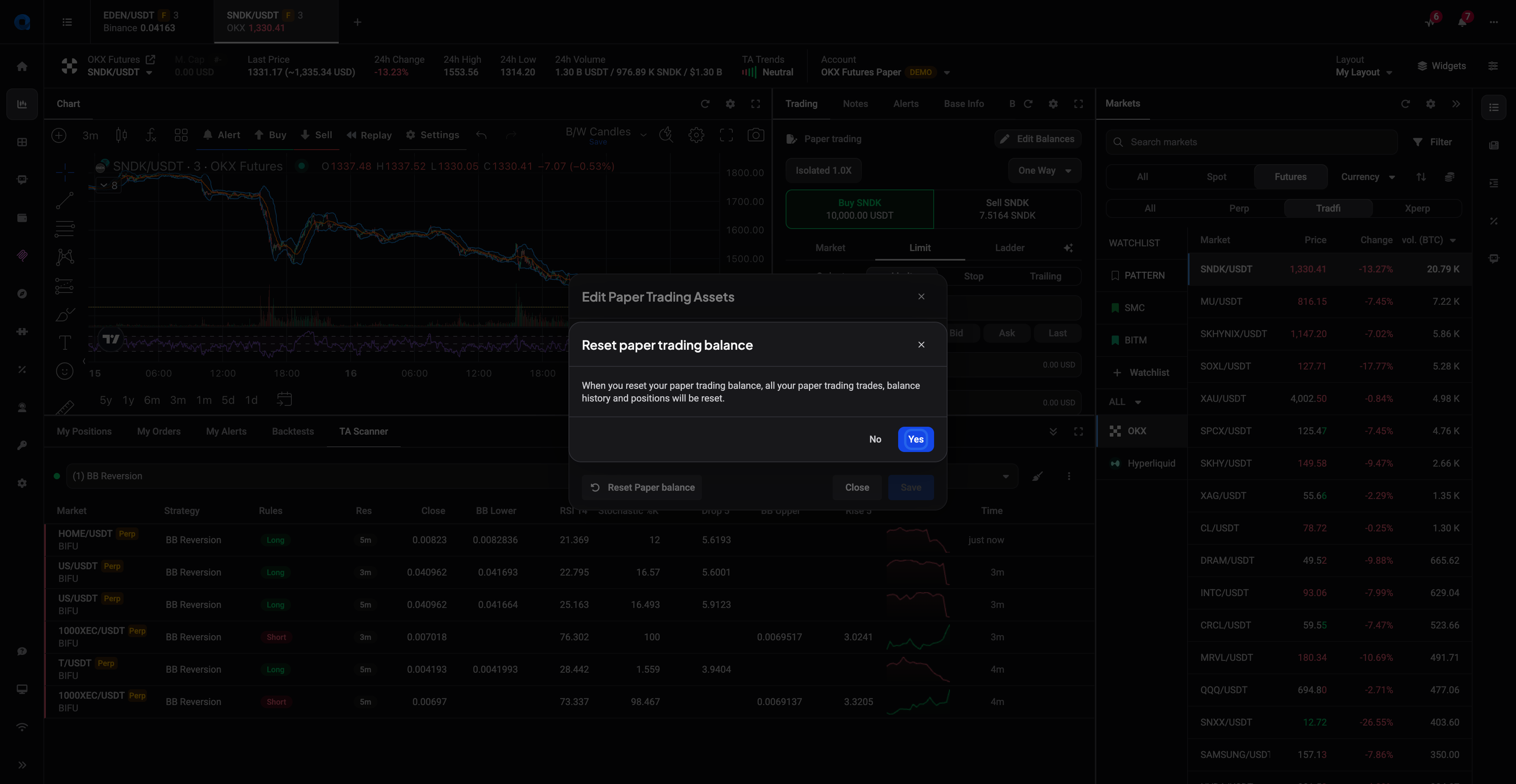
- Reset the account. In the Trading widget, click Edit Balances, then Reset Paper balance in the bottom-left of the dialog. After you confirm, all paper trades, orders, positions, and balance history are deleted and balances return to the starting amounts.
- Edit the balances to any amount you like, using Edit Balances in the Trading widget.
- Create a fresh paper account with clean history and starting balances.
 🔍 Click the image to see a larger version
 🔍 Click the image to see a larger version
## A few limits to know
🔍 Click the image to see a larger version
## A few limits to know
- Paper accounts count toward your plan’s exchange account (API key) limit, just like live accounts. See Choose your plan for the limits per plan.
- Bots running on paper accounts count toward your plan’s bot limits.
- Grid Bot isn’t available on futures paper accounts.
Ready to trade with real funds? See Connecting Your Exchange to link a live account.