
Trailing stop loss (Follow Price) on a smart order
Follow Price trails your stop loss behind the market once price has moved in your favour, so a winning trade can keep running while the stop follows it up. It’s one of the Protection modes on a smart order’s stop loss.
Setting it up
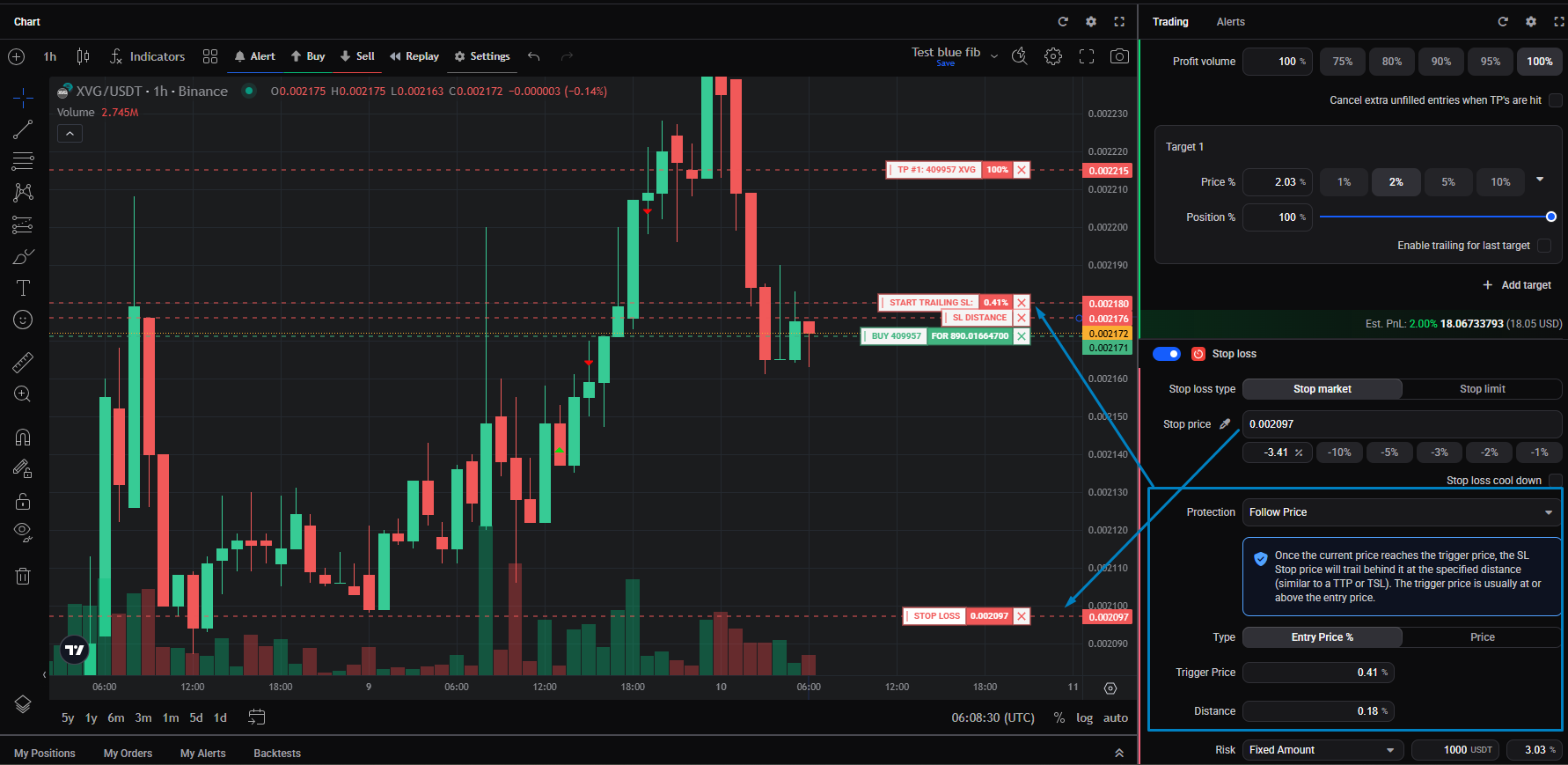 🔍 Click the image to see a larger version
Set Protection to Follow Price. Two settings shape how it trails:
🔍 Click the image to see a larger version
Set Protection to Follow Price. Two settings shape how it trails:
- Stop loss type (Stop market or Stop limit): the exit order type, the same choice as on any stop loss. See stop loss and protection modes.
- Trigger price type: Entry Price % to set the trigger and distance as percentages from your average entry, or Price to set them as actual prices.
Then set:
- Trigger Price: the price at which trailing starts. It’s usually at or above your entry price.
- Distance: how far the stop sits behind price (or drag the SL distance handle on the chart). It’s always positive: below price for a long, above for a short.
Match the trigger price type to your take profit. If your take-profit targets are set as Entry Price %, set the trigger price type to Entry Price % too; if they use a Fixed price, use Price. That keeps the trailing stop and your targets measured from the same basis. If they’re mismatched, a change in your actual entry (from slippage, or from later entries moving your average entry) pulls the percentage-based value along while the fixed price stays put, so the trigger and the target drift out of alignment. Since the trailing trigger usually sits between your entry and the first target, keeping them on the same basis keeps them in the right order.
Trailing only begins once price reaches the trigger. Before that, the stop sits at its initial price. As price moves in your favour, the trigger and the stop trail with it; if price pulls back, they hold, and the stop fires when price retraces by your Distance.
An example
Say you buy at 5 EUR with a 5% trailing distance. When price rises to 6, the stop moves up to 5.70. If price then drops to 5.50, the stop triggers and closes the position.
Good to know
- The trailing distance must be between 0% and 99%.
- If price drops sharply without ever reaching your trigger, trailing never starts, and your initial stop price is what protects you.
- When the trailing stop triggers, any remaining unfilled entries on the position are cancelled.
- Follow Price needs only one take-profit target, unlike the Average entry and Follow Take Profit modes, which need two or more.
- On futures, a trailing stop placed beyond the liquidation price won’t trigger.
Still stuck?
If a trailing stop isn’t moving as you expect, first check that price has actually reached the trigger. If it still looks wrong, reach out through support chat with the market and the position.