
How do trading fees work?
Altrady charges you a subscription. Your exchange charges the trading fees, and takes them out of each order as it fills. What’s worth knowing is which currency those fees come out of, because that differs by exchange and it explains some behaviour you’ll see in your balances and in your bots.
Altrady’s fee and your exchange’s fee are separate things
Altrady charges its subscription, plus any add-ons you’ve chosen, and takes no commission on your trades. Every trading fee you pay goes to the exchange, at the exchange’s own rates. Nothing in this article is about your Altrady bill: for that, see altrady.com/pricing.
Which currency the fee comes out of
Exchanges follow one of two conventions, and on spot markets it’s the exchange that decides which.
The fee comes out of the currency you receive. On a buy that’s the base currency, so you end up with slightly less of the coin than you ordered. On a sell it’s the quote currency. This is how spot trading works on Binance, Binance US, BingX, Bitvavo, Bybit, Crypto.com, Gate.io, HTX (Huobi), Hyperliquid, OKX, Poloniex and WOO X.
The fee always comes out of the quote currency, whichever direction you traded. Every other supported spot exchange works this way, including Coinbase, Kraken, HitBTC, MEXC and KuCoin.
There’s one exception to the first group. If you’ve enabled that exchange’s fee token and hold enough of it, the fee comes out of the token instead of your base currency. The exchange also has to allow the token to pay for orders placed over an API, and not all of them do. Bybit is the one to watch here: it has a fee token, but it can’t be used for orders placed through an API, so anything Altrady places on Bybit pays its fee in base currency regardless.
Fee-discount tokens
Several exchanges reduce your fees if you hold their token and switch the option on: BNB (Binance), CRO (Crypto.com), GT (Gate.io), HTX or TRX (HTX and Poloniex), HIT (HitBTC), KCS (KuCoin), MX (MEXC), OKB (OKX), and WOO through staking on WOO X.
Kraken discounts on trading volume rather than through a token. Bybit has a token, but because it can’t pay for API orders, volume is effectively what counts there too for anything placed from Altrady.
Fees on a paper account
Paper trading always charges fees in the quote currency, whichever exchange your paper account mirrors. So a paper account on one of the base-fee exchanges above won’t match its live counterpart on this one point.
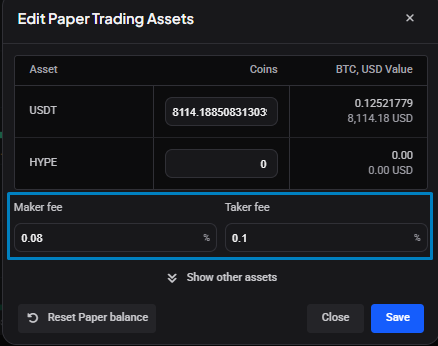
You can set the rate yourself. If a maker or taker fee is configured for that exchange and pair on the Edit Paper Trading Assets modal, that rate is what gets charged, including on every order a running grid bot places.
 🔍 Click the image to see a larger version
## Maker and taker
🔍 Click the image to see a larger version
## Maker and taker
An order that rests on the order book is a maker order. One that fills immediately against an order already there is a taker order. Most exchanges charge less for maker orders, since they add liquidity rather than remove it.
The Post Only setting keeps a limit order maker-only: if it would fill immediately, the exchange cancels it rather than charging you the taker rate.
Why a grid bot buys extra base currency when it starts
On an exchange that charges buy fees in base currency, a grid bot needs base currency in hand to place its sell orders. So when it starts, it buys a little more than the grid itself needs: enough to cover the fees on roughly 200 buy orders.
That buffer is calculated for a bot using arithmetic scaling, where every order uses the same amount of base currency.
Once the buffer runs out, the bot no longer holds enough base currency to place its sell orders. It does not top itself up. If you want the bot to keep trading, you need to buy more base currency yourself. This is one of the ways a grid bot can run short of currency, and it’s worth knowing if order errors start appearing on a bot that had been running happily for a while.
Where to see what you’ve paid
The Position Info widget breaks out fees alongside realized and unrealized PnL, so you can see what a position cost you to run. A grid bot’s Overview tab shows Fees paid as its own figure.
One thing to keep straight: the PnL figures Altrady shows are already net of trading fees. The separate fees line is there so you can see the amount, not because it still needs subtracting.
Backtest results understate fees
The grid bot backtester treats every simulated fill as a maker order. Live grid trading is mostly maker fills but not entirely, so a backtest’s fee total tends to come out lower than the same configuration would cost in practice. If you’re entering a fee rate for a backtest, blending your maker and taker rates gives a closer estimate.
As with any backtest, this is based on historical data and past results do not indicate future performance.
Still stuck?
If a fee doesn’t look right, or a balance is short by an amount you can’t account for, reach out through support chat with the exchange, the market, and the order in question, and the team can trace it with you.