
Portfolio Equity vs Folder Equity vs Account Equity: What's the Difference?
Altrady shows equity at three levels because your accounts nest inside folders, and folders nest inside your whole portfolio: Account Equity is one connected exchange account, Folder Equity is a group of accounts you’ve organized together, and Portfolio Equity is everything added up. They’re not three different calculations, they’re three zoom levels on the same numbers.
The three levels, from smallest to largest
Think of it like a set of nested folders on your computer.
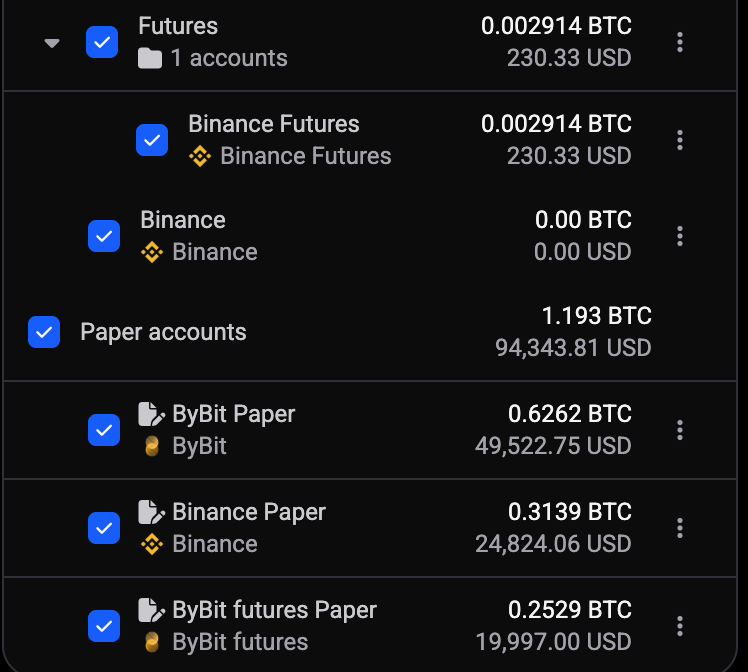
- Account Equity: the value of a single connected exchange account (say, your Binance account), in your base currency.
- Folder Equity: the combined value of every account you’ve placed inside one Folder. If you group your Binance and Bybit accounts into a folder called “Spot”, Folder Equity is the two added together.
- Portfolio Equity: the total across every account and folder in your Altrady dashboard, connected exchanges, paper trading accounts, and wallets included.
Nothing here is double-counted. An account’s balance rolls up into its folder’s total, and every folder (plus any accounts not in a folder) rolls up into the portfolio total. Portfolio Equity is always the top of the stack.
Where you’ll see each number
 🔍 Click the image to see a larger version
Open My Accounts in the sidebar. Next to each exchange account you’ll see its Account Equity. If that account sits inside a Folder, the folder row above it shows Folder Equity, the sum of everything inside. At the very top of the sidebar, Portfolio Equity shows the grand total across your whole dashboard.
You don’t have to build any folders to use Altrady. Without folders, you’ll only ever see Account Equity and Portfolio Equity, which is completely normal for anyone running one or two accounts.
When it’s worth creating a Folder
A Folder exists purely to give you a sub-total. Create one when you want to check a slice of your portfolio without doing mental math across your other accounts. A few common reasons people group accounts:
- Separating live trading accounts from paper trading accounts.
- Grouping accounts on the same exchange (multiple API keys on Binance, for example).
- Splitting a long-term holding account from an active-trading account.
If you don’t have a reason to look at a sub-total, you don’t need a folder, Portfolio Equity already gives you the full picture.
How to create a Folder
 🔍 Click the image to see a larger version
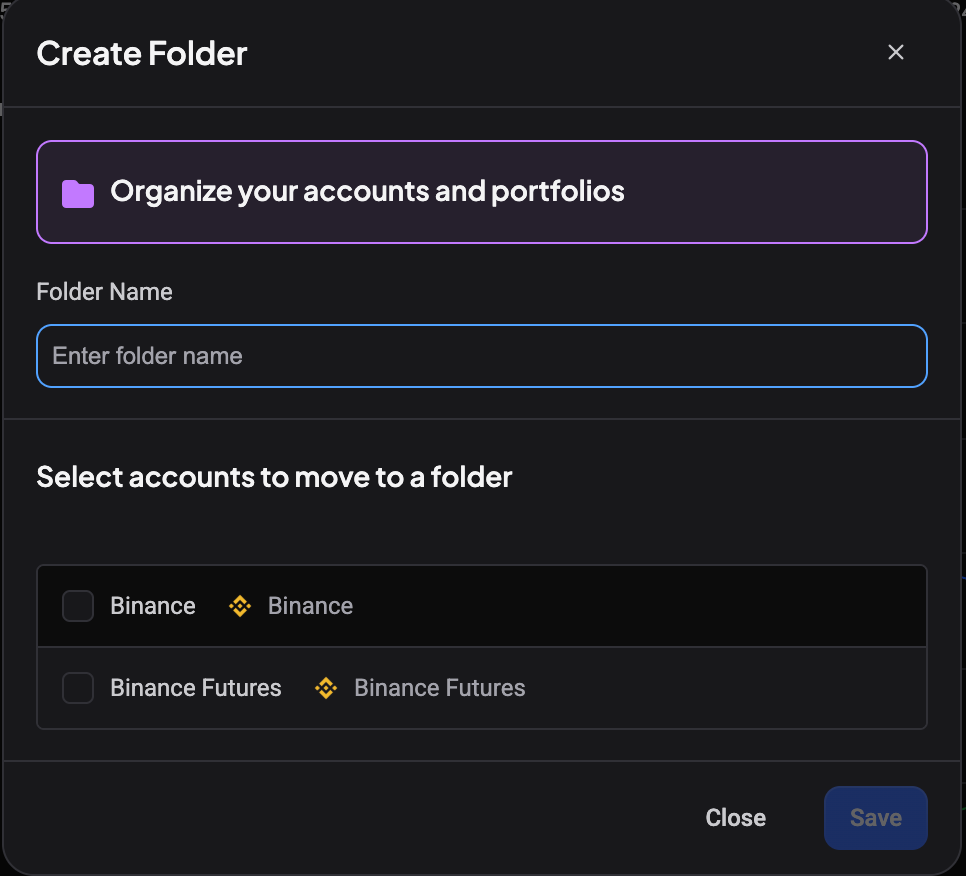
- In My Accounts, look for Create Folder (also reachable from an account’s menu as Move to folder).
- Give it a Folder Name and confirm.
- Select the accounts you want inside it and choose Move to folder, or drag existing accounts in.
Once accounts are inside, Folder Equity appears automatically. No setup step is needed to calculate it, Altrady sums the accounts for you.
Moving accounts in and out later
Folders aren’t permanent. Use Edit folder to rename it, Move to folder to shift an account into a different group, or Remove folder to disband it (the accounts stay connected, they just stop being grouped). Folder Equity recalculates instantly whenever accounts move.
What equity does (and doesn’t) include
Equity at every level reflects your account balances plus the current value of open positions, converted to your base currency. It’s a snapshot of what your accounts are worth right now, not a running log of trades. If you want a breakdown of how an individual position’s profit and loss is calculated (entry price, break-even, realized and unrealized P&L), that’s covered separately in /en/positions/understanding-position-info-numbers.
For the full list of trading terms used across Altrady’s dashboard, see /en/trading-terms-explained/altrady-trading-terms-glossary. If you’re wondering why some balances show in one currency and others convert automatically, that’s explained in /en/trading-terms-explained/base-currency-vs-quote-currency.
Still stuck?
If a number still doesn’t look right (an account missing from a folder’s total, or a balance that seems stale), reach out through support chat inside Altrady and the team can check it with you directly.